If you’re planning a trip to the UK or switching to a more flexible mobile setup, using an eSIM can save time and hassle. With no physical SIM card required, you can download your mobile plan instantly and start using data, calls, and texts within minutes. EE, known for its extensive coverage and reliable 5G network, is one of the most popular choices for both tourists and locals looking for a digital SIM solution.This complete guide explains how to get started with EE’s eSIM service. I’ll cover where to buy it, how to activate it on compatible devices, ways to move your existing number to a digital SIM, and the best prepaid plans currently available. By the end, you’ll know exactly how to set up your connection quickly and avoid common setup issues.
Why Choose EE eSIM in the UK?
An EE eSIM is a digital SIM that lets you connect to the UK’s EE mobile network without inserting a physical SIM card. Instead, you download a mobile profile directly to your phone using a QR code or activation link.
With an eSIM, you can activate mobile data, calls, and texts instantly, making it ideal for travelers, digital nomads, and anyone switching carriers without swapping SIM cards.Here are the main reasons many users prefer EE over other networks.

1️⃣Unmatched National Coverage
EE boasts the widest geographic coverage of any UK network, reaching 99.8% of the UK population . This is a critical advantage if your itinerary involves exploring beyond major cities. Whether you're hiking in the Scottish Highlands, visiting the Lake District, or exploring coastal towns in Cornwall, you are far more likely to stay connected with EE.
2️⃣Fast 4G and Leading 5G Speeds
EE offers some of the fastest mobile speeds in the UK, with average download speeds often significantly higher than other operators. Tests show its 5G network can reach average speeds above 200 Mbps in many locations.
For travelers or remote workers, this is ideal for:
-
Streaming videos
-
Uploading photos and content
-
Video meetings
-
Mobile gaming
3️⃣Convenience for Travelers & ResidentsInstant
-
Digital Setup: You can bypass physical SIM cards entirely. For tourists, EE’s Travel Data eSIMs can be purchased and activated before you even land in the UK via a simple QR code.
-
Dual SIM Flexibility: Using an EE eSIM allows you to keep your home country's physical SIM active for receiving important texts (like bank OTPs) while using EE for affordable, high-speed local data.
-
App Integration: The My EE app allows for seamless "Instant Download" swaps if you upgrade your phone, avoiding the need to wait for a physical SIM in the post.
4️⃣Flexible Prepaid Options
EE offers prepaid plans without long contracts, making them suitable for:
-
Short trips to the UK
-
Digital nomads
-
Students or temporary residents
Many plans provide large data allowances or unlimited data for 30 days.
Network Comparison at a Glance:
|
Feature |
EE |
Vodafone |
Three |
O2 |
|
Overall Rank |
#1 |
#2 |
#3 |
#4 |
|
Best For |
Reliability & 5G Coverage |
Rural & City Balance |
Peak 5G Speeds |
General Coverage |
|
5G Availability |
77.4% |
29.6% |
38.9% |
57% |
|
Reliability Score |
915/1000 |
880/1000 |
845/1000 |
810/1000 |
In short: EE eSIM is popular because it combines fast speeds, wide coverage, easy activation, and flexible prepaid plans, making it one of the most reliable ways to stay connected in the UK.
Phones Compatible With EE eSIM
To use EE eSIM, your phone must support eSIM and be unlocked.The quickest way to check that your device supports eSIM is to dial *#06# - like you would a phone number - on your device.If your device is eSIM compatible, it will show an EID (eSIM unique identification number).
Here’s a current list of phones that support EE UK eSIM:
|
Brand |
Model |
|
Apple |
For details on eSIM-compatible devices, visit this Apple web page. |
|
Samsung |
|
|
Fairphone |
Fairphone 4 or later |
|
|
Pixel 3a or later Pixel phones |
|
Other Manufacturers |
|
Many modern smartphones support eSIM, but you should always confirm compatibility before purchasing.
-
Settings (iOS): Go to Settings > Cellular (Mobile Service) > Add eSIM. If the option exists, you're good to go.
-
Settings (Android): Go to Settings > Network & Internet > SIMs > Add eSIM (or "SIM Manager" on Samsung).
How to Buy an EE eSIM?
Buying an EE eSIM depends on whether you are a tourist looking for a quick data fix or a UK resident wanting a long-term contract. The process has become significantly more digital, with most users receiving their eSIM instantly via an app or email.
A. For Tourists & Visitors (Prepaid/Data-Only)
The easiest way for travelers to get an EE eSIM is through the EE Travel eSIM portal.
-
Step 1: Visit the official EE Travel eSIM site.
-
Step 2: Choose a plan (e.g., £15 for 7 days or £30 for 30 days of unlimited data).
-
Step 3: Pay via credit/debit card or Apple/Google Pay.
-
Step 4: You will receive a QR code via email instantly. Scan it in your phone's cellular settings to activate.
⚠️Note: These plans are data-only and do not include a UK phone number for traditional calls/SMS.
B. For Residents (Pay Monthly & SIM-Only)
If you live in the UK and want a full-service plan (Data, Calls, and SMS), you can buy directly from the main EE website.
-
New Customers: Select "eSIM" instead of "Physical SIM" during the checkout process for any SIM-only or handset plan.
-
Existing Customers: If you want to switch your physical SIM to an eSIM:
C. Third-Party "Hybrid" Options
If you are a traveler who needs a UK phone number (+44) for things like restaurant bookings or 2FA, the official EE Travel eSIM won't work. Instead, use a partner like Sim Local:
-
Purchase online from Sim Local before you travel.
-
After purchase, you'll receive a QR code or activation link via email.
-
On your phone, go to Settings > Mobile Data (or Cellular) .
-
Tap Add eSIM or Add Mobile Data Plan.
-
Scan the QR code provided. Your eSIM will activate in minutes, and you'll have a UK phone number for calls and texts.
Quick Comparison of Purchase Methods:
|
Feature |
EE Travel Portal |
My EE App (Resident) |
Sim Local (Hybrid) |
|
Best For |
Tourists (Data Only) |
UK Residents |
Tourists (Data + Calls) |
|
Delivery |
Instant Email QR |
Instant App Download |
Instant Email QR |
|
UK Number |
No |
Yes |
Yes |
|
Credit Check |
No |
Yes |
No |
Activation & Setup
Once you receive your eSIM (usually via email), follow these steps:
Method 1: QR Code (Standard)
-
iOS: Settings > Cellular > Add eSIM > Use QR Code.
-
Android: Settings > Network & Internet > SIMs > Add eSIM > Scan QR.
🔔Tip: Ensure you are connected to Wi-Fi during this process.
Method 2: EE App (Existing Customers)
If you are swapping from a physical SIM to an eSIM:
-
Open the My EE app.
-
Go to Settings > Device and SIM > Replace my SIM/eSIM.
-
Choose Instant Download to install it directly to your device.
Transferring to a New Phone
EE supports several digital transfer methods in 2026.
iPhone to iPhone (Quick Transfer):
-
Place both phones next to each other.
-
On the new iPhone, go to Settings > Mobile Service > Add eSIM.
-
Select Transfer from Nearby iPhone.
-
Follow the on-screen prompts. Your old SIM will deactivate once the new one is live.
Android to iPhone (iOS 26 Feature):
-
With the 2026 updates, you can now transfer your number from a compatible Android device to an iPhone during the initial setup.
-
Open the Move to iOS app on Android and follow the prompts. Note: EE must be the carrier for this to work seamlessly.
Manual Transfer (Generic):
If the digital transfer fails:
-
Log into the My EE App on your new device.
-
Request a "Replacement SIM" and select "eSIM."
-
A security code will be sent to your old device or email.
-
Once verified, the new eSIM will download, and the old one will expire.
Best EE Prepaid & Travel eSIM Plans
In 2026, finding the best EE-powered eSIM plan depends on whether you value unlimited data (direct from EE) or local utility (calls and a UK phone number). EE has simplified its offerings, but third-party partners like Sim Local and Lyca Mobile often provide more "bang for your buck."
A. Official EE Travel eSIM (Best for Simplicity)
EE offers "one-off" digital data passes specifically for tourists. These are data-only (no phone number).
-
1 Day: £5 (Unlimited data)
-
7 Days: £15 (Unlimited data) — Includes 1 extra day free
-
30 Days: £30 (Unlimited data)
-
Why choose it: Zero setup hassle; uncapped 5G speeds; official support.
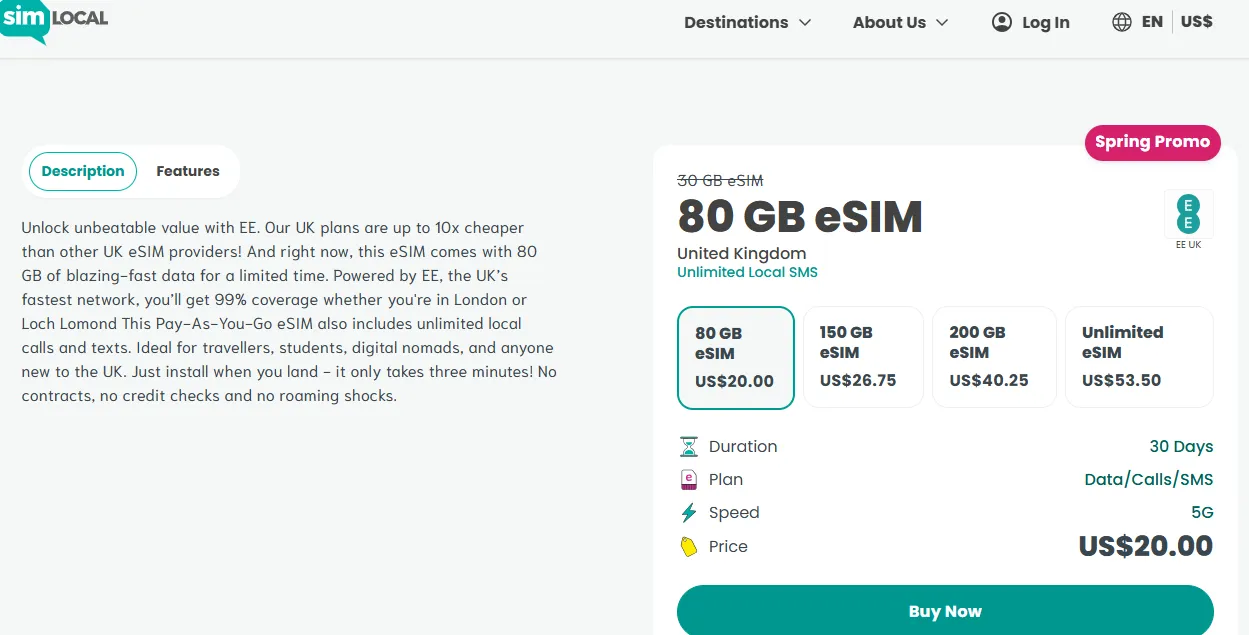
B. Sim Local "Spring Promo" (Best Overall Value)
Sim Local is an official partner that provides EE eSIMs with full local features, including a UK phone number (+44).
-
The Deal: $20 for 80GB (boosted from 30GB).
-
Duration: 30 Days.
-
Includes: Unlimited UK calls and texts.
-
Why choose it: It's almost half the price of the official EE 30-day pass and gives you a number for restaurant bookings or Uber.
C. Lyca Mobile (Best for Budget/International)
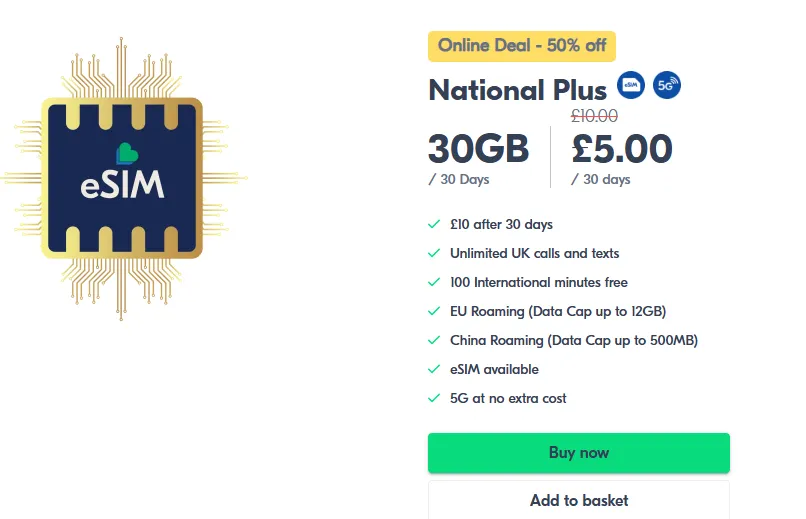
Lyca Mobile runs on the EE network and offers extremely aggressive pricing for short-term visitors.
-
The Deal: £5 for 30GB (Introductory 30-day rate).
-
Includes: Unlimited UK calls/texts + 100 international minutes.
-
Why choose it: The cheapest way to get high-speed EE data if you don't need "unlimited."
Comparison Table: EE vs. Alternatives
|
Feature |
EE Official (Travel) |
Sim Local (EE) |
Lyca Mobile (EE) |
|
Data Amount |
Unlimited |
80 GB |
30 GB |
|
Price |
£30 / 30 Days |
~$20 / 30 Days |
£5 / 30 Days |
|
UK Number |
❌ No |
✅ Yes |
✅ Yes |
|
5G Access |
✅ Included |
✅ Included |
✅ Included |
|
Best For |
Heavy Streamers |
All-around Travelers |
Budget Travelers |
💡Expert Tips:
-
Avoid Airport Kiosks: While convenient, airport prices for eSIMs can be 20%–40% higher than buying online via the EE portal or Sim Local website.
-
Data Tethering: Unlike some roaming eSIMs (like Holafly), all official EE and Sim Local plans allow you to use your phone as a hotspot for other devices.
EE eSIM FAQs
Does EE eSIM support 5G?
Some EE eSIM plans support 5G, but many prepaid options operate on fast 4G networks depending on the provider.
Can tourists buy EE eSIM?
Yes. Tourists can purchase EE prepaid eSIM plans online or through partner retailers.
Does EE travel eSIM include a phone number?
Some travel data eSIMs are data-only and do not include a UK phone number, meaning calls and SMS are unavailable.
Can I hotspot using EE eSIM?
Yes. Most EE plans allow tethering or hotspot sharing, depending on plan limits.
Can I get an EE eSIM on Pay As You Go?
No. As of 2026, official EE eSIMs are still exclusively for Pay Monthly (contracts) or the specific Travel Data eSIM for tourists. If you want a flexible, non-contract eSIM on the EE network, you should use an MVNO like Lyca Mobile or Sim Local.
How long does activation take?
Typically 5 to 15 minutes. In rare cases of network congestion, it can take up to 24 hours. If your phone says "Activating" for more than 30 minutes, try toggling Airplane Mode or restarting your device.
Do I need Wi-Fi to install my eSIM?
Yes. Your phone must have an active internet connection to "pull" the eSIM profile from EE's servers. Do not delete your old SIM profile until the new one is confirmed active.
Can I use EE eSIM abroad?
Once activated, an EE eSIM works the same way as a physical SIM. You can use it internationally depending on your plan and roaming allowances.
What happens if I delete my eSIM?
If you accidentally delete your eSIM profile, you can download a replacement through the EE app or request a new QR code from EE support or a store.
Summary: An EE eSIM is one of the most convenient ways to stay connected in the UK. With instant digital activation, strong coverage, and flexible prepaid plans, it’s a great option for travelers, remote workers, and anyone who prefers a SIM-free setup.