Step into the future of travel connectivity. For the modern explorer visiting Japan, an eSIM is no longer a luxury but an essential key to unlocking a smoother journey. Imagine landing at Haneda or Narita Airport and having instant access to maps, translation apps, and train schedules without the hassle of a physical SIM. If you're planning a trip and want to avoid connectivity headaches, you've come to the right place. This definitive guide delves deep into the evolving world of embedded SIM technology, offering clear, up-to-date advice to help you select, purchase, and activate the perfect plan for navigating the Land of the Rising Sun.Whether you’re a short-term visitor or a long-stay traveler, this resource will make sure you enjoy seamless internet access throughout your journey.Read on to discover how to maintain high-speed internet access from the moment your plane lands.
What is an eSIM and Why Use One in Japan?
eSIM Explained: An eSIM (embedded SIM) is a digital SIM card built into your device. It eliminates the need for a physical SIM, allowing you to activate a mobile data plan instantly by scanning a QR code or downloading a profile.to activate a cellular plan remotely.In Japan, eSIMs are now widely supported by major carriers and travel SIM brands. Here’s why it’s worth choosing an eSIM:
-
Convenience: No fiddling with tiny SIM trays or risking damage to your physical SIM.
-
Instant activation: Purchase and install your plan before you depart or right after you land. No waiting in line at the airport.
-
Keep your home SIM: Your physical SIM remains active, meaning you can still receive important calls and texts (MMS/SMS) from home, while using the eSIM for data.
-
Flexible plans: Choose data packages from 1 day to 90 days.
-
Cost-Effective: Travel-specific eSIM plans are often more affordable than traditional international roaming from your home carrier.
- Environmentally friendly: By eliminating the need for plastic SIM cards and bulky packaging, eSIMs contribute to reducing global environmental waste.
Phones Supporting eSIM in Japan
Most modern, flagship smartphones from the last 4-5 years support eSIM. Here’s a quick list of the most common eSIM-compatible phones for travel to Japan:
|
Brand |
Model Series (and newer) |
Key Notes for Japan |
|
Apple iPhone |
XS / XR, 11, 12, 13, 14, 15, 16, 17 |
iPhones from Mainland China generally do not support eSIM (they use dual physical SIM). |
|
Samsung Galaxy |
S20, S21, S22, S23, S24, etc. |
Some S20/S21, Note 20, and Z Flip models sold in the US, Hong Kong, or Korea may not have eSIM enabled. |
|
Samsung Fold/Flip |
Z Fold 2, 3, 4, 5 & Z Flip 3, 4, 5, etc. |
All recent foldables are supported. |
|
Google Pixel |
3, 4, 5, 6, 7, 8, Fold, Pixel Fold, etc. |
Pixel 3 and 3a models purchased in Japan or certain regions/carriers were sometimes sold without eSIM support. Newer models are reliable. |
|
Sony Xperia |
Xperia 1 IV, Xperia 5 IV, Xperia 10 III Lite, etc. |
Sony models sold in Japan (like the Rakuten-branded ones) often have local eSIM support. |
|
Other Brands |
Many newer phones from Motorola, Huawei, Sony, and Oppo also support eSIM. |
Compatibility varies widely by model and region for these brands. Always verify your specific model number. |
>>Japan eSIM Compatible Devices List
While the phones listed above have hardware support, their software must also be configured for the Japanese market. In almost all cases, phones purchased in North America, Europe, Australia, and most of Asia will work perfectly in Japan.
⚠️ Important Regional Exception: Phones Purchased in Mainland China: Phones bought in Mainland China typically have the eSIM functionality disabled for cellular data. They can only use eSIM for a second Chinese number. These phones will NOT work with a travel eSIM in Japan. Hong Kong models are fine.
How to Check if Your Phone Supports eSIM?
🔔Method 1: Check Settings
The most reliable way is to look for the feature in your phone's settings.
On iPhone: Go to Settings > Cellular (or Mobile Data). If you see an option for "Add Cellular Plan" or "Add eSIM," your iPhone supports it.
On Android: Go to Settings > Connections > SIM card manager (or Network & Internet > SIMs). Look for an option to "Add Mobile Plan" or "Download a SIM instead." The wording varies by brand.
🔔Method 2: Dial a Code (Quick Check)
- Open your phone's dialer (where you make calls).
- Dial *#06#
- A screen will pop up showing IMEI numbers. If your phone supports eSIM, you will also see the EID number listed. If you see the EID, your phone is compatible.
Simply having an eSIM-capable phone is not enough. You must ensure that your phone must be "Carrier Unlocked".This is the most critical rule. If you bought your phone directly from a manufacturer (e.g., Apple, Samsung) or your carrier has officially unlocked it, you are fine. If your phone is still locked to a carrier (common with contract phones in the US or other countries), it will not recognize or connect to a Japanese eSIM network.
‼️ Quick Summary:
|
Brand |
eSIM Supported Models |
Works in Japan |
|
Apple |
iPhone XR and newer |
✅ |
|
|
Pixel 4 and newer |
✅ |
|
Samsung |
Galaxy S20 and newer |
✅ |
|
Sony |
Xperia 10 III and newer |
✅ |
|
OPPO |
Reno 5 and newer |
✅ |
|
Xiaomi |
Mi 11 and newer |
✅ |
|
Huawei |
P40 and some later |
⚠️ Limited |
Where to Buy a Japan eSIM?
There are two main ways, each with its own advantages.
A. Purchase Online Before You Travel (Recommended)
✅Advantages:
-
Peace of mind with connectivity ready upon arrival.
-
Often cheaper than airport kiosks.
-
Easy to compare plans and prices from home.
This is the most popular and convenient method.Browse global eSIM providers on their website or app, select a Japan-specific data plan, and pay online. You will instantly or shortly receive a QR code via email.
Top Recommended Providers (2025):
-
Airalo: A user-friendly marketplace with a wide range of options from various local carriers.
-
Ubigi: Known for high-speed performance and reliable network coverage, often on the NTT Docomo network.
-
Holafly: Offers unique unlimited data plans for heavy users, though often at slightly lower speeds after a certain threshold.
-
Saily: Built by the NordVPN team, offers low-cost small data bundles.
- Mobal: Only major provider offering a true Japanese phone number (+Data).
|
Provider |
Network in Japan |
Best For |
Typical Plans Offered |
Key Feature |
|
Airalo |
SoftBank / au |
Best value & flexibility |
Fixed data (1GB, 3GB, 5GB, 10GB, etc.) for 7-30 days |
Global marketplace with simple, pay-as-you-go options. |
|
Holafly |
SoftBank / au |
Unlimited data users |
Unlimited data for 1-62 days |
Focuses on simple, "unlimited" plans (often with a high-speed daily limit before throttling). |
|
Ubigi |
Docomo |
Long-term or global travelers |
Fixed & monthly recurring plans |
Excellent network access and often caters to frequent flyers. |
|
Saily |
SoftBank / Docomo |
Security-conscious travelers |
Fixed data plans with various durations |
Integrated with security features (e.g., ad blocker, VPN-like features). |
|
Mobal |
SoftBank / Docomo |
Best for a Japanese phone number |
Voice + Data Plans |
Offers both long term eSIMs and tourist eSIMs with excellent 4G coverage from the NTT DoCoMo network.It also offers free incoming calls and texts, a mobile hotspot feature. |
B.Purchase Upon Arrival in Japan
✅Advantages:
-
In-person support if you encounter issues.
❌Disadvantages:
-
May be more expensive.
-
Potential for long queues, especially during peak travel seasons.
-
Less plan variety compared to online providers.
Some Japanese carriers also offer eSIM plans.Visit the counters of carriers like IIJmio, Mobal, or Sakura Mobile at major international airports (Narita, Haneda, Kansai) or in city centers.
-
Mobal Japan eSIM – Includes English support and voice options.
-
IIJmio Japan Travel eSIM – Budget-friendly, supports both data-only and full plans.
-
Nippon SIM / Sakura Mobile – Focused on tourists, strong coverage via SoftBank/Docomo.
Step-by-Step Purchase and Activation Guide
Phase 1: Purchase (Pre-Travel)
-
Choose Your Provider: Select the best provider and plan (e.g., 10GB for 15 days) based on your needs.
-
Purchase Online: Complete the transaction via the provider's website or app.
-
Receive Your Activation Code: You will immediately receive an email containing a QR code and manual installation details. Save this email or print the QR code!
Phase 2: Installation (Pre- or On-Arrival)
-
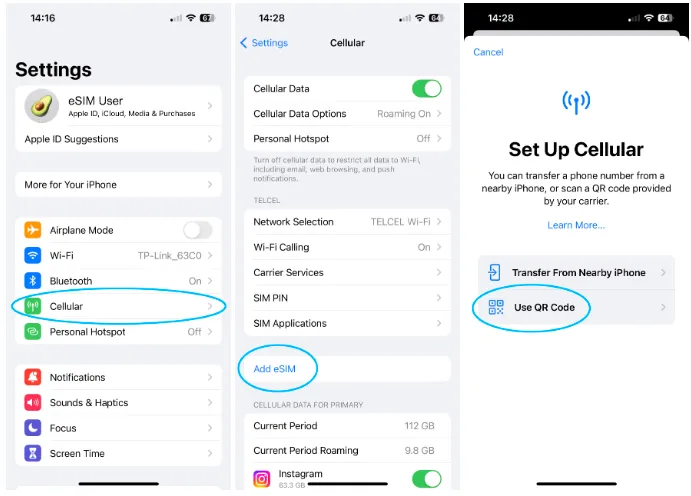
Open Settings: On your phone, go to the SIM/Cellular/Mobile Data settings.
-
Add eSIM: Select the option to "Add eSIM" or "Add Mobile Plan."
-
Scan QR Code: Use your phone's camera to scan the QR code you received.If scanning is not possible (e.g., your device is being used for the QR code display), use the Manual Activation Code provided in the email.
-
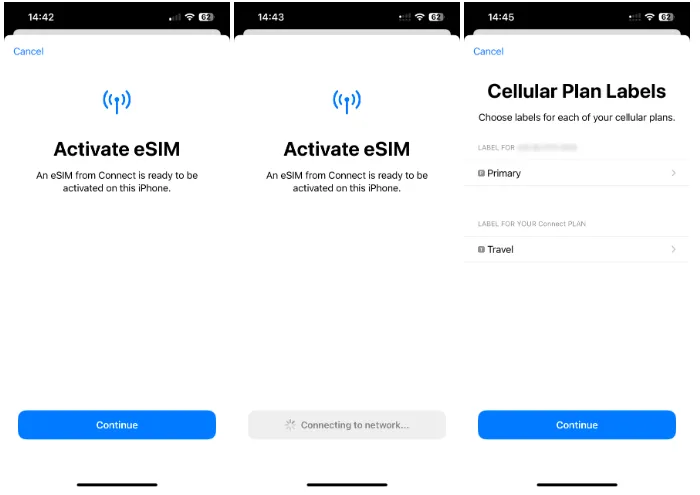
Label Your eSIM: When prompted, label the new line something clear like "Japan Data" or "Travel eSIM."
⚠️Important: Do not turn on the eSIM line yet. The plan validity starts once it connects to a Japanese network.
Phase 3: Activate (Upon Arrival in Japan)
-
Arrive in Japan: Land at Narita (NRT), Haneda (HND), or any Japanese airport.
-
Turn On Data Roaming: Go back to your Cellular/Mobile Data settings. Select the "Japan Data" eSIM line you just installed. Enable the line and turn on Data Roaming for this specific eSIM. (This only enables roaming on the new data line, not your expensive home carrier line.)
-
Set Data Line: Set the "Cellular Data" or "Mobile Data" primary usage to your new "Japan Data" line.
-
Connect: Your phone should automatically connect to the local Japanese network (Docomo, SoftBank, etc.). You are now connected!
Japan eSIM Price Comparison
Here is a comprehensive comparison of eSIM prices for Japan, broken down by data needs, plan duration, and provider type to help you find the best option.
|
Provider |
Data Allowance & Duration |
Approx. Price Range |
Key Note |
|
Airalo |
1GB (3 days) to 20GB (30 days) + Unlimited plans |
€4 - €66
|
Great coverage on SoftBank/KDDI networks. Known for low prices on smaller data bundles. |
|
Holafly |
Unlimited Data (1 to 90days) |
$3.90 - $139.99 |
Unlimited data (though speed may throttle after a daily high-speed limit, typically 500MB - 3GB). No hotspot on some plans. |
|
Ubigi |
1GB (3 days) to 60GB (12 months) + Unlimited plans |
$3.50 - $72 |
Also offers regional Asia plans and supports hotspot. |
|
Saily |
1GB (7 days) to 20GB (30 days) + Unlimited plans |
$3.99 - $71.99 |
Backed by Nord Security (NordVPN). Offers both fixed and unlimited data options. |
|
Mobal |
|
|
Strong regional and global plan options as well. |
💡 How to Choose the Best Value?
-
For Short Trips (7 days or less) and Low Data (Under 5GB): Look at Airalo or Saily's smaller plans (1GB/7 days or 3GB/30 days) for the cheapest upfront cost.
-
For Standard 1-2 Week Trips and Medium Data (10GB - 20GB): Nomad often has the best price per GB in the 20GB range. This is usually the sweet spot for most tourists.
-
For Heavy Use or "Unlimited" Needs: Consider Holafly or the unlimited plans from Saily or Nomad. Crucially, read the fine print! "Unlimited" typically means a daily high-speed cap (e.g., 1-3GB/day), after which the speed drops significantly (throttles). Sim Local is also noted for a high daily cap (10GB).
-
For Long-Term (1 Month+) : Look for the larger, multi-month plans from providers like Ubigi (up to 12 months) for the best long-term value.
-
For a real Japanese phone number for calls and texts, especially for short-term tourist stays or longer-term work, study, or residency: Mobal is a good option.
📌 Important Considerations
-
"Unlimited" Throttling: As mentioned, true unlimited, full-speed data is rare for tourist eSIMs. Always check the daily high-speed limit before the speed is reduced (throttled).
-
Coverage: Most reputable providers use major Japanese networks like KDDI (au) or SoftBank, ensuring good coverage in major cities (Tokyo, Osaka, Kyoto) and decent coverage in rural areas.
-
Validity: Make sure the plan's validity period (e.g., 7 days, 30 days) matches your trip length.
-
Data Only: Almost all tourist eSIMs are data-only. They do not come with a Japanese phone number for calls or SMS. If you need a local number, check providers like Mobal which offer dedicated voice/data plans.
Tips for Travelers Using eSIMs in Japan
-
Download your eSIM before your flight. You’ll need Wi-Fi to activate it.
-
Keep your original SIM for verification SMS (like bank or airline messages).
-
Turn off data roaming on your home SIM to avoid extra charges.
-
Use offline maps (Google Maps Offline) as backup in remote areas.
-
Check your data balance regularly via the provider’s app or website.
- Use Wi-Fi when available: To save data on your eSIM, use public Wi-Fi whenever you have the chance.
Common Issues and Solutions
|
Problem |
Possible Cause |
Solution |
|
No signal after activation |
Airplane Mode still on |
Turn it off and restart your phone |
|
Data not working |
Wrong APN settings |
Check provider’s setup guide |
|
Can’t scan QR code |
You exceeded the daily high-speed data limit (FUP) |
Wait until the next 24-hour cycle resets, or consider purchasing a top-up if available |
|
Slow speeds (throttling) |
Plan expired or consumed |
Top up via provider’s app |
|
eSIM plan doesn't appear |
The installation process was interrupted or incomplete. |
Check your device settings. If necessary, delete the profile and try rescanning the QR code (ensure you are connected to Wi-Fi for installation). |
Switching to an eSIM for your Japan trip is a no-brainer. It's the simplest, fastest, and most efficient way to guarantee you stay connected. By choosing a plan from a reputable online provider and following this setup guide, you can hit the ground running the moment you arrive in Japan, ready to explore everything this incredible country has to offer.