Let’s be honest—wireless bills have gotten out of hand. But what if you could get reliable nationwide coverage, 5G speed, and a full month of service for less than the cost of two takeout coffees? That’s the promise Mint Mobile has been delivering for years, and with their fully digital eSIM rollout in 2026, switching has never been simpler. Whether you’re tired of overpaying, looking to ditch physical SIM cards, or just want a plan that actually fits your lifestyle, this guide walks you through everything from activating your line to moving your existing number—and even keeping it active while you’re overseas. No hidden fees, no annual contracts, just straightforward wireless that makes sense.
What Is Mint Mobile eSIM?
An eSIM (embedded SIM) is a digital SIM card built directly into your phone that stores your account information and phone number just like a physical SIM card—but without the plastic card. Instead of physically inserting a SIM, you activate your service digitally through the Mint Mobile app or by scanning a QR code.
Mint Mobile operates on T-Mobile's network—the same towers that T-Mobile customers use—but at a fraction of the cost. Rather than paying monthly like traditional carriers, you buy service in bulk upfront (3, 6, or 12 months), which is how Mint keeps prices low.
🔻 Key eSIM Benefits:
-
Instant activation – No waiting for a SIM card to arrive in the mail.
-
Dual SIM support – Keep two active phone numbers on one phone (e.g., personal + work line).
-
Enhanced security – eSIMs offer stronger encryption and can't be physically stolen.
-
More physical space on phones – Removing the SIM card slot on newer smartphones opens up more room for memory or larger batteries, or just allows them to be lighter and thinner.
-
Eco-friendly – No plastic cards or shipping materials.
-
Great for international travel – Globetrotters who use eSIM may have an unclaimed SIM card slot in their phone, making it easy to use a local SIM card whenever they’re in a foreign country. You can also have multiple eSIMs on one phone, so purchasing an international plan via eSIM is an option too.
Mint Mobile eSIM Plans
Mint sells prepaid service in 3-, 6-, and 12-month packages. New customers typically receive promotional pricing for the first 3 months.The pricing structure is built around one simple idea: pay more upfront, save more money.
|
Plan Tier |
Data |
3-Month Price (New Customer) |
6-Month Price |
12-Month Price |
|
6GB Plan |
6GB high-speed |
$15/mo |
$20/mo |
$15/mo |
|
17GB Plan |
17GB high-speed |
$20/mo |
$25/mo |
$20/mo |
|
23GB Plan |
23GB high-speed |
$25/mo |
$35/mo |
$25/mo |
|
Unlimited Plan |
50GB high-speed |
$30/mo |
$35/mo |
$30/mo |
Every plan includes:
-
Unlimited Talk & Text
-
Free Calling to Mexico, Canada & the UK
-
5G & LTE
-
Wi-Fi Calling
-
Free Mobile Hotspot
-
Visual Voicemail
How to Get the $15/Month Rate?
-
For New Customers: Mint Mobile lets you try any plan (including the 17GB, 23GB, or Unlimited plans) at the promotional introductory rate of $15/month for your first 3 months (paid upfront as a $45 payment plus taxes and fees).
-
For Existing Customers: After your introductory 3-month period, you must renew for a 12-month contract to keep the $15/month rate on the 6 GB plan.
>>Click here for more plan details
Activation Guide – Step by Step
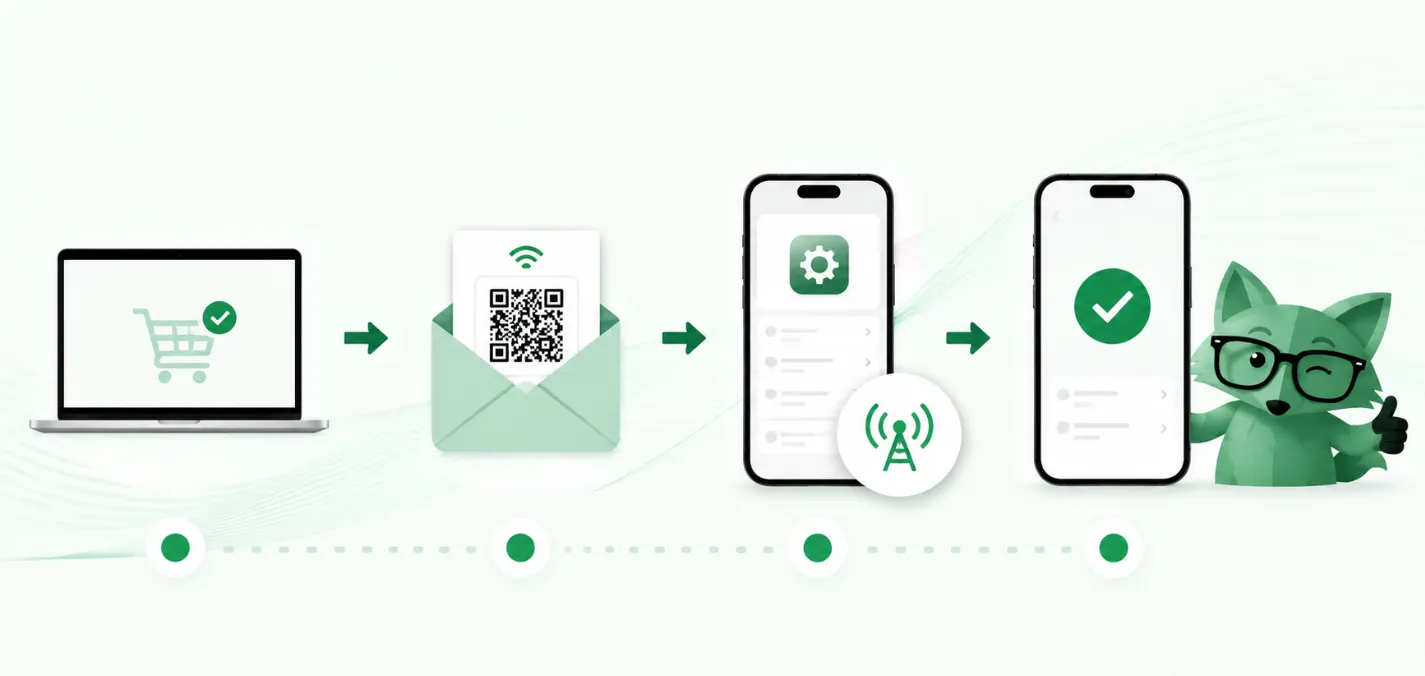
Because eSIM is fully digital, you can activate your Mint Mobile service in minutes without waiting for a physical card to arrive in the mail.
Pre-Activation Checklist
Before you begin, make sure:
-
Your phone is unlocked – Go to Settings > General > About and look for "Carrier Lock." If it says "No SIM restrictions," you're good to go. If not, contact your current carrier to request an unlock.
-
Your phone is eSIM-compatible – Most newer iPhones (XR and later) and Android phones support eSIM. iPhone 14 and newer models are eSIM-only – they have no physical SIM slot.Compatibility can be checked before purchase.
-
You're connected to Wi-Fi – You cannot download an eSIM using cellular data.
Buy Your Plan
Purchase your plan on the Mint Mobile website or app and select "eSIM Delivery" at checkout.
Activating Your eSIM
Activation usually takes only a few minutes.
Method 1: Using the Mint Mobile App (Recommended)
This is the smoothest, most automated path to activation.
-
Download and open the Mint Mobile App (iOS / Andriod) on your device.
-
Select Activate your SIM.
-
Enter the 11-digit eSIM ACT Code sent to your email after your purchase.
-
Choose whether to:
-
Get a new number (assigned instantly based on your ZIP code).
-
Keep your existing number (Port-In). If porting, you will need your current carrier's Account Number and Transfer PIN.
-
-
Follow the on-screen prompts to "Install Cellular Plan." Tap Continue to approve the profile download.
-
Restart your phone once the app indicates the install is complete.
Method 2: Manual Installation via QR Code
If you are activating on a laptop or secondary device, you can scan a QR code.
-
Open your activation confirmation email from Mint Mobile on a tablet, computer, or printed page.
-
Go to your phone's network settings:
-
iOS: Settings > Cellular > Add eSIM > Use QR Code.
-
Android: Settings > Network & Internet > SIMs > Add SIM / + > Download a SIM instead > Scan QR Code.
-
-
Point your phone’s camera at the QR code shown in the email.
-
Follow the configuration prompts to label your new line (e.g., "Mint Mobile").
-
Turn your phone off and back on to register the device on T-Mobile towers.
Converting a Physical SIM to eSIM
Converting your physical SIM card to an eSIM on Mint Mobile is a great move. It frees up your physical SIM slot for travel and secures your line against physical SIM-swapping theft.The process is straightforward and can be completed directly through your phone and the Mint Mobile app.
Before You Start: The Pre-Check
-
Connect to Wi-Fi: You will need a stable internet connection to download your new eSIM profile. Do not try this on cellular data.
-
Update Your Phone: Ensure your device is running the latest iOS or Android software version to avoid activation glitches.
-
Confirm Compatibility: Make sure your phone is carrier-unlocked and supports eSIM technology.
Method 1: Using the Mint Mobile App (Recommended)
This is the official and safest route for both iPhone and Android users.
-
Open the Mint Mobile App on the device you want the eSIM on.
-
Tap the Account tab in the bottom right corner.
-
Under the "Device" section, select Change Device (or Switch to eSIM if the shortcut is visible).
-
Select Get an eSIM.
-
The app will ask if you are switching on the same phone or moving to a new one. Select "This Device" (or current phone).
-
Submit the Order: Mint usually provides one or two free eSIM replacements per year; otherwise, a small fee may apply. Confirm the order.
-
Install the Profile: Once processed, a prompt will appear on your screen to install the cellular plan. Follow the on-screen steps.
-
Remove the Old SIM: Once your phone registers the new eSIM signal (you'll see signal bars), remove the physical plastic SIM card from your phone and discard it.
>>How to convert from a physical SIM card to eSIM
Method 2: iPhone Quick Transfer (iOS Only)
If you are using an iPhone, Apple has a built-in feature that can sometimes convert your physical SIM to an eSIM directly through iOS settings, provided the carrier supports it in your region.
-
Go to Settings > Cellular.
-
Tap Convert to eSIM (if you don't see this option, your specific account status requires you to use Method 1 above).
-
Tap Convert Cellular Plan.
-
Confirm the conversion and wait for the status to change to "Activating."
-
Once your physical SIM says "No Service," pop the plastic SIM out of your phone.
💡 Pro-Tip: Once the conversion is complete, restart your phone. This forces a clean handshake with T-Mobile's cell towers and ensures your data speeds and MMS messaging function perfectly right out of the gate.
Keeping Your US Number Abroad
If you are traveling outside the US or moving abroad temporarily, keeping your US phone number active for two-factor authentication (2FA) bank texts and family calls is essential.Mint Mobile offers two major ways to maintain your number.
Option A: The "Minternational Pass" (International Roaming)
Mint Mobile uses the Minternational Pass system for seamless roaming in over 180 countries. You can purchase these passes ahead of time and activate them inside the Mint App when you touch down.
|
Pass Duration |
Price |
Data Included |
Voice Minutes |
SMS Included |
|
1-Day Pass |
$5 |
1 GB High-Speed |
60 Mins |
60 Texts |
|
3-Day Pass |
$10 |
3 GB High-Speed (then Unlimited) |
200 Mins |
200 Texts |
|
10-Day Pass |
$20 |
10 GB High-Speed (then Unlimited) |
500 Mins |
500 Texts |
|
30-Day Pass |
$5 |
No Data (Requires Wi-Fi) |
100 Mins |
100 Texts |
⚠️ Note: The 30-Day No Data Pass ($5) is specifically tailored for expats or long-term travelers who want to hold onto their number and receive 2FA (Two-Factor Authentication) texts while relying on local Wi-Fi or a local second SIM card for data.
Option B: Wi-Fi Calling & Dual SIM Setup (The Free Hack)
If you do not want to purchase a Minternational Pass, you can route your Mint line over a local data connection using your phone's native Dual SIM capabilities.
Step-by-Step Setup:
-
Before leaving the US: Go to Settings > Cellular > Mint Mobile > Enable Wi-Fi Calling. This maps your account to allow calls and texts over the internet.
-
Buy a local eSIM or Physical SIM upon arrival at your destination (or use a global data provider like Airalo or Nomad).
-
Set your Data line to the local carrier, and keep your Default Voice/SMS line set to Mint Mobile.
-
When you are connected to Wi-Fi (or using the local cellular data line), your iPhone or Android will show "Mint Mobile using Cellular Data" or "Mint Wi-Fi".
-
You can now send/receive US text messages and phone calls absolutely free as if you were sitting in your living room in the United States.
Troubleshooting Common eSIM Issues
-
"No Service" after activation: Restart your device. If that fails, toggle Airplane Mode on for 10 seconds and turn it back off to force a tower handshake.
-
Can't send MMS (green bubble group texts / pictures): Ensure that Data Roaming is enabled in your phone's network settings if abroad, or verify that your APN settings are set to Mint's default values (Wholesale).
-
Verification text (SMS 2FA) not arriving: This usually means you do not have active roaming or Wi-Fi Calling enabled. Connect your phone to a stable Wi-Fi network with Wi-Fi Calling toggled ON to receive the system ping.
Frequently Asked Questions
Can I keep my phone number?
Yes. Mint supports porting most US mobile numbers.
Can I use Mint Mobile internationally?
Yes, but it's best used for keeping your US number while relying on Wi-Fi Calling or a local data eSIM when abroad.
Is Mint Mobile good for receiving verification codes overseas?
Yes. Many users use Mint specifically to receive banking and two-factor authentication (2FA) SMS while traveling or living abroad, often alongside a local eSIM for data. Availability depends on roaming/Wi-Fi Calling and the policies of the service sending the code.
Can I activate Mint eSIM outside the US?
Officially, Mint is intended for activation in the United States. Some users report success activating overseas using Wi-Fi (and sometimes a US VPN), while others were unable to complete activation until they returned to the US. If you're planning to rely on Mint before arriving in the US, activating while still in the country is generally the safest approach.
Does Mint Mobile charge a fee to switch from a physical SIM to an eSIM?
Mint Mobile gives you your first five eSIMs free of charge within any rolling 12-month period. If you need to replace or transfer your eSIM more than five times in a year, they cost $3 each.
Can I switch back to a physical SIM if I don’t like the eSIM?
Yes. You can order a replacement physical SIM card directly through the Mint Mobile app (under the Account dashboard). Mint charges a flat $9.95 replacement fee to ship you a new piece of plastic. Once you activate the new physical SIM, your old eSIM automatically deactivates.
Can I use both my Mint eSIM and a foreign SIM card at the same time?
Yes, assuming your phone supports Dual SIM functionality (like most iPhones and Samsung Galaxies). You can set your local foreign SIM as the primary line for mobile data, while keeping your Mint Mobile eSIM turned on exclusively to receive US calls and texts over Wi-Fi.
If I use Wi-Fi Calling abroad to receive text messages, does it count against my data or cost money?
No. As long as your phone explicitly says "Mint Mobile Wi-Fi" in your status bar, your phone treats that connection exactly as if you were standing in the middle of the US. Receiving 2FA bank codes and texting US numbers is completely free and won't use up any international roaming cash.