Keeping a US phone number active while living or traveling abroad used to mean paying for pricey roaming plans or maintaining a bulky physical SIM card. Not anymore. For expats, digital nomads, and frequent travelers, the Ultra Mobile eSIM has emerged as the ultimate loophole for seamless international connectivity. Whether you are looking to secure the ultra-affordable $3 PayGo plan, activate a new line from across the globe, or smoothly transfer an existing number to a digital SIM, this guide explains everything you need to know about getting started, managing your account, and maintaining your U.S. line from virtually anywhere in the world.
What Is Ultra Mobile?
Ultra Mobile is a prepaid mobile wireless carrier (MVNO) that operates on the T-Mobile 5G and 4G LTE networks. They are best known for budget-friendly month-to-month plans, free global texting, and unlimited international calling to over 90 destinations.
Ultra Mobile remains one of the most popular prepaid carriers for travelers, expats, digital nomads, and overseas students who need an affordable way to keep a U.S. phone number active. Thanks to eSIM support, users can activate service without a physical SIM card, transfer their number to a new device, and maintain access to U.S. calls, texts, banking verification codes, and two-factor authentication while living abroad.

🔻 Key Highlights:
-
The T-Mobile Connection: Ultra Mobile used to be the sister company to Mint Mobile (the carrier famously backed by actor Ryan Reynolds). T-Mobile officially acquired both Mint Mobile and Ultra Mobile, meaning Ultra Mobile operates as an official subsidiary of T-Mobile while maintaining its unique brand identity and international-focused plan structures.
-
Free International Calling: All of their standard prepaid plans include free, unlimited calling from the US to over 90 international destinations.
-
Global Texting: They offer unlimited text messaging to virtually any country in the world.
-
Notable Plans & Features: Ultra Mobile offers plans ranging from single-month options to bulk multi-month discounts (3, 6, or 12-month chunks).
-
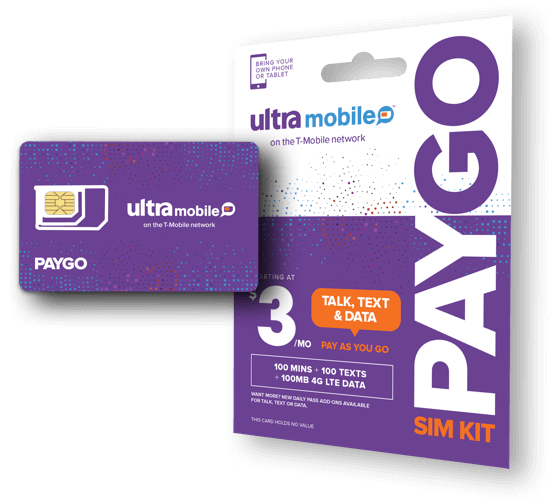
The $3 PayGo Plan: One of their most famous offerings is a bare-bones, hidden tier called "PayGo." For $3 a month, it gives you 100 minutes, 100 texts, and 100MB of data. It is widely considered the ultimate "parking plan" for American expats living abroad who just need to keep their US number active to receive two-factor authentication (2FA) bank texts over Wi-Fi calling.
-
Multilingual Support: Their customer care teams are specifically built to assist users in multiple languages, including English, Spanish, and Mandarin.
-
eSIM Support: They fully support digital eSIM activation, making it easy to swap service onto a phone without waiting for a piece of plastic in the mail.
The $3 PayGo Plan – Overview
Ultra Mobile's PayGo is a pay-as-you-go prepaid plan that costs just $3 per month. It is designed for light users who primarily need a US phone number for calls, texts, and minimal data usage.
Plan Inclusions:
|
Feature |
Allowance |
|
Monthly Cost |
$3 |
|
Talk Minutes |
100 minutes |
|
Text Messages |
100 texts |
|
Data |
100 MB (5G • 4G LTE) |
|
Mobile Hotspot |
Supported |
Overage Rates:
Once you exceed the monthly allowances, additional usage is charged at:
-
Additional minutes: $0.03 per minute.
-
Additional texts: $0.01 per text/MMS.
-
Additional data: $0.03 per MB.
Where to Purchase:
To get PayGo, you typically have to buy an official Ultra Mobile PayGo retail kit (often found on eBay or select T-Mobile/retail stores) which initially comes as a physical SIM card. Once activated, you can swap it to an eSIM.
Best For:
-
Receiving bank SMS codes.
-
Two-factor authentication (2FA).
-
Keeping a U.S. phone number active.
-
Travelers living overseas.
-
Secondary emergency number.
⚠️ Key Limitations:
-
❶ No plan switching: You cannot switch from a PayGo plan to any other Ultra Mobile plan.
-
❷ Data roaming not included: The PayGo plan does not come with data roaming; voice, SMS, and MMS roaming are paid through your PayGo Wallet balance.
-
❸ Account expiration: If no payment is made for 60 days after your last payment, your account and phone number will be canceled.
-
❹ Number recycling: PayGo numbers are prepaid and recycled; there is approximately a 10% chance of receiving a previously used number.
eSIM Compatibility
1. Checking Your Device
Before purchasing an Ultra Mobile eSIM, verify that your phone supports eSIM technology. Ultra Mobile lists Apple, Samsung, and Google as eSIM-compatible brands. You can use Ultra Mobile's compatibility checker tool at their website to confirm.
⚠️ Important note: eSIM requires an eSIM-compatible phone. iPhones older than the iPhone XR/XS series (2018) do not support eSIM. Additionally, eSIM functionality typically requires international/unlocked versions of devices—Chinese domestic models may not support eSIM.
2. Getting Your eSIM
When you purchase an eSIM, you will receive an email containing a QR code for activation. However, because the $3 PayGo plan is officially sold only as a physical SIM kit, getting it onto an eSIM requires a specific workaround.
Setting Up Ultra Mobile PayGo on eSIM
There are two primary ways to set up the $3 PayGo plan on an eSIM:
Method A: The Physical-to-eSIM Conversion (Recommended)
This is the safest method if you are currently in the United States or can have a physical SIM shipped to a US address before you depart.
-
Purchase the Physical SIM Kit: Buy the official "Ultra Mobile PayGo" SIM kit (typically retails for $10 to $13, which includes your first month of service) on eBay or from select T-Mobile retail stores.
-
Activate the SIM: Go to paygo.ultra.me/activate and enter the 11-digit activation code found on the card. Choose to get a new number or port your existing US number.
-
Insert and Initialize: Put the physical SIM into a phone while in the US to confirm you have active cellular service.
-
Convert to eSIM via the App:
-
Download the Ultra Mobile App (iOS / Andriod) on your eSIM-compatible phone.
-
Log in to your newly created account.
-
Navigate to Account > Order Replacement SIM > Switch to an eSIM.
-
Confirm your device's compatibility. The app will generate a digital eSIM profile and provide an on-screen prompt or QR code to install it.
-
-
Remove Physical SIM: Once the eSIM profile is successfully activated, your physical SIM will be permanently deactivated. You can safely discard it.
>>How to switch from Mobile eSIM Physical SIM to an eSIM
Method B: Direct eSIM Activation via Third-Party Sellers (If Already Abroad)
If you are already outside of the United States and cannot receive physical mail, some authorized third-party sellers on eBay sell pre-activated Ultra Mobile PayGo eSIM packages.
-
Purchase a Pre-Activated eSIM: Locate a reputable seller offering "Ultra Mobile PayGo eSIM" on eBay.
-
Provide Zip Code: Provide the seller with a US 5-digit zip code so they can generate a local phone number for you.
-
Install the eSIM via VPN:
-
Expats report that downloading the eSIM profile directly onto your phone while abroad can occasionally fail due to geo-blocking during the profile handshake.
-
Crucial Step: Connect your phone to a reliable US-based VPN server via Wi-Fi.
-
Scan the QR code or manually enter the SM-DP+ Address and Activation Code provided by the seller.
-
-
Enable Wi-Fi Calling Immediately: (See Section 4 for details).
How to Transfer (Port) Your Existing US Number?
If you want to keep your current mobile number (from Verizon, AT&T, T-Mobile, Mint, etc.), you can port it over during the activation phase.
What You Need From Your Current Carrier:
To transfer your number successfully, do not cancel your current service yet. Gather the following information:
-
Account Number: Found on your monthly bill (often different from your phone number).
-
Port-Out PIN (Transfer PIN): Often requested via your carrier’s app or by dialling a specific shortcut (e.g.,
#PORTor#225#). -
Billing Zip Code: The zip code registered to your current billing address.
Step-by-Step Porting Process:
-
Go to the activation portal (paygo.ultra.me/activate).
-
Enter your SIM’s activation code.
-
When prompted, select "Transfer My Existing Number".
-
Input your Account Number, Port-Out PIN, and Zip Code.
-
Submit the request.
⚠️ Note: Mobile-to-mobile ports usually take anywhere from 10 minutes to a couple of hours. Landline or VoIP (like Google Voice) transfers can take up to 5 business days. Keep your old SIM in your phone until it completely loses service, indicating the transfer has succeeded.
How to Keep & Use Your US Number Abroad?
If you are leaving the US, you have two primary ways to ensure your Ultra Mobile line continues to receive texts (especially verification codes) and calls without draining your wallet.
Strategy A: Wi-Fi Calling (The Best & Cheapest Method)
Before you board your flight, make sure you turn on Wi-Fi Calling in your phone's settings while still inside the US.
-
How it works: When you are connected to a Wi-Fi network anywhere globally, your phone treats the connection as if you are standing in the United States.
-
The Benefit: Making calls, receiving calls, and exchanging texts over Wi-Fi will deduct from your standard 100-minute/100-text allotment rather than charging roaming fees. Incoming texts are free against your 100-text bucket.
Strategy B: International Roaming (UpRoam Wallet)
If you are away from Wi-Fi and need cell towers abroad, Ultra Mobile operates via UpRoam in over 210 destinations.
-
How to set it up: Go to your online account or the Ultra Mobile app, select International Roaming, and add credit via "UpRoam" in increments of $5, $10, $20, or $40.
-
Pay-per-use: Once outside the US, standard roaming rates will apply against this credit balance (typically starting around $0.25/minute and $0.02/text depending on the country).
Account Management
1. Ultra Mobile App
The Ultra Mobile app (version 1.2.28 and later) supports PayGo accounts and allows you to:
-
Manage your account
-
Track account balances
-
Activate replacement SIMs
-
Switch between physical SIM and eSIM
-
Transfer eSIM to a new device
Supported accounts: Ultra, Flex, PayGo (Tourist accounts are not supported).
Download: Available on iOS (requires iOS 15.0 or later) and Android.
2. eSIM Management
Switching between physical SIM and eSIM:
-
Available directly in the Ultra Mobile app (version 1.2.28+).
-
You can switch between physical SIM and eSIM, or transfer eSIM to a new device.
-
Your phone must support eSIM to see these options.
Free switches: You get 2 free switches per year; additional switches cost $3 each.
Replacing a lost/deleted eSIM:
-
Contact Ultra Mobile customer service.
-
The agent will verify your identity (phone number, email, last 4 digits of payment card, recent call history).
-
A verification code will be sent to your phone.
-
The agent will email a new QR code for eSIM activation.
3. Recharging Your Account
You can recharge your PayGo plan through multiple methods:
- Online: Log in at my.ultra.me and pay via debit/credit card.
-
Auto Renew: Set up automatic monthly recharge.
-
Log in and add a credit/debit card under Billing Info.
-
Select "Auto Renew On".
-
Choose $5, $10, or $20 denomination ($3 applied to monthly plan).
-
-
Retail: Visit an Ultra Mobile authorized retailer or T-Mobile store for PayGo Recharge cards.
-
Phone: Call Care Team at 888-777-0446
4. Account Settings
-
Change email/contact preferences: Log in at my.ultra.me.
-
Voicemail: Checking voicemail counts against your minutes balance.
Frequently Asked Questions
Q1: Can I activate my eSIM while already outside the US?
Yes, but it is trickier. You must use a VPN connected to a US server over Wi-Fi during the initial installation to bypass geo-restrictions. Additionally, you will not receive a cellular signal initially. You must immediately connect to a Wi-Fi network that supports Wi-Fi Calling to register your line.
Q2: Does iOS 18+ Quick eSIM Transfer work with Ultra Mobile?
Yes. If you upgrade your iPhone while abroad, iOS 18 allows you to transfer your eSIM from your old iPhone to your new iPhone directly during setup, provided both phones are on the same local Wi-Fi network and Bluetooth is turned on.
Q3: What happens if I run out of my 100 minutes or SMS while abroad?
If your 100-unit allowance is exhausted, your incoming and outgoing calls/texts will temporarily stop unless you have funds topped up in your PayGo Wallet. If you have a wallet balance, it will automatically bill at $0.03/min and $0.01/SMS.
Q4: Will my account close if I don't use it?
Your account will remain active as long as the $3 monthly fee is successfully paid. Set up Auto-Renew in the app to ensure your service is never interrupted.
Q5: Can I receive bank verification texts overseas?
Yes. Most users receive SMS verification codes successfully through Wi-Fi Calling or international roaming services.
Q6: Is the $3 PayGo plan enough for number retention?
Yes. For users who only need to receive occasional calls, texts, and authentication codes, the $3/month PayGo plan is usually sufficient.