As more smartphones support embedded SIM technology, many Australian mobile users are making the transition away from traditional plastic SIM cards. Not all mobile plans are created equal, especially when you’re going digital. Amaysim has built a solid reputation for affordable, no-lock-in contracts, and their eSIM offering is no exception. But with several data allowances and expiry options available, how do you choose the right one? And once you’ve decided, what’s the quickest way to get it running on your device? This guide covers everything you need to know about Amaysim eSIM, including supported devices, available plans, activation steps, transferring your eSIM to a new phone, troubleshooting tips, and frequently asked questions.
What Is Amaysim eSIM?
Amaysim is an Australian mobile virtual network operator (MVNO) that operates on the Optus network.An eSIM (embedded SIM) is a digital version of a traditional physical SIM card that is built directly into compatible devices. Instead of waiting for a physical SIM to arrive by mail or purchasing one from a store, you can download and activate your Amaysim eSIM digitally in a matter of minutes—at no extra cost.
When you activate an eSIM, Amaysim prepares a unique encrypted profile containing your account details and authentication keys that only your specific device can access. This process, called Remote SIM Provisioning, happens entirely over the internet.
eSIMs are great for people who don’t want to faff around with fiddly physical SIMs. And because they can be used alongside a physical SIM, they’re also brilliant for people who want the flexibility of having one phone with two different phone numbers!

Key Benefits of Amaysim eSIM:
Using an amaysim eSIM gives you all the perks of their budget-friendly prepaid plans, stripped of the hassle that comes with physical plastic cards.The primary benefits fall into three main categories: convenience, flexibility, and network reliability.
1. Instant Digital Activation
-
Zero Wait Time: You don't have to wait for a SIM card to arrive in the mail or drive to a retail store. You can purchase a plan online and scan the digital profile to get connected within minutes.
-
Perfect for Travelers: If you are arriving in Australia from overseas, you can purchase and set up your amaysim eSIM before you even land, giving you instant data access the moment you touch down.
2. Dual SIM Flexibility
-
Two Numbers, One Phone: An eSIM allows you to run two active connections on a single device simultaneously. You can use your amaysim eSIM for cheap data and local Australian calls, while keeping your original physical SIM active for international roaming or a work number.
-
Easy Switching: You can easily toggle between cellular networks right in your phone’s settings without having to physically swap cards.
3. Optus Network Coverage
Amaysim runs on the trusted Optus mobile network, covering over 98.5% of the Australian population. Most of their eSIM plans feature 5G access at no extra cost, ensuring high-speed data for streaming and browsing.
4. Eco-Friendly & Secure
-
Reduced Plastic Waste: By eliminating the plastic SIM card, the cardboard packaging, and the shipping footprint, eSIMs are a much more sustainable option for the environment.
-
Enhanced Security: A physical SIM card can be stolen out of a lost phone and placed into another device to access your accounts. An eSIM is digitally locked to your device's hardware chip, making it incredibly difficult for thieves to tamper with.
Amaysim eSIM Compatible Devices
Before purchasing an eSIM, you must ensure your device supports the technology.Unsure if your device supports eSIM? Check compatibility here. Or dial *#06# to verify your device. If it's eSIM compatible a 32-digit EID number will display on your screen.
Or check your phone’s settings under “Mobile Network” or “SIM Manager”.
-
iPhone: Settings → Mobile Service / Mobile Data → Look for "Add eSIM" or "Convert to eSIM". Alternatively, go to Settings → General → About and scroll down for an EID number. iPhones from XS / XR (2018) onwards support at least one eSIM.
-
Samsung: Settings → Connections → SIM Manager → Look for "Add mobile plan" or "Add eSIM".
-
Google Pixel: Settings → Network & Internet → SIMs → Look for "Add eSIM" or "Download a SIM instead?"
The following devices are officially compatible with Amaysim eSIM:
|
Phones |
Tablets |
|
|
Best Amaysim eSIM Plans
Amaysim offers eSIM across all its prepaid mobile plans, including plans with 7-day, 28-day, and 365-day expiries. As of 2026, Amaysim no longer offers postpaid billing for new mobile services—all new mobile and data-only plans are prepaid.
🔻Key features of Amaysim plans include:
-
No Lock-in Contracts: Change or cancel your plan at any time.
-
Unlimited Data Banking: Any unused data rolls over to your next recharge and never expires, as long as you maintain an active plan.
-
International Perks: Most plans include unlimited standard international talk and text to selected countries (up to 42 destinations on higher-tier plans).
-
Free eSIM: There is no extra charge for choosing an eSIM over a physical SIM.
When signing up on the Amaysim website or app, simply select the eSIM option instead of "Physical SIM" during the checkout process.
The best amaysim eSIM plans are broken down by category below to help you choose the right fit:
1. The Best Value Pack (Top Recommendation)
If you want the absolute best balance of data and price, amaysim frequently runs aggressive introductory promotions for new online services.
-
The Standout Deal: $35 UNLIMITED 95GB Plan
-
The Promo: Often discounted to $35 for your first 6 renewals (ongoing price is $45 for 95GB/28 days). It frequently includes massive bonus data spikes—such as 400GB total data for those initial 6 renewals.
-
Speed: 5G network speeds capped at 200Mbps.
-
International: Includes unlimited standard international talk and text to 42 countries.
-
2. The Mid-Tier Sweet Spot
For users who want a steady, predictable bill with plenty of data for streaming and navigation without relying on introductory promos.
-
The Plan: $40 UNLIMITED 80GB Plan
-
The Inclusions: 80GB of standard data per 28 days (look out for promotional periods that bump this up to 120GB for the first few renewals).
-
Speed: 5G network speeds capped at 150Mbps.
-
International: Unlimited standard talk and text to 42 countries.
-
3. The Low-Cost/Basic Tier
Perfect for light users, kids, or those who are almost always connected to home and work Wi-Fi.
-
The Plan: $30 UNLIMITED 15GB Plan
-
The Inclusions: 15GB of data per 28 days. New sign-ups can often catch this on a massive first-month discount (sometimes slashed to around $11 for the first renewal).
-
Speed: 5G network speeds capped at 150Mbps.
-
International: Unlimited standard talk and text to 28 countries.
-
4. Long-Expiry Plans (Set and Forget)
If you prefer to pay once and not worry about a phone bill for an entire year, these plans offer excellent value over 365 days.
|
Plan Price |
Total Data Allocation |
Expiry Period |
Network Speed |
International Inclusions |
|
$150 Plan |
150GB |
184 Days (6 Months) |
Max 150Mbps (5G) |
Talk & Text to 42 countries |
|
$270 Plan |
200GB |
365 Days (12 Months) |
Max 150Mbps (5G) |
Talk & Text to 28 countries |
|
$320 Plan |
240GB |
365 Days (12 Months) |
Max 150Mbps (5G) |
Talk & Text to 28 countries |
⚠️ A Note on Speeds: Amaysim caps download speeds on their 5G network to either 150Mbps or 200Mbps depending on the tier of your plan. This is more than fast enough for seamless 4K streaming, video calling, and gaming, but it is worth noting if you require uncapped speeds.
How to Activate a New Amaysim eSIM?
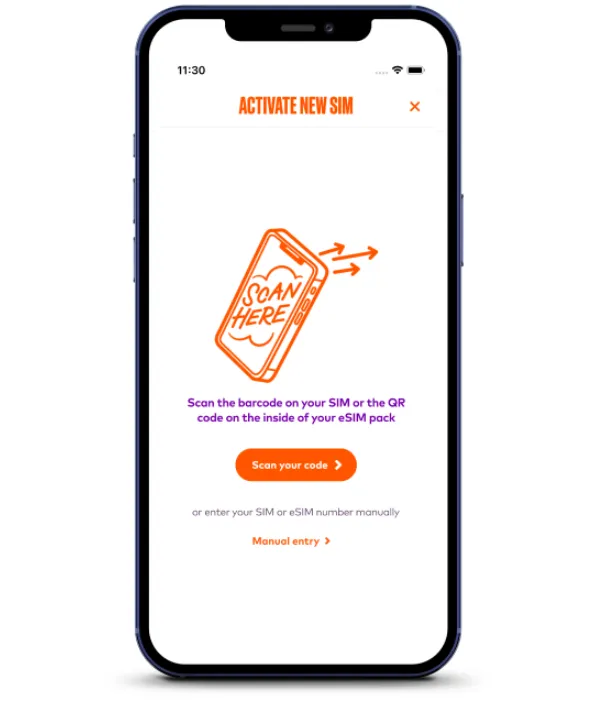
The easiest way to buy and activate an Amaysim eSIM is directly through your smartphone.
Step 1: Purchase your plan
Download the official Amaysim app or visit their website. Select your chosen prepaid plan and choose eSIM instead of a physical SIM at the checkout.
Step 2: Connect to Wi-Fi
Ensure your phone is connected to a strong, stable Wi-Fi network. The setup process requires an internet connection to download the profile from Amaysim's servers.
Step 3: Trigger the download
In the App.Open the amaysim app on the phone you intend to use. Log in, complete the brief ID check (using a driver's licence, passport, or Medicare card), and tap Download eSIM.
Step 4: Follow system prompts
Your phone's native operating system will prompt you to add the cellular plan. Agree to the prompts and do not let your phone go to sleep or make calls while the profile installs.
How to Convert a Physical SIM to an eSIM?
If you are an existing Amaysim customer using a plastic SIM card and want to switch to a digital profile on the same phone, you can convert it in minutes.
-
Step 1: Open the amaysim app on your phone.
-
Step 2: Swipe up from the home screen to open your plan details.
-
Step 3: Select Replace SIM.
-
Step 4: Tap I want a replacement eSIM and select Continue.
-
Step 5: Once the app verifies your device is compatible, click Confirm replacement. Your old plastic SIM will work for a brief transition period (usually 1 to 3 hours) until it loses signal, signaling that your new eSIM profile is active and ready.
Your eSIM can also be easily moved to another device
This can be done in an instant on the easy-to-use amaysim app:
-
Log in to the amaysim app and swipe up on the home screen.
-
Select ‘Replace SIM’.
-
Select ‘I want eSIM for my new device’.
-
Select ‘Confirm replacement’ and follow the prompts to move your eSIM to your new device.
You can have multiple eSIMs on the same device
In most cases, you can store more than one eSIM on your device. However, you can only use one at a time, so if you have multiple eSIMs downloaded, you’ll have to toggle between them in your device settings. Some devices may support multiple eSIMs being active, but we advise checking with your manufacturer.
⚠️ Note: For now, at least, eSIMs can’t be used on wearables or smartwatches.
Troubleshooting & Tips
-
Activation Delays: Number transfers from other Australian telcos generally complete within a few hours, but can take up to 3 business days. If you are keeping a number, your old SIM stays active until the porting process finishes.
-
Stuck Profile: If an eSIM download stalls, restart your phone and ensure you have a strong Wi-Fi connection before retrying. Do not delete the eSIM profile from your phone settings without contacting support, as QR codes/tokens are single-use.
-
International Roaming: Amaysim eSIMs support international roaming across more than 120 destinations, managed via prepaid roaming add-on packs within the app.
-
Request a Replacement QR Code: eSIM QR codes are strictly single-use. If your installation was interrupted, you cannot scan the same QR code again. You must contact Amaysim support or use the app to request a replacement.
Support and Contact Information
-
Amaysim Help Centre: https://help.amaysim.com.au
-
Amaysim Website: https://www.amaysim.com.au
-
Phone support: Call 1300 808 300
-
In-app support: Available through the Amaysim app
For eSIM-specific troubleshooting, visit the eSIM Troubleshooting section of the Help Centre.