Planning a trip to France or across Europe often comes with one major headache: staying connected without breaking the bank. While traditional roaming can lead to "bill shock," the transition to digital SIM technology has changed the game. As one of France’s leading telecommunications giants, Bouygues Telecom offers a robust solution for modern travelers.With eSIM support from Bouygues Telecom, you can activate a mobile plan instantly without inserting a physical card. It’s faster, cleaner, and perfect for anyone who wants seamless connectivity on the go.In this guide, you’ll learn how Bouygues eSIM works, where to purchase it, how to set it up on your device, and what to do if you need to switch phones. I'll also explore the most cost-effective prepaid options so you can enjoy fast data, clear calls, and reliable coverage across France without unnecessary hassle.
What Is a Bouygues eSIM?
Instead of a plastic chip that you slide into a tray, the eSIM is a software profile that you download directly onto your phone’s internal chip. For travelers and locals alike, it's the "invisible" way to connect to France's 4G and 5G networks.It works just like a regular SIM: it connects your device to the Bouygues Telecom network so you can make calls, send texts, and use mobile data.You can activate mobile plans without inserting any card — everything works via QR codes or app links.Choosing Bouygues Telecom for your trip to France or Europe is a smart move, especially since they offer some of the most generous data packages for tourists.
Key Features of the Bouygues eSIM:
-
Coverage: Works in France and throughout the European Union.
-
Instant Delivery: You don't have to wait for a package in the mail or find a kiosk at the airport. You buy it online, and the QR code arrives in your inbox.
-
Instant Activation: Fast activation via Wi-Fi and QR code or app.
-
Dual SIM Capability: You can keep your home phone number active (for receiving important bank 2FA texts) while using Bouygues for cheap local data.
-
Eco-Friendly: No plastic waste or shipping emissions.
-
Convenience: Easier to manage multiple lines (e.g., personal & travel).
- Easier to transfer: If you change phones, you can often transfer the eSIM profile without needing a new card.
How it Works with Bouygues:
Bouygues Telecom is particularly popular because they offer a dedicated "Travel" version of their eSIM. Unlike many other European carriers that require a local bank account or physical address, the Bouygues Travel eSIM is designed specifically for non-residents.
-
Pre-loaded with a Number: Unlike "Data-Only" eSIMs (like Airalo), a Bouygues eSIM usually comes with a French (+33) phone number, allowing you to make calls and receive texts across Europe.
-
Automatic 5G: In 2026, almost all Bouygues eSIM plans include 5G access by default, provided your phone supports it and you are in a covered area (like Paris, Lyon, or Marseille).
In short, a Bouygues eSIM is just a modern, digital way to use a mobile plan on your phone without needing a physical SIM card — faster to activate, easier to manage, and ideal for dual lines or travel plans.
What Devices Support Bouygues eSIM?
To use a Bouygues eSIM, your device must be carrier-unlocked and equipped with an internal eSIM chip. As of 2026, the list of compatible devices has expanded significantly to include almost all mid-to-high-end smartphones.Here's a current overview of the types of phones that support Bouygues Telecom’s eSIM:
|
Brand |
Model |
|
Apple |
⚠️Note: Some region-specific models — particularly iPhones sold in Mainland China, Hong Kong or Macau — may lack eSIM support. |
|
Samsung |
|
|
|
Pixel 3/3 XL and all newer models (including the Pixel 10 series) |
|
Other Brands: |
|
🔍Quick Compatibility Check:
If you aren't sure if your specific device is ready, you can check instantly:
-
Open your phone's dialer.
-
Type *#06#.
-
Look for an EID number (a 32-digit code). If you see an EID, your device is eSIM-compatible.
Best Bouygues Prepaid eSIM Plans
In 2026, Bouygues Telecom remains a top-tier choice for European travelers. While they offer many plans, the "My European eSIM" series is the gold standard because it includes a French phone number (+33) and unlimited calls within Europe—features often missing from cheaper "data-only" providers like Airalo.
🏆 Top Choice: My European eSIM (Premium)
This is the most popular plan for tourists. It provides a massive amount of data and a generous validity period that covers a full month.
Best For: Travelers spending 2–4 weeks in Europe who need to make restaurant reservations, use Google Maps heavily, and want the speed of 5G.
|
Plan Feature |
my European eSIM 30GB |
my European eSIM 60GB |
my European eSIM 120GB |
|
Data (Europe/UK) |
30GB |
60GB |
120GB |
|
Network Speed |
5G / 4G LTE |
5G / 4G LTE |
5G / 4G LTE |
|
Calls & SMS |
Unlimited in Europe |
Unlimited in EU/UK |
Unlimited in EU/UK |
|
Validity |
30 Days |
30 Days |
30 Days |
|
Price (Approx.) |
€29.90 |
€39.90 |
€49.90 |
⏱️ Best for Short Trips: Travel Basic
If you're only visiting for a week or ten days, these smaller bundles save you money while keeping you on the same high-quality network.
-
Travel Basic+ (€19.90): 20GB of data (15 days).
-
Unlimited calls and SMS within Europe.
-
Best for social media users who need to make local calls.
-
-
Travel Basic (€14.90): 15GB of data (15 days).
-
Data Only (No phone number/calls).
-
Best for budget travelers who rely on WhatsApp/FaceTime for communication.
-
How to Buy a Bouygues eSIM?
Buying a Bouygues eSIM is a straightforward process.Here’s a clear step-by-step guide on how to buy a Bouygues eSIM, whether you want a regular mobile plan with eSIM included or a prepaid travel eSIM (often called My European eSIM) you can install on your phone before travelling in France and Europe:
A. Buy an eSIM With a Bouygues Mobile Plan (Standard Subscription)
If you're subscribing to a regular Bouygues Telecom mobile plan (with or without commitment):
1. Via Bouygues Official Website
-
Go to the Bouygues Telecom site and choose your mobile plan.
-
During checkout, select “eSIM” instead of a physical SIM when prompted.
-
Bouygues now offers an eSIM option right at subscription online — no need to buy a physical SIM first.
-
-
Confirm your plan and order (you’ll usually pay a small fee for the eSIM — historically about €1 with some offers).
-
Once ordered, Bouygues will send you a QR code (by email or through your Bouygues customer account) to install the eSIM.
2. In Bouygues Stores
You can also walk into a Bouygues Telecom store in France and ask for a mobile plan with eSIM. The staff can help you purchase and often install the eSIM onto your device.
B. Buy a Prepaid (Travel) Bouygues eSIM Online
For most travelers, the best option is the "My European eSIM," which is specifically designed for tourists and includes a French phone number (+33).
1. Buy Online
This is the most convenient method as it allows you to receive your eSIM via email instantly.
-
Visit the Official Bouygues/SimOptions Portal or authorized resellers like eSIM.net or Gigago.
-
Select your desired plan (e.g., 30GB for 30 days).
-
Provide your email address and payment details.
-
Confirm that your device is eSIM-compatible (dial
*#06#to check for an EID). -
You will receive a QR code and activation instructions in your inbox within minutes.
2. At the Airport (Paris CDG or Orly)
If you prefer to buy in person, you can do so immediately after landing.
-
Where to Look: Go to the Tourist Information desks.
-
⚠️Note: While Relay convenience stores sell physical Bouygues SIMs, they typically do not sell the eSIM version (as of 2025/2026). Only the Tourist Information desks have been authorized to provide the digital QR code version.
-
-
Requirements: You will need to show your passport for registration at the desk.
3. Buy at a Bouygues Boutique in France
There are over 500 Bouygues Telecom stores across France.
-
Process: Simply walk in and ask for a "Prepaid eSIM" or the "My European eSIM."
-
What to Bring: You must bring your physical passport. Stores cannot activate a line without official ID.
-
Payment: They accept major credit cards (Visa/Mastercard) and cash.
💡Important Buying Tips:
-
Early Setup: You can scan the QR code and install the profile while still at home (using Wi-Fi). The "validity period" (e.g., 30 days) usually does not start until the phone first connects to a European cellular tower.
-
Verification: By French law, you must register your identity for mobile lines. If you buy online, you may receive a follow-up link to upload a photo of your passport. If you don't do this within 15–30 days, the line may be suspended.
-
Avoid "Data-Only" Traps: Many third-party apps (like Airalo) sell "Bouygues" data, but these often do not include a phone number or 5G. If you need to make local calls or use 5G, ensure you are buying the official "My European eSIM" package.
How to Activate Your eSIM?
After completing your purchase (either standard plan or travel eSIM),you’ll receive an email with a QR code or an activation link.Activating your Bouygues eSIM is a completely digital process that takes about 5 minutes. While the official documentation sometimes suggests you must be in France, as of 2026, you can scan and install the profile anywhere in the world using Wi-Fi.
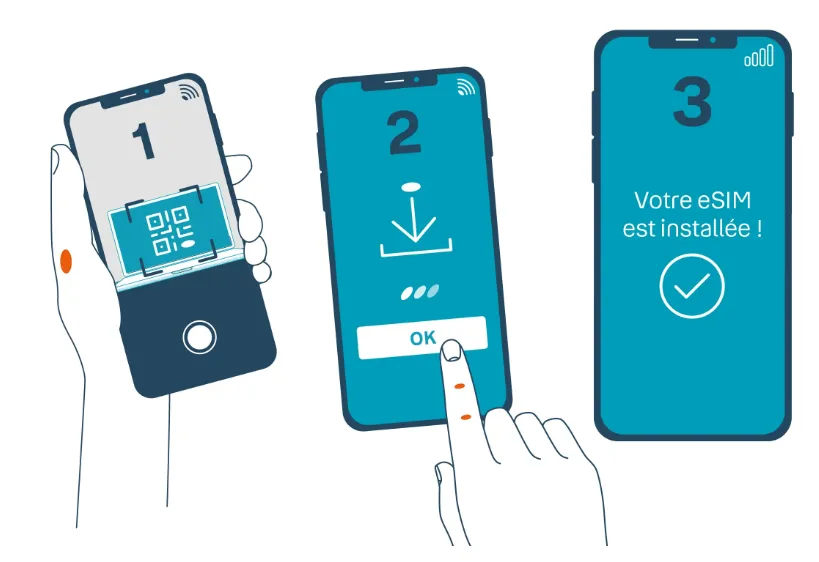
Step 1: Installation (Best done at home/on Wi-Fi)
Do not wait until you land to scan the code, as you will need a stable internet connection to download the eSIM profile.
For iPhone (iOS):
-
Go to Settings > Cellular (or Mobile Service).
-
Tap Add eSIM.
-
Select Use QR Code and scan the code received in your email.
-
Follow the prompts to label the new line (e.g., "Bouygues" or "Travel").
-
Set your home SIM as the "Default Line" for now so you don't lose connection before you travel.
For Android (Samsung/Pixel):
-
Go to Settings > Connections > SIM Manager.
-
Tap Add eSIM or Add Mobile Plan.
-
Select Scan QR Code and scan your email attachment.
-
Confirm the download and label the plan.
Step 2: Activation (Upon arrival in France)
Once you land in France or any other covered European country, follow these steps to start using data:
-
Turn on the Line: Go to your SIM settings and toggle the Bouygues eSIM to On.
-
Switch Mobile Data: Change your "Mobile Data" source from your Primary SIM to the Bouygues eSIM.
-
Enable Data Roaming: This is the most common reason for failure. Even if you are in France, you must turn Data Roaming ON in the Bouygues eSIM settings for the data to flow properly.
Step 3: Troubleshooting (If data doesn't work)
If you see bars but have no internet, you likely need to manually set the APN (Access Point Name).
-
APN Name: Bouygues Telecom
-
APN: mmsbouygtel.com
-
Username/Password: Leave blank
‼️Quick Check: You should receive a welcome SMS from Bouygues shortly after landing. This text will contain your French phone number. If you don't see it, you can dial #135# to display your number on the screen.
How to Register for a Bouygues eSIM?
French law requires all mobile lines to be registered with a valid ID to prevent fraud and misuse.Before you can use a Bouygues eSIM, you’ll need to complete a simple online registration. This links your identity to your mobile number and activates your service.
-
The 30-Day Rule: If you are only visiting France for less than 30 days, you often do not need to complete this. Many travelers use the 30GB or 60GB plans for their entire trip without ever registering.
-
Long-Term Use: If you plan to use the line for more than 30 days or want to top up (add more data) later, registration is mandatory. If ignored, Bouygues will suspend your outgoing services after the first month.
Option 1: Online (The Easiest Way)
If you bought your eSIM through a partner like SimOptions or the official Bouygues portal, you should receive a registration link via email. If not, follow these steps:
-
Go to the Portal: Visit the Bouygues Prepaid Registration Page.
-
Enter Your Info: You will need:
-
Your French phone number (sent to you via SMS when you first activated the eSIM).
-
The last 4 digits of your eSIM serial number (ICCID), found in your phone's cellular settings.
-
-
Upload Documents: You must upload a clear photo of your Passport or European ID card.
-
⚠️Note: The passport must be in Latin script (English/French/etc.).
-
-
Wait for Confirmation: Processing usually takes 24–48 hours. You will receive an SMS once your identity is verified.
Option 2: By Phone (English Support)
If the website gives you trouble, you can register over the phone.
-
Call 634 from your Bouygues line (or +33 6 68 634 634 from another phone).
-
Ask for English: Though the automated menu is in French, once you reach an agent, you can ask for someone who speaks English.
-
Provide Details: You will verbally give your name, passport number, and your current address in France (your hotel or Airbnb address is perfectly fine).
Option 3: In-Store
If you are already in France, walk into any Bouygues Telecom boutique.
-
Hand the staff your phone and your physical passport.
-
They will scan your ID and link it to your eSIM profile immediately. This is the most "failsafe" method if the online portal rejects your photo upload.
⚠️Common Registration Pitfalls:
-
Address: If the form asks for a French address, use your hotel or rental address. Do not use your home address outside of Europe, as the system may reject it.
-
Photo Quality: Ensure there is no glare on your passport photo; the automated system is very picky about reading the text.
-
Confirmation SMS: If you don't receive a text with your phone number upon landing, dial #135# on your keypad to see your number—you'll need this to log in to the registration site.
How to Transfer a Physical SIM to eSIM?
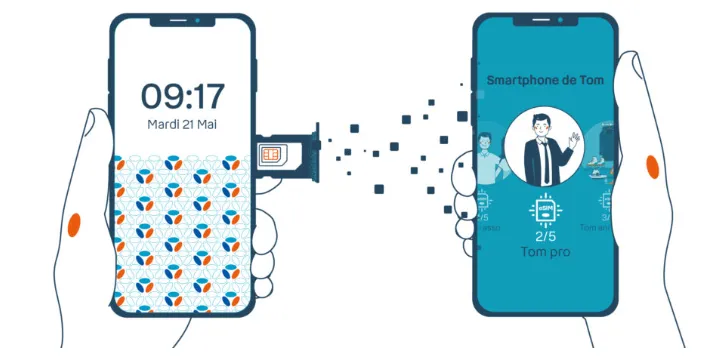
If you already use a Bouygues physical SIM, you can convert it into an eSIM without changing your number, plan, or data. The process is fast and fully digital on compatible phones.
A. For Monthly Subscribers
If you have a standard French contract, you can perform the swap entirely through your online account.
-
Log In: Go to the Bouygues Customer Area (Espace Client).
-
Navigate: Go to "Mon Mobile" (My Mobile) and look for "Remplacer ma carte SIM" (Replace my SIM card).
-
Select eSIM: Choose the eSIM option. You will be asked to confirm your device's compatibility.
-
Fee: There is typically a one-time replacement fee of €20 that will appear on your next bill.
-
Activation: Once the request is processed, you will receive a QR code in your customer area or via email. After scanning it, your physical SIM will deactivate automatically within an hour.
B. For Tourists (Prepaid "My European SIM")
If you are using the prepaid tourist SIM, the rules are a bit stricter.
-
No Direct "Swap" Button: Most Bouygues prepaid systems do not have a self-service "Convert to eSIM" button in the app.
-
The Store Method: Your best bet is to visit a physical Bouygues Telecom boutique in France. They can verify your ID, deactivate your physical card, and issue a new eSIM QR code for the same phone number.
-
New Purchase Alternative: If you haven't activated your physical SIM yet, it is often faster and cheaper just to purchase the eSIM version online ($20–$40) rather than trying to convert a physical card you already bought.
C. Using Device Settings (The "Quick Switch")
Some newer smartphones allow you to initiate a transfer directly in the settings, provided the carrier supports it:
-
iPhone: Go to Settings > Cellular (Mobile Service) > Convert to eSIM. If Bouygues supports it for your specific plan, you will see your number listed there. Follow the prompts to convert.
-
Samsung: Go to Settings > Connections > SIM Manager. Tap on your physical SIM and look for "Convert to eSIM."
⚠️Warning: Once you convert to an eSIM, your physical SIM card becomes "dead." Do not throw it away until you are 100% sure your eSIM is receiving signal and making calls.
Important Considerations
Support Contacts:
-
Customer Service: 1064 (free from Bouygues mobile)
-
International: +33 130 146 064
-
Online Chat: Available through website/app
-
Stores: 600+ Bouygues boutiques across France
Tips for Best Experience:
-
Activate before leaving home country if possible.
-
Download Bouygues Telecom app for easy management.
-
Keep physical SIM as backup if device supports dual SIM.
-
Note your phone number – eSIMs don't display number on purchase receipt.
-
Backup QR code securely – you might need it for reinstallation.
Bouygues eSIM – Q & A (FAQ)
Does Bouygues eSIM support dual SIM?
Yes. Most eSIM-compatible phones support Dual SIM (eSIM + physical SIM or eSIM + eSIM). You can keep your home SIM active while using Bouygues eSIM for data in France or Europe.
When does the Bouygues eSIM start?
For prepaid travel plans, the validity usually starts when the eSIM first connects to a supported network, not when you buy it. That means you can install it early and activate it once you arrive.
Can I install Bouygues eSIM before traveling?
Yes. It’s recommended to install the eSIM on Wi-Fi before departure. Just keep the line turned off until you land in France or Europe so the validity doesn’t start too early.
What happens if I delete my Bouygues eSIM?
If you delete the eSIM profile, the line stops working. Some QR codes can only be used once, so you may need to contact Bouygues to get a new QR code to reinstall.
Does Bouygues eSIM work outside France?
Most Bouygues prepaid eSIM plans include EU roaming, and many also work in the UK. Your phone will connect automatically to partner networks while traveling.
Can I hotspot with Bouygues eSIM?
Yes. Personal hotspot / tethering is usually supported, as long as your plan allows data sharing and you haven’t hit your data limit.
Is Bouygues eSIM refundable?
Usually no. Once an eSIM is issued or activated, it’s often non-refundable, so check compatibility before buying.
Do I get a phone number with Bouygues eSIM?
Yes. Most Bouygues eSIM plans provide a French mobile number, which you can use for calls, SMS, and verification messages.
Can I transfer an eSIM from one phone to another?
Yes, but Bouygues eSIMs are usually single-scan. This means if you get a new phone, you cannot simply scan the old QR code again. You must:
-
Log in to your Customer Area.
-
Request a "Replacement eSIM" for your new device.
-
Pay the replacement fee (if applicable) and scan the new QR code.
How do I top up/top up my prepaid eSIM?
Multiple ways:
-
Bouygues Telecom app (recommended)
-
Online account at bouyguestelecom.fr
-
Top-up cards from tabacs, supermarkets
-
Automatic recharge setup in app
Does Bouygues support 5G for tourists?
Yes. In 2026, Bouygues includes 5G access on its primary "My European eSIM" plans (30GB and 60GB) at no extra cost.5G availability depends on local network partnerships when roaming outside of France. In France, 5G coverage is excellent in major cities like Paris, Nice, and Lyon.
Can I use iMessage and WhatsApp with my home number?
Yes. When you activate the Bouygues eSIM:
-
iPhone: Go to Settings > Messages > Send & Receive. Ensure your original home number is still checked.
-
WhatsApp: When you open the app, it will ask if you want to switch to your "new number." Select NO (Keep Existing Number). You will continue using WhatsApp with your original contacts and number while the Bouygues eSIM provides the data.
Who do I call for help in English?
Bouygues provides a dedicated support line for travel eSIMs:
-
From your Bouygues line: Dial 634.
-
From any other phone: Dial +33 6 68 634 634.
-
Hours: Monday to Saturday, 8:00 AM to 8:00 PM (Paris time).