Planning a trip to China in 2026? One of the first things travelers need to figure out is how to stay online after arrival. From navigating unfamiliar cities to using essential apps like maps, payments, and translation tools, mobile internet quickly becomes a travel necessity.Fortunately, modern eSIM technology makes getting connected much easier than buying a traditional SIM card at the airport. In just a few minutes, you can download a data plan directly to your phone and start using the internet without paperwork or long queues. What's the best travel SIM for China?Is there an eSIM that doesn't need VPN?This guide explains how international visitors can access mobile data in China, compares popular eSIM options, and shares practical tips to help you stay connected smoothly throughout your journey.
Why Use an eSIM for Traveling in China?
Using a travel eSIM is widely considered the "gold standard" for staying connected in China. While local SIM cards are cheaper for long stays, an eSIM solves the two biggest headaches for international travelers: internet censorship and bureaucracy.

Here is exactly why an eSIM is your best bet for a 2026 trip:
1. Automatic "Great Firewall" Bypass
This is the most important thing for travelers to understand. China's internet is regulated by a system often called the "Great Firewall," which blocks many Western websites and apps, including Google (Gmail, Maps, Search), Facebook, Instagram, WhatsApp, and others.
-
How eSIMs work: Travel eSIMs use international roaming. Your data is routed through servers outside of mainland China (usually Hong Kong or other regions).
-
The Result: Your phone thinks it’s in Hong Kong, so all your favorite apps work natively without needing a VPN.
- Check Before You Buy: When choosing a provider, look for features like "built-in firewall traversal" or "access to Google/WhatsApp" to ensure you can use your favorite apps.
2. Skip the Passport Registration & Lines
In China, buying a local SIM card is a legal process that requires real-name registration.
-
Local SIM: You must find a carrier store (China Mobile/Unicom), wait in line, and have your passport scanned and photographed. In some smaller cities, staff may not be trained to register foreign passports.
-
eSIM: You buy it online in 60 seconds, scan a QR code, and you're done. No paperwork, no queues, and no language barrier.
3. Immediate Connection Upon Landing
The moment your plane touches the tarmac in Beijing or Shanghai, you can turn on your phone and have data.This is critical for calling a DiDi (Uber), using Alipay to pay for a train ticket, or using Apple Maps to find your hotel.Without an eSIM, you are "digitally blind" until you find a kiosk or hotel Wi-Fi (which often requires a Chinese phone number to log in).
4. Keep Your Home Number Active
Since an eSIM is digital, you don't have to remove your physical SIM card.
- Dual-SIM Setup: You can keep your home SIM active to receive 2FA (Two-Factor Authentication) text messages from your bank, while using the eSIM for all your data needs. This prevents you from being locked out of your accounts while abroad.
Phones That Support eSIM in China
When it comes to using an eSIM in China, the most important thing to know is where you bought your phone. Many devices sold globally support eSIM, while phones purchased in mainland China may have restrictions.
⚠️The "Big Warning" for iPhone Users:
If you bought your iPhone in Mainland China, Hong Kong, or Macau, it almost certainly does not support eSIM.To comply with local regulations, Apple has historically manufactured iPhones for these markets with two physical SIM slots instead of the eSIM + Physical SIM setup used in the rest of the world.
- The 2026 Exception: For the first time, the iPhone Air and iPhone 17e sold in Mainland China do support eSIM. However, even these models have restrictions: they generally only work with Chinese carrier eSIMs (which require in-person ID verification) and may not support international travel eSIMs while you are inside China.
If you bought your phone in the US, Europe, Canada, or most other regions, your device is likely compatible.Here is a detailed breakdown of compatible devices:
|
Brand |
Model |
|
Apple (Non-Chinese Models) |
|
|
Samsung |
These phones typically support dual SIM + eSIM or dual eSIM depending on the model. |
|
|
|
|
Other Android Brands |
|
How to Check Your Phone Right Now:
If you're unsure about your specific model, here are two foolproof ways to check:
-
Check for an EID Number (The Surefire Way): The most reliable method is to open your phone's dialer and type *#06# . If your screen displays an EID number (a long string of digits), your phone is eSIM-compatible . If you only see an IMEI number, your phone likely does not support eSIM.
-
Check Your Phone's Settings: You can also navigate to your phone's settings menu. The exact path varies slightly, but it's usually in a similar place:
-
iPhone: Go to Settings > Cellular or Mobile Service. If you see an option "Add Cellular Plan" , your iPhone supports eSIM.
-
Android: Go to Settings > Connections > SIM Card Manager. Look for an option to "Add eSIM" or "Add mobile plan" .
-
The Best China Travel eSIM Plans
Many companies offer eSIM data plans for China.The best eSIM for you depends on your specific needs, such as data usage, trip length, and the importance of accessing blocked services. Here’s a comparison of the top providers recommended for travel to China.
|
Provider |
Best For |
Top Plan (Approx.) |
Why Choose It? |
|
Reliability & Speed |
$12 for 10GB (30 days) |
Best overall; uses HK-routing for stable, uncensored 5G. |
|
|
Heavy Users |
$35.60 for 10 days (Unlimited) |
Truly unlimited data; great if you plan to stream or upload video. |
|
|
Perks & Value |
$14.99 for 10GB (30 days) |
Includes free airport lounge access if your flight is delayed. |
|
|
Security |
$15.99 for 5GB (30 days) |
Created by NordVPN team; focus on privacy and stable connections. |
|
|
Beginners |
€23 for 10GB (30 days) |
Most user-friendly app, though slightly more expensive per GB. |
|
|
Asia-Wide Coverage & Value |
$35 for 25GB (30 days) |
Reliable 5G speeds, data consumption tracking, good for multi-country trips |
|
|
Convenience |
Varies by duration |
Can be bundled with your hotel/flight bookings. |
Prices and availability change frequently, so it’s best to check the provider’s website before purchasing.
Which Major Operators Do China eSIMs Connect To?
Major international eSIM providers for China primarily connect to the country’s three government-owned telecom giants. Depending on the specific eSIM provider you choose (such as Airalo, Holafly, or Jetpac), your device will likely roam on one or more of the following networks:
1. China Unicom (中国联通)

-
Best For: Compatibility and standard international eSIM use.
-
Description: This is the most common partner for international eSIM providers (like Airalo, Klook, and Saily). Because China Unicom’s network architecture is most compatible with international GSM standards, it offers a seamless experience for foreign devices.
-
Coverage: Excellent 4G and 5G coverage in major cities like Beijing, Shanghai, and Guangzhou.
2. China Mobile (中国移动)

-
Best For: Broadest nationwide coverage.
-
Description: As the world’s largest mobile network operator, China Mobile offers the most extensive coverage, particularly in rural or mountainous areas. Many premium eSIMs (like Holafly or MobiMatter) partner with China Mobile to ensure you stay connected outside of major urban hubs.
-
Coverage: Dominant nationwide; best for travelers heading to remote provinces like Yunnan, Sichuan, or Tibet.
3. China Telecom (中国电信)

-
Best For: Fast 5G in specific regions.
-
Description: While slightly less common as a primary partner for international data-only eSIMs, some providers use China Telecom for its robust 5G infrastructure. It is frequently offered as a secondary or "multi-network" option that your phone can switch to if other signals are weak.
How to Buy and Activate Your China eSIM?
Getting an eSIM for China is a simple process that you can complete before you even leave home. Follow these steps for a stress-free setup.
Step 1: Purchase Your eSIM Plan Online
-
Choose a Provider: Select a provider from the table above that best fits your travel needs (data, duration, budget).
-
Select a Plan: Pick a data package based on your expected usage and trip length. Options typically range from 1 to 30, or even 365 days.
-
Buy Online: Complete the purchase on the provider's website or app. You'll usually receive a confirmation email with activation instructions (like a QR code) within minutes.
Step 2: Install the eSIM (Before You Travel)
‼️Important: Install your eSIM while you still have a Wi-Fi connection at home.
-
For most providers: You will receive a QR code via email.
-
On iPhone: Go to Settings > Cellular or Mobile Service > Add Cellular Plan, then scan the QR code.
-
On Android: Go to Settings > Network & Internet > Mobile Network > Add Carrier or Download a SIM instead > scan the QR code.
-
-
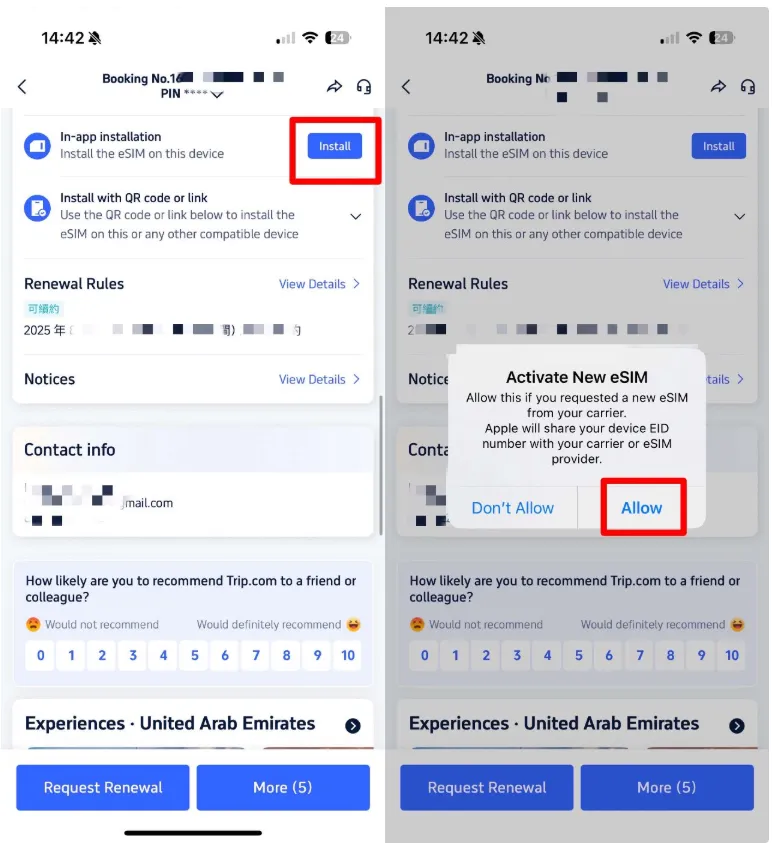
For providers like Trip.com: You may be able to install it directly with one tap from the booking details in their app, with no QR code needed
Step 3: Configure Your Phone
-
Label Your Plan: After installation, label the new plan clearly (e.g., "China eSIM") in your settings to avoid confusion.
-
Set Default Line: You can set the China eSIM as your default line for Mobile Data. Keep your home SIM enabled for calls and SMS if you wish.
Step 4: Activate Upon Arrival in China
-
Enable Data Roaming: In your phone's settings, turn on Data Roaming specifically for your new China eSIM line. This is necessary for it to connect to the local network.
-
Restart (if needed): The connection may establish immediately, or you can toggle Airplane Mode on and off to speed up the process.
Essential Travel Tips for Using Your eSIM in China
1. Pre-Trip Prep
-
Download Offline Maps: Before you leave, download offline maps of your destination cities in an app like Maps.me or even Google Maps (while you can still access it). This serves as a perfect backup.
-
Save Key Addresses: Have the addresses of your hotel and key attractions written down in Chinese characters. This is invaluable for showing taxi drivers or when asking for directions.
-
Update Apps: Update all your essential apps (translation, ride-hailing, messaging) on your home Wi-Fi before you depart.
2. Wi-Fi in China: A Word of Caution
While Wi-Fi is available in most hotels, cafes, and public spaces, it comes with its own challenges .
-
Verification Loops: Many public Wi-Fi networks require you to log in with a local Chinese phone number for verification. Your foreign number or eSIM (which is data-only) won't work for this, so you may not be able to connect .
-
Slow or Restricted: Hotel Wi-Fi can sometimes be slow or unreliable, especially during peak hours. Relying on your personal eSIM data connection is often a more dependable option.
3. The "Must-Have" Apps
Western apps will work on your eSIM, but China runs on its own ecosystem. Install these before you land:
-
Alipay / WeChat: Essential for 99% of payments (cash is rarely used). Both now allow you to link international Visa/Mastercard.
-
Amap (Gaode) or Baidu Maps: Google Maps is often outdated in China. Apple Maps works well if you have an iPhone.
-
Trip.com: The best English-language app for booking high-speed rail and hotels.
4. Local Number Needs
Most travel eSIMs are data-only and do not provide a local Chinese phone number . For 99% of travel needs (navigation, translation, app-based messaging like WhatsApp or iMessage, and ride-hailing apps like DiDi), this is perfectly fine.
- When you might need a number: For setting up some local services like a shared bike account or if you need to make traditional voice calls. If this is essential, you would need to consider buying a physical local SIM card upon arrival.
5. Battery Management
Because your phone will constantly be searching for signals and routing data internationally, your battery will drain faster than usual. Always carry a CCC-certified power bank (required for flights in China).
6. Buy Regional Plans
If your trip includes Hong Kong, Macau, or Taiwan, buy an "Asia Regional" plan rather than a "China Only" plan to save money.
Frequently Asked Questions
Can I buy an eSIM after arriving in China?
Most travel eSIMs are purchased online. Chinese telecom stores usually sell physical SIM cards instead of tourist eSIMs.
Do China eSIMs include a phone number?
Most plans are data-only, so you typically won’t get a Chinese phone number.
Is eSIM better than a local SIM card?
For short trips, eSIM is usually easier because it avoids registration requirements and store visits.
Does eSIM work everywhere in China?
Coverage is excellent in major cities and tourist destinations, but speeds may drop in remote areas.
How much data should I buy?
It depends on your usage:
-
Light user: 1–3GB for maps, translation, and messaging.
-
Moderate user: 5–10GB for social media and browsing.
-
Heavy user: Unlimited data plans are available for streaming or frequent use.
Can I top up my eSIM in China?
Yes, most providers allow topping up or extending your plan directly via their app or website.
Do eSIM phones in China support satellite messaging?
Some do, but they are separate features. For example, the OPPO Find X9 Pro (Satellite Communication Version) supports both eSIM and satellite connectivity, but this is a premium feature, not standard on all models.
Is 5G available on eSIM in China?
Absolutely. All major carriers and the new phone models listed above support 5G on eSIM connections. Carriers report that 73% of HarmonyOS eSIM users choose data plans exceeding 50GB, indicating heavy 5G usage.
Can I use two eSIMs at the same time?
Yes, on phones like the Honor Magic8 Pro Air, you can have two physical SIMs and two eSIMs installed simultaneously. However, due to hardware limits, only two numbers can be active (standby) at the same time.
Can I use my eSIM for Hotspots/Tethering?
Most travel eSIMs (Nomad, Airalo, Jetpac) allow hotspotting. However, "Unlimited" plans (like Holafly) often have a daily cap on hotspot data (usually 500MB to 1GB per day), after which tethering is cut off or slowed significantly.
Can I receive SMS for 2FA (Bank codes) while using the eSIM?
Yes, provided you keep your primary (home) SIM active in your settings.
-
Setup: Set your Primary SIM for "Calls/SMS" and your eSIM for "Cellular Data."
-
Warning: Turn off "Data Roaming" for your home SIM to avoid massive charges from your domestic carrier.