Planning a trip to New Zealand requires a lot of logistics, but your mobile connection shouldn’t be one of them. In 2026, eSIM technology offers the ultimate flexibility for tourists, allowing you to switch between networks and top up data without swapping physical cards. Whether you need a high-speed plan for streaming and social media or simply want a local number to make reservations, finding the right setup is crucial for a stress-free journey. So how to buy New Zealand eSIM?Below, I’ve curated the latest options for purchasing, installing, and managing your service, ensuring you spend less time troubleshooting Wi-Fi and more time enjoying the landscapes.
What Is an eSIM and Why Use It in New Zealand?
An eSIM (embedded SIM) is a digital SIM that allows you to activate a mobile plan without inserting a physical card. Instead of swapping SIMs at the airport, you simply scan a QR code and get connected instantly.
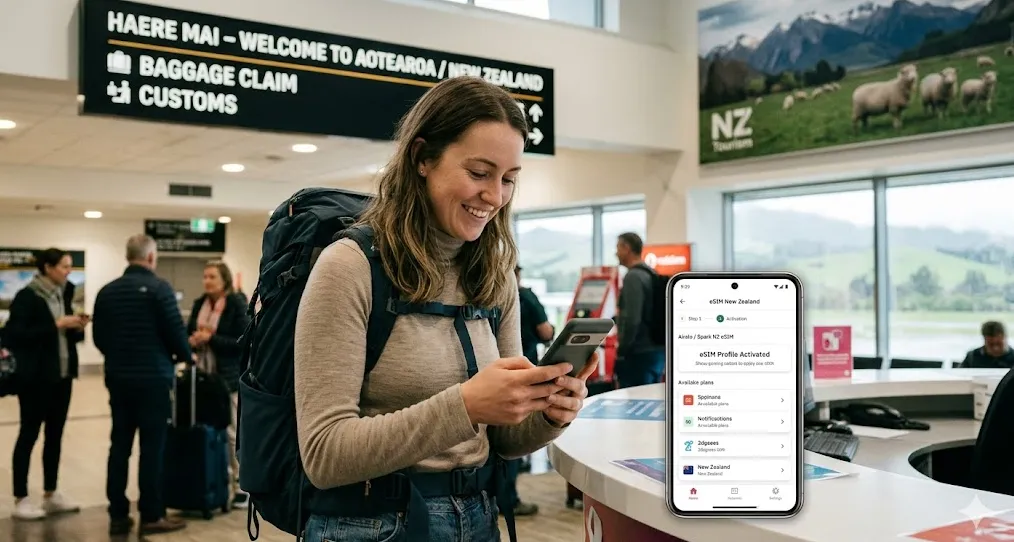
For travelers to New Zealand, using an eSIM is often the smartest choice for staying connected. Here are the key reasons why:
1. Instant Connectivity (Skip the Airport Queue)
Auckland and Christchurch airports can be hectic. With an eSIM, you don't have to find a Spark or One NZ kiosk, wait in line, and fumble with a SIM card tool while jet-lagged. You can buy and install your plan while waiting for your connection in Sydney or LAX and have 5G the moment your wheels touch the tarmac.
2. Keep Your Home Number Active
This is the "Dual SIM" advantage. You can keep your home SIM active to receive important texts (like bank 2FA codes or emergency messages from family) while using the NZ eSIM for all your data-heavy tasks like Google Maps and Instagram.
⚠️Note: Just ensure "Data Roaming" is turned off for your home SIM to avoid nasty surprise charges.
3. Better Coverage Management
New Zealand’s topography is rugged. If you find yourself in a "dead zone" in the Southern Alps, you can easily download a second eSIM from a different provider (e.g., switching from One NZ to Spark) in minutes to see if they have a better signal in that specific valley.
4. Security & Peace of Mind
If you lose your phone on a Great Walk, a physical SIM can be popped out and used by someone else. An eSIM is digitally locked to your device. Furthermore, there’s no risk of losing that tiny, original SIM card from home because it never leaves your phone.
5. Significant Cost Savings
International roaming plans from your home carrier can cost anywhere from $8 to $10 or more per day . In contrast, eSIM data plans for travelers are much more affordable. For example, a 10GB plan valid for a month can cost as little as US$13-$17 . This can mean a saving of over 80% compared to daily roaming charges.
‼️eSIM vs. Physical SIM vs. Roaming: A Quick Comparison
To help you see the difference at a glance, here's how the main options compare for a trip to New Zealand:
|
Feature |
eSIM (Recommended) |
Physical Local SIM |
Home Carrier Roaming |
|
Activation |
Buy online, scan QR code before departure. Instant on arrival |
Buy at airport kiosk or store, show passport. Can involve queues |
Usually automatic. Just turn on data roaming |
|
Cost (10GB) |
$13 - $25 total |
~$30 - $45 total |
$80 - $140+ for a 2-week trip ($8-$10/day) |
|
Your Home Number |
Keep it active for calls and texts alongside your eSIM |
Your home SIM is removed or deactivated. You lose access to it |
Keep your number active, but at a high daily cost |
|
Convenience |
High. No physical swapping. Everything is managed in your phone settings |
Medium. Requires you to carry and manage a small plastic card |
High. No setup needed, but can lead to bill shock |
|
Local Phone Number |
Most data-only eSIMs do not provide a local number for calls/SMS |
Yes, you get a New Zealand phone number for local calls and texts |
You keep your home number |
In short, an eSIM offers the perfect balance of cost, convenience, and functionality for most travelers to New Zealand. It lets you avoid high roaming fees, skip the airport queues, and keep your home number active, all while providing instant, reliable data the moment you arrive.
Understanding Network Coverage in New Zealand
New Zealand’s landscape is a mix of high-tech cities and rugged, off-grid wilderness. The network landscape has shifted significantly with the total shutdown of 3G, making your choice of provider more important than ever.
New Zealand has three "Tier 1" network providers. All other brands (like Skinny, Mighty Mobile, or international eSIMs like Airalo) "piggyback" on one of these.Here is the breakdown of how coverage works across the three main networks.
|
Provider |
Geographic Coverage |
5G Status |
Best For... |
|
85% (The Leader) |
120+ Locations |
South Island road trips & remote hiking hubs. |
|
|
~80% |
High-speed Urban |
Auckland, Wellington, and 5G performance. |
|
|
~75% |
Expanding rapidly |
Budget-conscious travelers staying in towns. |
City Coverage & Speed
5G is widely available in all major cities, including Auckland, Wellington, Christchurch, and Queenstown.
Regional & Rural Coverage
-
One NZ generally has a slight edge in rural coverage, being one of the largest networks in the country.
-
Spark is also very reliable, with deep coverage across the North Island.
-
2degrees has good 4G coverage in cities and towns, but its 5G network is still expanding.
⚠️The "Dead Zone" Warning:
-
❶ Rural Gaps: Expect no signal on long stretches of the Haast Pass, Milford Road, and parts of the Catlins.
-
❷ Offline Maps: Always download Google Maps or Maps.me for offline use before starting a road trip.
-
❸ Satellite Messaging: One NZ has partnered with SpaceX (Starlink) to provide satellite text messaging in areas with no cell coverage—a potential lifesaver for hikers.
Quick Checklist: Is Your Phone Compatible?
Before you buy an eSIM for your New Zealand trip, you need to clear two hurdles: technical compatibility and carrier locking.Most flagship phones are eSIM-ready, but if you’re using a mid-range device or one purchased abroad, follow this quick checklist.
1. Check for the "Add eSIM" Option
The fastest way to know if your phone has the hardware is to look for the menu:
-
iPhone: Settings > Cellular (or Mobile Service > Add eSIM.
-
Android (Samsung/Google/Xiaomi): Settings > Connections > SIM Manager > Add eSIM (or "Download a SIM instead").
2. The "EID" Digital ID
If you see an EID number, your phone is eSIM-capable. Quick Shortcut: Dial *#06# on your keypad. If a barcode labeled "EID" appears, you’re good to go.
Even if your phone can use an eSIM, it won't work in New Zealand if it is "locked" to your home provider (e.g., AT&T, Verizon, EE).
-
iPhone Check: Settings > General > About > Carrier Lock.If it says "No SIM restrictions," you are free to use any NZ eSIM.
-
Android Check: This varies, but usually, if you are still paying off your phone on a monthly contract, it is likely locked. You must contact your home carrier and ask them to "Unlock for International Travel."
Here’s a 2026 list of phones that support eSIM — perfect if you’re planning to use an eSIM in New Zealand:
|
Brand |
Compatible Models |
|
Apple |
iPhone XS, XR, and all newer models (11, 12, 13, 14, 15, 16, 17, and SE 2/3/4). |
|
Samsung |
S20 through S26 Series, Z Fold/Flip 3 through 7, and A54/A55/A56. |
|
|
Pixel 4 and all newer models (5, 6, 7, 8, 9, 10). |
|
Others |
OnePlus 11+, Xiaomi 13+, Motorola Razr (2022+), and most Sony Xperia 1/5/10. |
⚠️A Critical Update: The 3G Shutdown
As of December 2025, New Zealand has fully shut down its 3G network. To stay connected, your phone must support 4G calling (VoLTE) . Before you travel, check with your phone manufacturer to ensure your device is compatible. One NZ has a list of supported phones on their website.
How to Buy New Zealand eSIM?
Buying an eSIM for New Zealand is a straightforward digital process. You have two main paths: buying from a local New Zealand carrier (best for getting a local +64 number) or a global data provider (fastest/easiest).
Option 1: Buy a Local NZ eSIM (Best for Local Calls)
Best if you need to call NZ hotels, book shuttles, or receive SMS codes for local apps.
You can purchase:
-
On the official website/app
-
At airport kiosks
-
In retail stores
🔔The Catch: Airport prices are identical to online prices, but the queues can be long. Buying online 24 hours before you fly is the smartest move.
Option 2: Buy a Global Data eSIM (Best for Most)
Best if you only need data for Maps, WhatsApp, and social media. You can do this from your couch before you leave.
Below are some popular providers for 2026:
-
Airalo: A trusted global leader with various Philippine plans.
-
Holafly: Providing unlimited data eSIMs for international travel across 160+ destinations.
-
Nomad: Offers flexible data top-ups and connects to Globe's 5G network.
-
Ubigi: Known for reliable connections via the Smart network and has large data packages.
Purchase via website of app, select "New Zealand " as your destination, choose a data package, and pay. The eSIM (QR code) will be available instantly in the app.
‼️Local vs. International eSIMs: Which should you choose?
|
Feature |
Local Provider |
Travel eSIM |
|
Local NZ Number |
Yes (Included) |
No (Data only) |
|
Best For |
Road trips, calling local businesses |
City breaks, short stays, convenience |
|
Activation |
Requires arrival in NZ to finalize |
Activate anywhere via app |
|
5G Access |
Guaranteed (where available) |
Often 4G, some 5G supp |
How to Install and Activate Your eSIM?
Installing an eSIM is a 5-minute process that you should ideally complete before you leave for the airport. Since New Zealand’s 3G network is now fully deactivated, following these steps ensures you have 4G/5G signal the second you land.
Phase 1: Installation (At Home / On Wi-Fi)
Do this 24 hours before your flight to ensure you have a stable connection.
For iPhone (iOS 17, 18, & 19):
1. Open the QR Code: Have the email from your provider (Spark, One NZ, Saily, etc.) open on a laptop or another device.
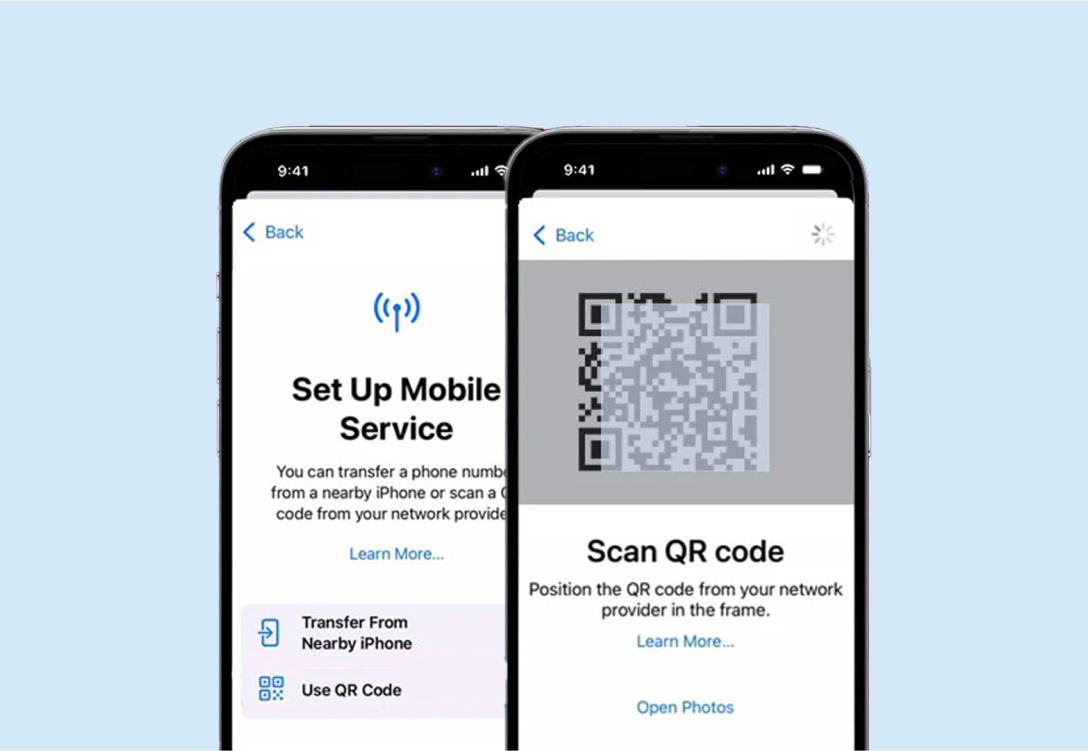
2. Navigate: Go to Settings > Cellular (or Mobile Service) > Add eSIM.
3. Scan: Select Use QR Code and point your camera at the code.
4. Label Your Line: When prompted, label the new line as "NZ Travel" and your existing SIM as "Home."
5. Default Settings: Set your Home line as the default for "Voice" and "iMessage" for now. Set the NZ Travel line for "Cellular Data" (but keep it "Off" until you land).
For Android (Samsung/Pixel):
1. Navigate: Go to Settings > Connections > SIM Manager (Samsung) or Settings > Network & Internet > SIMs (Pixel).
2. Add eSIM: Tap Add eSIM or the + icon.
3. Scan: Choose Scan QR code from carrier and scan your code.
4. Confirmation: If asked to "Switch to this network," select No (or keep the line disabled) until you actually arrive in NZ.
Phase 2: Activation (Upon Landing in NZ)
Once the plane touches down at Auckland, Christchurch, or Queenstown airport.
1. Toggle the Line "ON": Go back to your SIM settings and turn the NZ Travel eSIM to ON.
2. Enable Data Roaming: This is the step most people forget!
-
Select your NZ Travel eSIM.
-
Ensure Data Roaming is toggled ON.
-
⚠️Note: Ensure Data Roaming is OFF for your Home SIM to avoid charges.
3. The "Local Call" Trigger (Local Carriers Only): If you bought a local eSIM from Spark or One NZ, you often need to "trigger" the plan:
-
One NZ: Call 777 from your keypad. You’ll hear an automated voice confirm your plan is active.
-
Spark: Usually activates automatically, but you can text BAL to 333 to receive a confirmation of your data balance.
-
Skinny: You must call 456 to complete the setup.
If you see "No Service" or a "SOS only" icon:
-
Restart Your Phone: The #1 fix. It forces the phone to handshake with the new Kiwi towers.
-
Check APN Settings: If data isn't working, go to the eSIM settings and check the "Access Point Name" (APN). International providers like Airalo often require you to manually type in a word (e.g., "internet" or "globaldata") provided in their setup email.
-
Select Network Manually: Go to Settings > Cellular > Network Selection. Turn off "Automatic" and manually select Spark or One NZ.
Best eSIM Plans for Tourists
Choosing the right plan depends on one question: Do you need a local New Zealand phone number? Since the 3G network shutdown, all tourist plans now prioritize 4G/5G data and VoLTE (Voice over LTE) for calls. Here are the top-rated options currently on the market.
🏆 Top Recommendation: Spark NZ (Travel Packs)
Best for: Most tourists, especially those visiting the South Island.
Spark is widely considered the best for coverage in rural areas and "Great Walks" locations.
-
10GB Pack: ~$49 NZD ($30 USD) – Valid for 90 days.
-
50GB Pack: ~$79 NZD ($48 USD) – Valid for 90 days.
-
Perks: Includes a local +64 number, unlimited NZ/AUS minutes, and free data for Spotify.
🥈 Best for Heavy Data: One NZ (formerly Vodafone)
Best for: Speed and high-usage travelers staying in cities like Auckland or Queenstown.
One NZ was recently rated the "Best Mobile Network" in NZ for the fourth year running.
-
40GB Travel eSIM: ~$69 NZD ($42 USD).
-
100GB Travel eSIM: ~$99 NZD ($60 USD).
-
Perks: Local +64 number and generous international minutes (approx. 200–250 mins) to countries like the US, UK, and Canada.
🥉 Best Budget Options (Data Only)
If you don't care about a local phone number and just want cheap data for Google Maps and WhatsApp, use an international provider.
|
Provider |
Best For |
Price (Approx.) |
Network Used |
|
Overall Value |
$3.99 (1GB / 7 days) / $23.99 (10GB / 30 days) |
Spark (5G) |
|
|
Budget / Short Trips |
$1 (1GB / 4 days) |
Spark/2degrees |
|
|
Reliability |
€4 (1GB / 3 days) / €21.50 (10GB / 15 days) |
Spark (5G) |
|
|
Best Value Per GB |
$9.99 (10GB / 30 days) |
Spark |
💡 Which one should you choose?
-
If you're hiking or road-tripping the South Island: Go with Spark. Their coverage in the "black spots" between towns is superior.
-
If you're a digital nomad or heavy streamer: One NZ’s 100GB plan offers the best value for massive data buckets.
-
If you're on a 3-day layover: Grab the Jetpac $1 deal or a small Saily pack. It’s significantly cheaper than any local "Travel" plan.
Frequently Asked Questions
Do I need to show my passport to buy an eSIM?
It depends on the provider:
-
International eSIMs: No. You can buy these with just an email address and a credit card.
-
Local NZ Carriers: If you buy a "Travel Pack" online, you usually don't need to provide a passport. However, if you go into a physical retail store to buy a local SIM/eSIM, they are legally required to register your details, which usually involves a passport scan.
Will my iMessage and WhatsApp still work?
Yes. Since these apps are tied to your phone's Apple ID or account settings rather than the SIM card, they will continue to work perfectly. When you install your NZ eSIM, your phone will ask if you want to keep using your existing number for iMessage/FaceTime—just select "Yes."
Can I share my data (Hotspot) with my laptop?
Generally, yes. Most NZ eSIMs allow "Personal Hotspot."Some "Unlimited" plans (like those from Holafly) may restrict hotspot usage or throttle speeds after a certain amount of shared data. Local Spark/One NZ travel packs fully support hotspotting until your data cap is reached.
What happens if I run out of data?
You won't be cut off entirely from the world.
-
Local Carriers: You will receive a text when you hit 80% and 100% of your data. You can "Top Up" by visiting their website or app.
-
International eSIMs: Most have a "Top Up" button in their app that adds data to your existing eSIM profile instantly.
Is 5G available everywhere?
Not quite. 5G is widespread in Auckland, Wellington, Christchurch, and Hamilton, as well as tourist hubs like Queenstown. However, in rural areas or while driving between towns, your phone will likely stay on 4G (LTE).
What is the "777" or "456" call I keep hearing about?
This is unique to local NZ providers. To "wake up" a new local number:
-
One NZ: Dial 777.
-
Skinny: Dial 456.
Are there any hidden fees?
No. eSIM plans are prepaid with no contracts, activation fees, or surprise charges.
Can I buy an eSIM for someone else?
Yes, but the QR code can only be scanned once. You'll need to share the code with the person using it, or install it on their phone directly.