Staying connected in Australia is easier than ever thanks to digital SIM technology. Instead of dealing with physical cards, travelers and locals can now set up mobile service directly on their devices within minutes. Optus, one of Australia’s leading mobile networks, supports this modern solution across many popular phones and tablets. In this guide, you’ll learn how to install a digital SIM with Optus, switch between devices, choose the right data package, and avoid common setup issues so you can enjoy fast, reliable connectivity from day one.
What Is an Optus eSIM & Why Use It?
An eSIM (embedded SIM) is a digital SIM that replaces a physical SIM card on compatible devices (phones, tablets, watches, etc.). It connects your device to the Optus network for calls, SMS, data, and 5G without inserting a physical card.With a compatible device, an Optus eSIM can replace your physical SIM card, or you can use both and enjoy the flexibility of having multiple numbers on one phone, on select devices.
Why Use an Optus eSIM?
✅ Near-Instant Activation
The biggest perk is speed. You don't have to wait for a SIM card to arrive in the mail or visit an Optus store. You can buy a plan online and be connected to the Optus 5G network in as little as 15 minutes.
-
No delivery delays: Get connected in minutes, not days.
-
No store visits: Activate anytime, anywhere with internet.
-
Perfect for: Last-minute plans, travel emergencies, immediate replacements.
✅ "Two Numbers, One Phone"
Most modern smartphones (iPhone 12+, Samsung S20+, Pixel 4+) allow you to use a physical SIM and an eSIM at the same time. This is perfect for:
-
Personal + Work: Separate numbers, one device.
-
Local + Travel: Keep Aussie number active + add local data eSIM abroad.
-
Optus + Other Carrier: Combine Optus coverage with another network.
✅ Enhanced Security
Because an eSIM is embedded inside the phone, it cannot be physically stolen or removed. If your phone is lost, a thief cannot simply "pop out" the SIM to use your service in another device, making it much harder for them to bypass two-factor authentication (2FA) on your accounts.
✅ Space & Design
Removing the physical SIM tray allows manufacturers to make phones more water-resistant and use the extra internal space for larger batteries or better cooling systems. In fact, by 2026, several flagship models have ditched the physical tray entirely (eSIM-only).
✅ Eco-Friendly
By choosing an eSIM, you eliminate the plastic waste of the SIM card itself, the credit-card-sized holder it comes in, and the carbon footprint of shipping a physical product to your door.
In short, an Optus eSIM is a convenient, flexible, and secure way to stay connected—whether you’re a local subscriber, frequent traveler, or someone who wants multiple numbers on one phone.
Physical SIM vs. Optus eSIM: Quick Comparison
|
Feature |
Physical SIM |
Optus eSIM |
|
Delivery |
2–5 business days |
Instant (via My Optus App) |
|
Setup |
Manual (Insert tool) |
Digital (App download) |
|
Multiple Lines |
Usually 1 |
Multiple (up to 10 profiles stored) |
|
Durability |
Can be damaged/lost |
Cannot be lost |
|
Swapping Phones |
Very easy (just move the card) |
Requires App/Transfer process |
Who Should Get an Optus eSIM?
-
Frequent travelers (domestic & international).
-
Business professionals needing separate work/personal lines.
-
Students/backpackers moving between countries.
-
Tech enthusiasts wanting latest mobile technology.
-
People who often lose small items (goodbye tiny SIM cards).
-
Remote workers needing reliable backup connectivity.
Phones Compatible with Optus eSIM
Most flagship and mid-range smartphones are eSIM compatible. As a general rule, if your device was released in 2020 or later, it likely supports Optus eSIM technology.Here's a 2026‑updated list of devices that are generally compatible with Optus eSIM:
|
Brand |
Model |
Note |
|
Apple |
|
Some region‑specific variants (e.g., certain China or Hong Kong models) may not support eSIM even if the model generally does. Always check your specific device model.
|
|
Samsung |
|
Some region‑specific versions (especially US models or older “FE/Fan Edition” variants) may be excluded from eSIM support even if the hardware supports it. |
|
|
|
Some Pixel mid‑range “a” models also support eSIM on Australian variants. |
|
OPPO |
|
The OPPO Find X5 Lite is not compatible. |
>>Check eSIM Compatible Phones list
⁉️How to Check Your Device Instantly:
If you aren't sure about your specific model, you can verify compatibility in seconds:
-
Open your phone's Phone/Dialler app.
-
Dial *#06#.
-
Look for an EID number (a 32-digit barcode number).
-
If an EID is listed, your phone is eSIM compatible. If you only see IMEI numbers, your phone requires a physical SIM card.
🔎Important Compatibility Tips:
✔️Just because a device has eSIM hardware doesn’t guarantee Optus will activate it — carrier support for specific device models matters.
✔️Always check your device’s model number and firmware region — some international variants don’t support eSIM on Australian networks.
✔️Make sure your device is unlocked or specific to Optus to enable eSIM installation.
Optus eSIM Plans & Pricing
Optus offers a streamlined range of eSIM plans across Prepaid and SIM Only Plan(month-to-month) options. The pricing for an eSIM is identical to a physical SIM; you are simply choosing a digital delivery method.
1. Prepaid Plans
Prepaid eSIMs are popular for their flexibility and lack of credit checks. You can activate these instantly via the My Optus App.Prepaid plans often roll over data with AutoRecharge if you top up before expiry (caps apply).
-
Best Value ($36 / 28 Days): Online only. 20GB standard data. New customers often get a bonus (e.g., 60GB for the first 3 recharges). Includes 400 mins to 50+ countries.
-
The "Heavy User" ($49 / 28 Days): 35GB standard data (often boosted to 90GB for new activations). This is one of the only prepaid plans with uncapped 5G speeds.
-
Weekly/Short Term ($13 / 7 Days): 5GB standard data. Ideal for short trips or testing the network.
-
Long Expiry (365 Days): $350 for 220GB standard data (often 300GB for new users). Excellent for low-maintenance users.
2. SIM Only Plan
These are month-to-month "Endless Data" plans. If you exceed your high-speed allowance, your data continues at a capped speed of 1.5Mbps so you never get bill shock.These plans include unlimited standard talk and text, 5G access where offered, and typically no lock-in contract.
|
Plan Name |
Monthly Data |
Monthly Cost |
Key Inclusions |
|
Small Choice Plus |
50GB |
$55 |
Unlimited standard national Talk & Text. |
|
Medium Choice Plus |
200GB |
$65 |
Unlimited Talk & Text to 35 international destinations. |
|
Promo Plan |
360GB |
$69 |
$10/month credit to spend on subscriptions of your choice for 12 months below:
|
|
Large Choice Plus |
400GB |
$85 |
$20/month credit to spend on subscriptions of your choice for 12 months below:
|

3. International Roaming Pricing
If you have an Optus eSIM and travel overseas, the roaming "Add-ons" are quite competitive:
-
Choice Plus (Postpaid): $5 per day for 5GB of data and unlimited standard talk/text in "Zone 1" countries (covers 150+ destinations). It triggers automatically when you use data or make a call abroad.
-
Prepaid Roaming:
-
$5 Add-on: 1GB data + 100 mins/SMS (1-day expiry).
-
$25 Add-on: 5GB data + 50 mins/SMS (14-day expiry).
-
$45 Add-on: 10GB data + 100 mins/SMS (28-day expiry).
-
How to Get an Optus eSIM?
Getting an Optus eSIM is a fully digital process that can be completed in minutes, though the steps differ slightly depending on whether you are joining for the first time or already have an account.
Before you begin the eSIM process, make sure you have:
-
A stable internet connection.
-
The compatible device you wish to activate your eSIM on.
-
The latest My Optus app version installed on your device.
-
Checked for a software update for your device (or the download may fail).
Option 1: For New Customers (Instant Setup)
If you are moving to Optus from another provider or starting a new service, follow these steps:
-
Choose a Plan Online: Go to the Optus website and select your preferred Prepaid (Flex Plus) or Postpaid (Choice Plus) plan.
-
Select eSIM: During the checkout process, under "SIM Type," select eSIM.
-
Complete ID Check: You will need a valid ID (Australian Driver's License, Medicare Card, or International Passport).
-
Download the My Optus App: Once you receive your confirmation email, download the app on the device you intend to use.
-
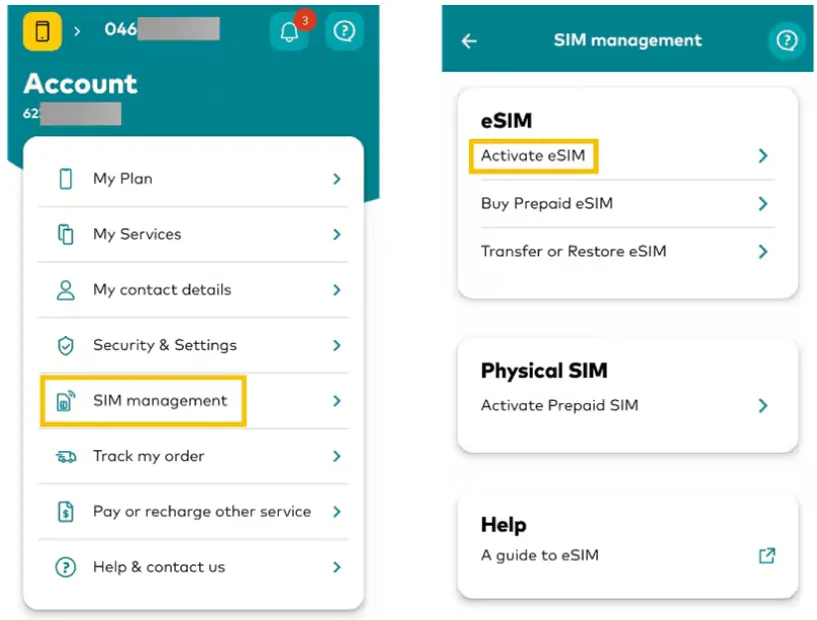
Activate: Log in to the app, tap Account > SIM Management > Activate eSIM. The app will handle the download—no QR code scanning is required for most modern devices.
To get My Optus app scan the QR code below:

Option 2: For Existing Customers (Switching from Physical SIM)
If you already have an Optus physical SIM and want to convert it to a digital eSIM:
-
Open the My Optus App on your eSIM-compatible phone.
-
Navigate to SIM Management: Tap the Account tab, select your service, and then tap SIM Management.
-
Transfer/Replace: Choose Transfer or Restore eSIM (sometimes listed as "Replace SIM").
-
Security Check: You’ll receive a one-time code via SMS to verify the swap.
-
Install: Follow the on-screen prompts. Your physical SIM will stop working as soon as the eSIM profile is successfully activated (usually within 15 minutes).
Option 3: In-Store Visit
Visit any Optus retail outlet. They can provide a physical QR code card if you prefer not to use the app for initial setup.
-
Find nearest store: Optus Store Locator
-
Bring:
-
Photo ID (Driver's license/Passport)
-
Compatible device (charged)
-
Existing SIM details (if transferring)
-
-
Staff will:
-
Verify eligibility
-
Generate QR code
-
Help with activation
-
Test connectivity
-
Activation & Setup (By Device)
The activation process for an Optus eSIM is highly automated. While the My Optus App is the recommended method for all devices, you can also use your device’s native settings for a manual setup.
1. Via My Optus App (Recommended)
-
Connect to Wi-Fi.
-
Install/update the My Optus App.
-
Go to Account → SIM Management → Transfer or Restore eSIM.
-
Follow the prompts to install.
-
Restart your phone and connect to the network.
Activation typically takes 15 minutes up to 4 hours.
2. Via QR Code
🔺iPhone & iPad Setup
Apple devices offer the most integrated experience with "Carrier Activation," where the plan is pushed directly to your device.
-
Go to Settings > Cellular(Mobile Service/Mobile Data) > Add eSIM.
-
Choose Transfer from Nearby iPhone (if upgrading) or Use QR Code.
-
If you have a digital order, a notification "Optus Cellular Plan Ready to be Installed" will appear. Tap it and follow the prompts.
🔺Samsung Galaxy Setup
Samsung uses the "SIM Manager" to handle digital profiles.
-
Connect to WiFi.
-
Go to Settings > Connections > SIM manager.
-
Tap Add eSIM.
-
Select Scan QR code from service provider (if you have one) or Search for plans if your Optus plan was assigned to your EID.
-
If using the My Optus App, simply tap Activate eSIM within the app, and it will register the profile in your SIM Manager automatically.
🔺Google Pixel Setup
Pixels treat eSIMs as "Downloaded SIMs."
-
Go to Settings > Network & internet > SIMs.
-
Tap the + (Add) icon.
-
Select Download a SIM instead?.
-
Scan the QR code provided by Optus or log in to the My Optus App to have the profile pushed to your device.
-
Once downloaded, ensure the toggle for the new SIM is switched to On.
Most eSIMs activate within 15 minutes, but if you are porting a number from another provider (Telstra/Vodafone), it can take up to 4 hours (and usually only occurs during business hours).
Transferring eSIM to a New Phone
Optus has streamlined the transfer process for 2026 to prevent security fraud while maintaining ease of use.
Method A: App-Based Transfer (Universal)
-
Install the My Optus App on your new device.
-
Log in and navigate to Account > SIM Management.
-
Select Transfer or Restore eSIM.
-
Follow the identity verification steps. Once the new eSIM activates, the old one will automatically deactivate.
Method B: Apple/Samsung Quick Transfer
If both phones are present and use the same OS (e.g., iPhone to iPhone), you can often use the native "Transfer from Nearby Device" option in the setup wizard. You will still need to verify the swap via a code sent to your Optus-linked email or SMS.
Optus eSIM: Q & A
How can I remove an eSIM from my device?
To remove an eSIM profile from your phone:
On iOS:
-
Go to Settings → Mobile.
-
Select the eSIM you want to remove.
-
Tap Delete eSIM and confirm.
On Android:
-
Go to Settings → Connections → SIM card manager.
-
Select the eSIM profile.
-
Choose Remove/Delete/Deactivate and confirm.
Can I use my Optus eSIM for another service on my account?
Yes. If you’re the account holder, you can activate the eSIM on any eligible service linked to your account. Simply forward the eSIM setup email to the device you want to use, then follow the instructions to download and install it on that device.
Can I use more than one phone number on my Optus eSIM capable device?
Yes, on an Optus eSIM-capable device, if you have 2 active mobile phone services you can use two phone numbers on the same device simultaneously - one can be an eSIM while the other would be a physical SIM.
How can I switch back to a physical SIM from an eSIM?
You'll need to either visit a store to get a physical SIM or contact us to get a physical SIM delivered to you.
How long does Optus eSIM activation take?
Usually 5–15 minutes, but in some cases it may take up to 4 hours. Restarting your phone often helps complete the setup.
Does Optus eSIM support 5G?
Yes. If your device and plan support 5G and you’re in a coverage area, Optus eSIM works on the same 5G network as a physical SIM.
Can tourists use Optus eSIM in Australia?
Yes. Visitors can purchase Optus prepaid eSIM plans in-store after arriving in Australia. Passport ID is usually required for activation.
Does Optus charge extra for an eSIM?
No. There are no activation fees or monthly surcharges for choosing an eSIM over a physical SIM for your primary phone plan. The only exception is Optus Number Share ($5/month), which allows you to share your mobile number with a cellular-capable smartwatch.
Can I use my Optus eSIM overseas?
Absolutely. If your plan has International Roaming enabled, your eSIM works exactly like a physical SIM. In 2026, Optus offers a $5/day Roaming add-on for Postpaid customers that gives you 5GB of data per day in over 100 "Zone 1" countries.