From ordering tapas to navigating train schedules, internet access plays a key role in making your Spain trip stress-free. Instead of dealing with physical SIM cards or unreliable Wi-Fi, many travelers are turning to embedded SIM technology for instant connectivity. With a wide variety of options available, finding the right balance between cost, coverage, and the convenience of a local Spanish number can feel overwhelming. In this comprehensive guide, I’ll walk you through the simplest ways to secure high-speed mobile data, explore the top prepaid data plans for this year, and show you how to get a local number to make restaurant reservations or use taxi apps as easily as a local.
Why Use eSIM in Spain?
An eSIM (embedded SIM) is a digital SIM card that allows you to activate a mobile plan without inserting a physical card.Using an eSIM in Spain for 2016 is no longer just a "techy" alternative; it has become the standard for international travelers. Here is why it is superior to traditional roaming or physical SIM cards:
1. Instant Connectivity (Skip the Airport Queue)
The traditional way to get data in Spain involved landing, finding a "Movistar" or "Vodafone" kiosk, waiting in line, and handing over your passport for a physical SIM.
- The eSIM Advantage: You can buy and install your plan while sitting on your couch at home. The moment your plane touches down in Madrid or Barcelona, your phone connects to the local network automatically.
2. Avoid Expensive Roaming Fees
For non-EU visitors (from the UK, US, Canada, etc.), roaming charges can be £2-6 per day or more. An eSIM costs a fraction of this with predictable, upfront pricing.
3. Use Your Home Number Simultaneously
Your phone can run two lines simultaneously (Dual SIM). You can use the Spanish eSIM for all your data (Google Maps, Instagram, Uber) while keeping your primary home SIM active to receive important 2FA (Two-Factor Authentication) texts or keep your WhatsApp linked to your original number.
4. No More "SIM Ejector" Tools
Swapping physical SIM cards on a plane or in a busy train station is a recipe for losing your tiny, expensive home SIM card.
- The eSIM Advantage: Everything is digital. There is nothing to lose, nothing to poke into the side of your phone, and no tiny pieces of plastic to keep track of.
5. Safety and Security
Public Wi-Fi in airports and cafes is a common target for hackers.
- The eSIM Advantage: Using a private, encrypted cellular connection via an eSIM is significantly more secure for accessing banking apps or booking train tickets via Renfe.
6. No ID or Paperwork
Unlike physical Spanish SIM cards, which require passport verification, most travel eSIMs can be bought online without any ID.
7. Access to 5G Networks
By 2026, Spain’s 5G infrastructure (especially via Movistar and Vodafone) covers nearly every major city and tourist coastal area.
- The eSIM Advantage: Most modern travel eSIMs (like Ubigi) provide direct access to 5G speeds, which is often faster than the Wi-Fi found in Spanish Airbnbs or older hotels.
‼️Summary: You should use an eSIM in Spain if you want to save money, stay secure, and avoid the hassle of physical stores, all while keeping your home phone number active for emergencies.
Phones Supporting eSIM in Spain
eSIM works in Spain with any compatible phone—it’s not country-specific. As long as your device supports eSIM and is unlocked, it will work with Spanish networks like Movistar, Orange, or Vodafone.Most modern flagship phones support eSIM, but it's always a good idea to double-check.
Here is a breakdown of which phones are compatible:
|
Brand |
Model |
|
Apple |
⚠️Warning: iPhones purchased in Mainland China typically do not support eSIM (they have two physical SIM slots instead). Some models from Hong Kong and Macao also lack eSIM. |
|
Samsung |
|
|
|
|
|
Other Popular Brands in Spain |
|
How to verify your phone right now?
Before you buy a plan, check if your specific device is ready:
-
Check for an EID Number: Dial *#06# on your keypad. If an EID number (32 digits) appears on the screen, your phone is eSIM capable.
-
Settings Check (iOS): Go to Settings > Cellular (Mobile Service). If you see "Add eSIM" or "Add Cellular Plan," you’re good.
-
Settings Check (Android): Go to Settings > Network & Internet > SIMs. Look for a "+" sign or "Download a SIM instead."
🔔Final Tip: Ensure your phone is Network Unlocked. If you are still paying off your phone to a carrier (like Verizon, AT&T, or O2), they may have blocked the eSIM slot for travel. Reach out to them to unlock it before your trip!
Network Coverage in Spain
Spain has excellent nationwide mobile coverage, making it one of the easiest countries in Europe to stay connected. Whether you're in major cities like Madrid and Barcelona or traveling through rural regions, you’ll generally have stable 4G—and increasingly 5G—access.
The country has four main operators.Most eSIM providers partner with these top networks.
|
Operator |
Coverage Profile |
Best For |
|
The Gold Standard. Best nationwide reach, especially in deep rural areas and the interior. |
Road trips and remote villages. |
|
|
Urban Leader. Massive presence in cities and tourist hubs. High reliability. |
Digital nomads in Madrid/Barcelona. |
|
|
The Speed King. Often leads in 5G speeds in city centers and popular resorts. |
Power users and heavy streaming. |
|
|
The Value Network. Uses its own towers + roams on Orange for back-up. |
Budget-conscious travelers. |
All major networks offer ~98–99% availability across Spain.Strong signal in:
-
Cities (Madrid, Barcelona, Valencia, Seville)
-
Tourist areas (Costa del Sol, Balearic Islands)
-
High-speed train routes (AVE)
Movistar leads 5G expansion with coverage reaching 90%+ of the population.
Top eSIM Providers & Best Plans for Tourists
The market has shifted toward high-data, low-cost plans. Here are the top contenders based on performance and value:
|
Provider |
Best For |
Network |
Data Sharing (Hotspot) |
Local Number? |
Price Example |
|
Unlimited Data |
4G/5G (Orange/ Movistar / Vodafone España / Yoigo) |
Yes (1GB/day limit) |
No |
$36.90 for 10 days (Unlimited) |
|
|
Regional Plans & Tethering |
4G/5G (Orange) |
Yes (Unlimited) |
No |
$17 for 5 days (Unlimited) |
|
|
Overall Value & Reliability |
4G/5G (Yoigo and Orange) |
Yes (Unlimited) |
No |
$18 for 7 days (Unlimited) |
|
|
Frequent Travelers |
4G/5G (occasional) |
Yes (Unlimited) |
No |
$24.99 for 30 GB (30 days) |
|
|
Local Number |
4G/5G (Movistar network) |
Yes |
Yes (+34) |
€10 for 60GB (28 days) |
|
|
Full Service |
4G/5G (Orange network) |
Yes |
Yes (+34) |
€17.99 for 20GB (14 days) |
How Much Data Do You Need?
Recommended usage:
|
Travel Style |
Data Needed |
|
Light (maps, chat) |
3–5 GB |
|
Normal travel |
5–10 GB |
|
Heavy use (social/media) |
10–20 GB |
|
Remote work / hotspot |
20GB+ or unlimited |
How to Get a Local Spanish Number?
Many tourists are surprised to find that popular eSIMs like Airalo or Holafly do not typically come with a phone number—they are data-only.
-
To get a (+34) number: You must choose a local "Prepaid" (Prepago) plan.
-
Top Pick: Orange Holiday Spain or Movistar Prepago. These offer massive data bundles (often 50GB–100GB) and include a Spanish mobile number for local calls and texts.
- Alternative: GlobaleSIM or eTravelSim are among the few travel-specific providers that offer plans including a digital local number without needing to visit a shop.
Buying & Activating Your eSIM
You have two main paths: International Travel eSIMs (easy, data-only) or Local Operator eSIMs (cheaper, includes a phone number).
Phase 1: Buying Your eSIM
A. International Travel eSIMs (Easiest)
-
Providers: Airalo, Saily, Holafly etc.
-
Best for: Tourists who want data the moment they land without showing a passport.
-
Buying Process:
1. Download the provider's app.
2. Select "Spain" and your desired data amount.
3. Pay via Credit Card, Apple Pay, or Google Pay.
4. No ID required: These are 100% digital and bypass Spanish SIM registration laws.
B. Local Spanish Operators (Best Value)
-
Providers: Orange, Movistar, or Vodafone.
-
Best for: Travelers staying 2+ weeks who need a local (+34) number and the cheapest "cost-per-GB."
-
Buying Process:
1. Visit a physical store in Spain (bring your Passport—it is legally required for local registration).
2. Ask for a "Prepago" (Prepaid) eSIM. 3. They will scan your passport, take payment, and hand you a QR code.
Phase 2: Activation Steps
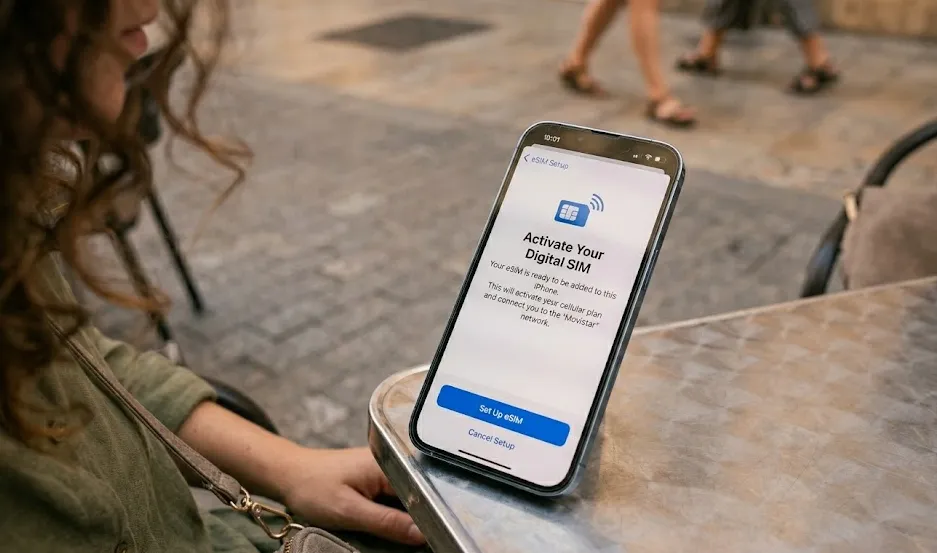
‼️Crucial Rule: Always install the eSIM while you still have stable Wi-Fi (at home or the airport), but only activate the line once you land in Spain.
For iPhone Users:
-
Go to Settings > Cellular (Mobile Service) > Add eSIM.
-
Scan the QR Code provided in your email or the app.
-
Label the Label: Name it "Spain" or "Travel."
-
Primary Line: Set your home SIM as the Default Voice line (to keep receiving texts).
-
Cellular Data: Set the new "Spain" eSIM as the data source.
-
Data Roaming: Ensure "Data Roaming" is switched ON for the Spain eSIM, but OFF for your home SIM to avoid accidental charges.
For Android Users:
-
Go to Settings > Network & Internet > SIMs > Add eSIM.
-
Scan the QR Code.
-
Select the eSIM for Mobile Data.
-
Enable Data Roaming specifically for the Spain eSIM profile.
⚠️Important Checklist:
-
❶ Check "Carrier Lock": Your phone must be unlocked. On iPhone, check Settings > General > About > Carrier Lock. It should say "No SIM restrictions."
-
❷ Validity Start: For most travel eSIMs (like Airalo), the 7 or 30-day clock only starts when you connect to a Spanish tower. You can safely install it a few days before your flight.
-
❸ Hotspotting: If you plan to share data with a laptop, check if your plan allows "Tethering." (Holafly's unlimited plans sometimes restrict this, while Orange and Saily usually allow it).
🔔Pro Tip: If your data isn't working immediately upon landing in Madrid or Barcelona, toggle Airplane Mode on and off. This forces the eSIM to "handshake" with the local Movistar or Orange towers for the first time.
Frequently Asked Questions
Can I use my eSIM in other countries after Spain?
Yes, if you purchase a regional Europe plan. Otherwise, you can simply buy a new eSIM for your next destination.
Do I need a Spanish phone number to use apps like Cabify or for restaurant reservations?
No, these apps work with a data connection and can be linked to your international number. However, a Spanish number can sometimes be useful for calling local businesses directly.
What's the difference between an eSIM and a virtual number?
An eSIM is a digital SIM card that provides you with a local data connection (and sometimes a number). A virtual number is a phone number that works over an app and doesn't provide cellular data.
Can I install the eSIM after arriving?
Yes, connect to airport WiFi and complete the installation. But installing before departure means instant connectivity on arrival.
Does eSIM support hotspot?
Most plans do, but always check before buying.
Will my WhatsApp number change if I use a Spanish eSIM?
No. WhatsApp is tied to your account, not your SIM card. When you install an eSIM, WhatsApp will ask if you want to change your number—select "No" or "Keep Existing." You can continue messaging your friends using your home number while the eSIM provides the data.
Most eSIMs are "Data-Only." How do I make calls?
Use Data-Based Apps. Since most travel eSIMs (like Airalo or Saily) don't have a phone number, you should use WhatsApp, FaceTime, or Telegram for calls. If you must call a local Spanish landline (like a restaurant), use Skype Credit or Google Voice, which cost pennies per minute.
Can I still receive texts (SMS) from my bank for 2FA?
Yes, if you keep your home SIM active. Most modern phones (iPhone 13+, Samsung S22+) allow Dual SIM mode. Keep your home SIM "On" for texts but set your Spain eSIM as the "Cellular Data" line.
What if my eSIM shows "No Service" when I arrive?
Try the "Big Three" fixes:
1. Toggle Airplane Mode: Give it 10 seconds to reset.
2. Turn on Data Roaming: Many travel eSIMs require "Data Roaming" to be ON in your settings to work (don't worry, you won't be charged extra by the eSIM provider).
3. Manual Network Selection: If "Automatic" fails, go to your Cellular Settings and manually select Movistar or Orange.
Is "Unlimited Data" actually unlimited?
Read the fine print. In 2026, many "unlimited" plans (like Holafly) provide high-speed data up to a certain point (e.g., 2GB or 5GB per day) and then throttle your speed to 2G/3G speeds. If you are a heavy video streamer, look for native local plans from Orange Spain, which offer massive 100GB+ caps at full 5G speed.
Can I top up if I run out of data?
Yes, all major eSIM providers offer top-ups through their app or website.
What if I accidentally delete the eSIM?
Most providers let you re-download it from your account or email a new QR code. Keep your purchase confirmation handy.
Do I remove my home SIM card?
No. Keep it in. Just designate the eSIM as your data line in settings. You'll still receive calls/texts on your home number (check roaming rates first).