Planning your adventure to the vibrant metropolis of Hong Kong? Staying connected is no longer a luxury, but a necessity for seamless travel. Forget the hassle of physical SIM cards, searching for local stores, or fiddling with tiny plastic chips. This comprehensive article delves into everything you need to know about eSIMs for Hong Kong, the digital solution that's revolutionizing how international visitors access mobile data. We'll cover the best options for purchase, competitive rates, and a step-by-step activation process to ensure you're online the moment you land. Get ready to navigate the city, share your experiences, and stay in touch effortlessly with this essential connectivity handbook!
What Is eSIM & Why Use It in Hong Kong?
An eSIM (embedded SIM) is a digital SIM.You can buy and activate a mobile plan online by scanning a QR code, which connects your phone to the network instantly. It functions just like a traditional SIM but is entirely digital, so there's no physical card to handle.It's the perfect solution for travelers wanting instant connectivity and for residents looking to simplify their device setup.Now, eSIM technology is widely adopted by Hong Kong's major mobile network operators (MNOs), making it easy for both residents and visitors to get connected without a physical SIM card.
Benefits in Hong Kong:
Using an eSIM in Hong Kong is beneficial because it allows you to get instant, local data access for your trip without swapping out your physical SIM, enabling you to keep your own number active while having a separate data-only plan for navigation and communication. It offers convenience, security, and flexibility for travelers by avoiding the need to purchase and manage a physical SIM card at the airport.
-
Instant Connectivity: You can get connected to local internet service providers as soon as you land, without having to find a store or wait for a physical SIM card.
-
Keep Your Number: You can use an eSIM for data while keeping your physical SIM active for calls and texts, which is useful for staying in touch with people back home.
-
Convenience: There is no need to physically change SIM cards, making it easy to switch between plans or operators.
-
Security: eSIMs are more secure because they cannot be physically lost, damaged, or stolen like a traditional SIM card.
-
Flexibility: It is easy to switch between mobile operators if needed and to have multiple profiles on a single device.
Phones Supporting eSIM in Hong Kong
Not all phones support eSIM.Your device must be unlocked (not tied to a specific carrier) and must be eSIM-compatible.Most flagship phones released since late 2018/2019 are compatible.
Supported Smartphones (Partial List):
|
Manufacturer |
Model Requirements (Generally) |
Key Exceptions/Notes for HK Models |
|
Apple iPhone |
iPhone XS, iPhone XS Max, iPhone XR, and all subsequent models (iPhone 11, 12, 13, 14, 15 16,17 series). |
iPhones sold in Mainland China, Hong Kong, and Macao are often physical dual-SIM models and DO NOT SUPPORT eSIM, except for a few models (e.g., iPhone 12 mini, 13 mini, SE 2/3). Verify your device's origin! |
|
Samsung Galaxy |
Galaxy S20 series, Note 20, Z Flip/Fold, or later. |
Samsung devices purchased in Hong Kong, China, or Taiwan often do not support eSIM. Please verify your specific model's country of origin. |
|
Google Pixel |
Pixel 3 (excluding 3a/3a XL) and later models. |
Generally compatible, as long as the device is unlocked. |
|
Other Brands |
Huawei P40/Mate 40 Pro, Oppo Find X series, Xiaomi 12T Pro/13 series, Motorola Razr/Edge series, and others. |
Compatibility varies significantly by model and region. Always check the eSIM provider's compatibility list. |
>>Search for more phones that support eSIM
How to Verify eSIM Support on Your Phone:
🔔Method 1: Check Settings
Go to your phone's settings:
-
iPhone: Settings > General > About. Look for a section called "Digital SIM" or "Add Cellular Plan."
-
Android: Settings > Network & Internet (or Connections) > SIM card manager. Look for an "Add eSIM" or "Add mobile plan" option.
If you see an option to "Add Cellular Plan" by scanning a QR code, your phone supports eSIM.
🔔Method 2: Dial a Code (Quick Check)
-
Open your phone's dialer (where you make calls).
-
Dial *#06#
-
A screen will pop up showing IMEI numbers. If your phone supports eSIM, you will also see the EID number listed. If you see the EID, your phone is compatible.
Simply having an eSIM-capable phone is not enough. You must ensure that your phone must be "Carrier Unlocked".This is the most critical rule. If you bought your phone directly from a manufacturer (e.g., Apple, Samsung) or your carrier has officially unlocked it, you are fine. If your phone is still locked to a carrier (common with contract phones in the US or other countries), it will not recognize or connect to a Hong Kong eSIM network.
Key eSIM Providers for Hong Kong
You have two main categories of providers: Local Operators (for longer stays or local numbers) and Global Providers (best for travel data).
A. Local Mobile Network Operators (MNOs)
All major telecom operators in Hong Kong support eSIM options for both post-paid (monthly contract) and prepaid services.These companies offer reliable network coverage, often including 5G service, and provide local phone numbers. You may need to complete Real-Name Registration for these.
|
Carrier Name |
Key Feature |
Notes |
Best For |
Purchase/Activation |
|
|
One of the largest carriers, with extensive 5G coverage and many tourist-friendly plans. |
Widely available for both postpaid (1O1O) and prepaid (csl) plans. |
Overall ease & coverage |
In-store at CSL/1O1O centers or via CSL App (for existing customers). |
|
|
Often has competitive data packages and good value-for-money plans. |
Offers eSIM across most of its plans, including some prepaid options(e.g., SoSIM is a popular prepaid option with eSIM support). |
Budget-conscious users |
In-store or via their respective apps (e.g., SoSIM App). |
|
|
Known for its reliable network and good customer service. |
Offers a variety of prepaid and postpaid eSIM options. |
Network reliability |
In-store or via the CARE App. |
|
|
A major provider with a wide range of affordable local and data-centric plans. |
Available for specific plans and is popular for cross-border (HK/Mainland China) packages. |
Affordable data |
In-store or via MyLink App (for existing customers). |




⚠️Note: For local carriers, you will typically need to check if they offer prepaid eSIM options for visitors or if their eSIM is primarily for contract/postpaid plans. Some virtual operators like Birdie and ClubSIM (both associated with local MNOs) also offer eSIMs.
✅Pros of Local Providers:
-
Get a local phone number for calls and SMS.
-
Often includes unlimited social media data (Facebook, WhatsApp, etc.).
-
High-speed, reliable 5G/4G networks.
-
Staff can assist with setup in person.
❌Cons of Local Providers:
-
Requires passport registration.
-
Usually need to be purchased within Hong Kong.
B. Popular Global/Regional eSIM Providers
If you prefer a purely travel-focused purchase, global travel-eSIM platforms sell Hong Kong data plans delivered by QR code or via their app and do not require Real-Name Registration. These are quick and convenient for short visits. Here are some popular global/regional eSIM providers:
|
Provider |
Key Feature |
Best For |
Typical Network Partner (HK) |
|
|
Offers unlimited data plans for specific durations. |
Heavy data users who want peace of mind with no limits. |
CSL / 3 Hong Kong (3HK) |
|
|
(Highly Popular) Huge variety of Hong Kong-specific and regional Asia plans. |
Best value & flexibility. |
3 Hong Kong (3HK) |
|
|
Offers competitive data packages for Hong Kong. |
Budget-conscious travelers who prefer a fixed, pay-as-you-go data allowance. |
CSL / 1O1O / CMCC HK |
|
|
Flexible data packages (e.g., 1GB, 3GB, 5GB). |
Budget-conscious travelers who prefer a fixed, pay-as-you-go data allowance. |
Varies (often CMHK, CSL, or SmarTone) |
|
|
Known for good 5G coverage and global plans. |
Long-term or global travelers. |
H3G Hong Kong / Smartone
|
|
Regional/Multi-Country Packs (HK, Macau, Mainland China). |
Travelers visiting multiple countries in the region. |
Various local MNOs |





✅Pros of Global eSIM Providers:
-
Instant Setup: Buy and receive the QR code via email anywhere in the world.
-
No Registration: No passport required.
-
Easy Management: Manage everything directly from the provider's app.
❌Cons of Global eSIM Providers:
-
Data-Only: These plans do not include a local phone number for traditional calls or SMS.
-
Can Be More Expensive: Per-gigabyte cost can be higher than local providers.
‼️Recommendation: For long-term use with a local phone number, choose CSL, 3, SmarTone, or CMHK. For short-term data only, an international travel eSIM is often the most convenient option.
Types of eSIM Plans for Hong Kong
There are broadly two categories of eSIMs relevant to Hong Kong:
1. Local Carrier eSIM Plans
Provided by CSL, SmarTone, 3HK, CMHK.It can be postpaid (monthly) or prepaid (in 3HK’s case for roaming-data).These eSIM Plans are good for long stays, local phone number, voice / SMS, and reliable local coverage.
2. Travel / Data-Only eSIMs from Resellers
-
Providers like Airalo, microESIM, eSIM-specialty platforms.
-
Data-only plans (no local phone number), often cheaper for short trips.
|
Feature |
Local HK MNO (Postpaid/Prepaid) |
Global Travel eSIM (Airalo/Holafly) |
|
Local Phone Number |
YES (Required for HK Real-Name Registration) |
NO (Usually data-only) |
|
Real-Name Registration |
Required in HK to activate a local SIM/eSIM. |
NOT Required (As the provider is international) |
|
Convenience |
Requires in-person store visit or app/website process with verification. |
100% online, can be installed before you leave. |
|
Hotspot/Tethering |
Typically supported. |
Generally supported, but check the specific plan details. |
|
Cost |
Flexible, good for long stays/heavy usage. |
Excellent value for short-term, data-only usage. |
How to Get a Hong Kong eSIM: Step-by-Step Process
Method A: Get eSIM from Local Providers (csl, SmarTone, etc.)
Step 1: Pre-application / Preparation
-
Make sure your device supports eSIM.
-
Bring ID (passport) for registration / real-name verification if required.
-
Have Wi-Fi or mobile data ready for scanning / activation.
Step 2: Purchase the eSIM
1) Official Carrier Stores
Visit a carrier’s shop (csl AI Store, 1O1O Center, SmarTone store, 3HK shop) to request eSIM. csl provides a physical Activation Kit (QR code) in-store.
2) Self-Service
Some carriers allow conversion of existing SIM to eSIM via app: SmarTone CARE App supports physical-SIM → eSIM conversion.
By Hong Kong law, you need to show your passport for prepaid SIM registration. The staff will handle the registration process for you.
Step 3: Scan & Install
Follow any on-screen instructions prompted by your carrier:
-
Connect your phone to a Wi-Fi network (e.g., airport or hotel Wi-Fi).
-
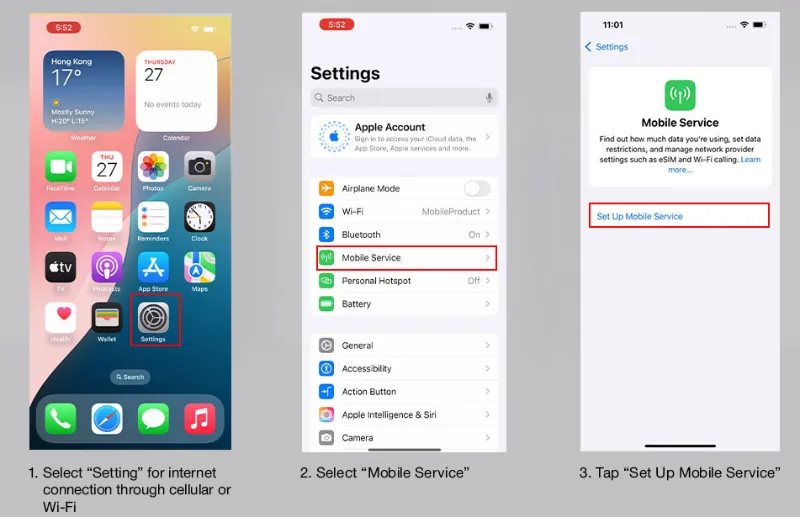
Go to your phone's cellular settings (Settings > Mobile Service > Set Up Mobile Service on iPhone).
-
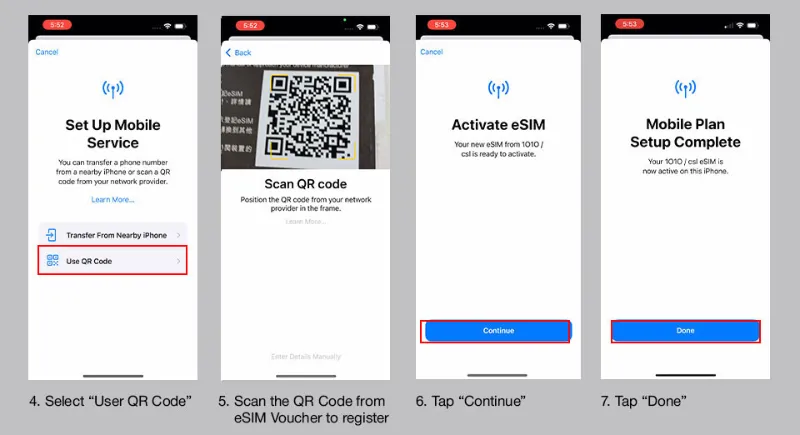
Choose "Scan QR Code" and point your camera at the QR code provided.
-
Follow the on-screen prompts to install the cellular plan.
-
You may need to label the plan (e.g., "HK Data") and choose settings for cellular data and default voice line.
-
Once installed, turn on the line and ensure "Data Roaming" is enabled for that specific plan. You should now be connected to the Hong Kong network.
 Step 4: Real-Name Registration (if needed)
-
Upload ID / passport via carrier’s portal or app (if required). csl requires real-name registration before eSIM subscription.
-
Wait for confirmation / approval (may take some time depending on carrier).
Step 5: Test & Use
After activation, restart your device to make sure profile is fully enabled.Go into Mobile Data / Cellular settings: select which SIM / profile to use for data, voice, SMS.If you're using multiple SIMs, label them (e.g., “HK Local” vs “Home”).
Step 6:Top-Up / Manage Plan
-
Use carrier’s app or website to top up (for prepaid) or manage monthly plan.
-
For SmarTone: if you need to switch back to a physical SIM later, you can, but there’s a HK$50 fee.
Method B: Get eSIM from Global Providers
Step 1: Purchase the eSIM
Select a provider (e.g., Airalo, Nomad, or a local operator) and the data/duration plan that suits your needs.Complete the purchase through the provider's website or app.After payment, you will receive an email or in-app notification containing the eSIM's activation details. This is usually a QR code or a manual activation code.
Step 2: Installation on Your Device
1) Using a QR Code (Most Common Method):
-
Ensure your phone is connected to Wi-Fi.
-
Go to your phone's cellular settings:
-
iPhone: Settings > Mobile Service > Set Up Mobile Service.
-
Android (Varies): Settings > Network & Internet > Mobile network > Add or Settings > Connections > SIM card manager > Add mobile plan.
-
-
Select the option to Use QR Code and scan the QR code provided by the eSIM provider (you'll need to display the QR code on a different screen/device).
-
Follow the on-screen prompts. You may be asked to label your new plan (e.g., "Hong Kong Travel").
2) Using a Manual Activation Code:
-
Follow the same initial steps as above.
-
Select the option to Enter Details Manually.
-
Input the SM-DP+ Address and Activation Code provided by the carrier/provider.
Step 3: Activation and Setup
-
Select the Line for Data: Go back to your Cellular/SIM settings and select the newly installed eSIM as your default line for Mobile Data/Cellular Data.
-
Enable Data Roaming (CRITICAL for Global Providers): If you are using a global eSIM provider (Airalo, Nomad, etc.), you must enable Data Roaming for the new eSIM line. This is because these providers use local partner networks, which your phone sees as "roaming," but you will not incur extra roaming charges from your plan.
-
Set APN (If required): Some providers require a specific Access Point Name (APN). This information will be included in the activation email/instructions. You can usually find the APN settings under your device's cellular settings.
-
Connecting: Your phone should now connect to the local network (e.g., CMHK, CSL) and your data service will be active.
Hong Kong Travel eSIM Price Comparison
Here is a comprehensive comparison of eSIM prices for Japan offered buy global providers, broken down by data needs and plan duration to help you find the best option.
|
Provider |
Data Allowance & Duration |
Approx. Price Range |
|
Unlimited Data (1 to 90 days) |
$6.90 - $149.99 |
|
|
1GB (3 days) to 50GB (30 days) + Unlimited plans(up to 30 days) |
€4 - €63 |
|
|
1GB (7 days) to 50GB (45 days) |
$4 - $49 |
|
|
1GB (7 days) to (30 days) |
$3.99 - $71.99 |
|
|
3GB (15 days) to 60GB (12 months) + Unlimited plans |
$7 - $79 |
How to Choose the Best Value?
For Short Trips (7 days or less) and Low Data (Under 5GB): Look at Airalo or Saily's smaller plans (1GB/7 days or 3GB/30 days) for the cheapest upfront cost.
For Standard 1-2 Week Trips and Medium Data (10GB - 20GB): Nomad often has the best price per GB in the 20GB range. This is usually the sweet spot for most tourists.
For Heavy Use or "Unlimited" Needs: Consider Holafly or the unlimited plans from Saily or Nomad. Crucially, read the fine print! "Unlimited" typically means a daily high-speed cap (e.g., 1-3GB/day), after which the speed drops significantly (throttles). Sim Local is also noted for a high daily cap (10GB).
For Long-Term (1 Month+) : Look for the larger, multi-month plans from providers like Ubigi (up to 12 months) for the best long-term value.
Important Considerations
1.Data-Only vs. Voice/SMS
Most global travel eSIMs (Airalo, Nomad) are data-only. They do not provide a local Hong Kong phone number for calls or SMS. If you need a local number, check with local Hong Kong MNOs (like 3HK or CMHK prepaid plans) or specific global providers (like aloSIM, which offers calls/SMS via a separate App).
2.Local Purchase vs. Online
Purchasing from a global provider online is the most convenient method for travelers. Purchasing from a local HK MNO (e.g., at the airport or a retail store) might give you more options for longer-term or voice plans, but requires an in-person visit.
3.iPhone/iPad Purchased in Hong Kong/Macao
Re-verify your device's compatibility. Many iPhone models sold in HK and Macao (except a few mini models) are physical dual-SIM only and do not have an eSIM.
4.Dual SIM is Your Friend
Use Dual SIM Dual Standby (DSDS) to keep your home number active for calls/texts and use the HK eSIM for data. You can set this in your cellular settings.
5.Keep the QR Code Safe
Do not discard the physical QR code card until you are 100% sure the eSIM is active and working. You may need it for re-installation.Once you delete an eSIM profile from your device (e.g., if you switch phones), you will typically need the original QR code or a new voucher from the carrier to re-install it.
6. Switch Back to Physical SIM If Needed
If you want to revert from eSIM to physical SIM, know the carrier’s policy and cost (e.g., SmarTone charges for reversion).
7.Know Registration Rules
For locals or long stays, be ready for identity verification when getting local eSIM — bring ID / passport.
Quick FAQ
Can I buy & activate before I arrive?
Yes — most travel eSIMs and some local carrier activations can be completed before arrival; just delay the activation start in-app until you land.
Is 5G available on HK eSIMs?
Yes — major carriers support 5G on compatible devices/plans; check carrier plan details.
Will eSIM work for roaming/voice?
Data works widely. Voice/SMS availability depends on plan/carrier; many carriers offer voice-capable eSIMs but travel-only data eSIMs may be data-only. Always check plan specs.
Where is the easiest place to buy a tourist eSIM in Hong Kong?
Hong Kong International Airport (HKIA). The retail counters for CSL, SmarTone, and CMHK are located in the arrivals hall. The staff are experienced in helping tourists and will handle the registration and setup for you.
I have a physical SIM from my home country. Can I use both it and a HK eSIM?
Yes! This is the primary advantage of eSIM. You can use both simultaneously in "Dual SIM" mode. You can set your home SIM for calls/texts and the HK eSIM for data, ensuring you never miss a message from home while enjoying fast local internet.
Do Hong Kong eSIMs support voice and SMS?
-
Carrier eSIMs: Yes, they support data, local calls, international calls, and SMS.
-
Travel eSIMs: Usually data-only (no voice/SMS).
If you need a local Hong Kong phone number, choose a carrier eSIM.
Can I switch from a physical SIM to an eSIM in Hong Kong?
Yes. All major Hong Kong carriers allow conversion via online request, app, or store visit.Fees may apply (usually HK$0–50 depending on carrier).
Do eSIMs work immediately after landing in Hong Kong?
Yes—if you activate before the trip, it will auto-connect once you arrive.