Planning your Japanese adventure? Staying connected has never been easier, thanks to the rise of digital eSIM services. This comprehensive guide dives deep into one of the top choices for travelers: Sakura Mobile. Sakura Mobile is a highly-rated, Japan-based provider, making it an excellent and reliable choice for travelers who prioritize strong network coverage and dedicated English support.Whether you’re a frequent traveler or visiting for the first time, understanding the different packages, activation process, and performance reviews can save you time and stress. This article breaks down everything you need to know to get your Sakura eSIM up and running smoothly.
What is Sakura Mobile?
Founded in 2014, Sakura Mobile is a Japanese telecommunications provider specifically designed for foreign residents and tourists in Japan,often providing more stable connections and better localized support than international eSIM resellers. Their primary goal is to eliminate the language and bureaucratic barriers that often make getting mobile service in Japan difficult for non-Japanese speakers.Their products include rental pocket Wi-Fi devices, data-only SIM cards, eSIMs, and monthly voice and data plans.They are a MVNO (Mobile Virtual Network Operator), meaning they don't own their own physical wireless network. Instead, they rent capacity from major carriers. Sakura Mobile operates on the NTT DOCOMO network, which is renowned for having the best coverage and reliability across Japan, including rural areas.Now,Sakura Mobile has became one of the most popular choices among international travelers thanks to its stable network, unlimited data plans, and excellent English-language support.
Services Offered by Sakura Mobile
Sakura Mobile provides solutions for virtually every connectivity need in Japan:
|
1. SIM Cards / eSIM |
They offer both physical SIM cards and eSIMs for data and voice:
|
|
2. Pocket Wi-Fi |
Portable hotspots available for rent, often picked up at airports or delivered to hotels. They connect multiple devices at once. |
|
3. Home Fiber Internet |
They even assist with setting up home internet, providing interpreters and English guidance for the complicated installation process. |
Key Characteristics of Sakura Mobile
1. Target Audience: Foreigners
This is their core focus. Everything from their website to customer support is tailored for non-Japanese:
-
Full English Support: Their customer service is available in English via phone and email.
-
Simple Requirements: They streamline the sign-up process, which is a significant advantage in Japan where standard contracts can require complex resident registration.
2.Key Advantages
-
Top Network Coverage: By utilizing the NTT Docomo network, they offer some of the most extensive and fast 4G and 5G coverage throughout Japan, including on the Shinkansen (bullet trains) and in many subway stations.You won't lose connection in mountainous regions or small towns.
-
Convenience: Tourists can order an eSIM online before they arrive and have internet the moment they land. Residents can get a functional phone number quickly without fluent Japanese.
-
No Complex Registration: They handle the compliance with Japanese telecom regulations on your behalf, making the process much smoother than going directly with a major Japanese carrier.
-
Flexible Contract Terms: They offer both short-term (for tourists) and long-term (for residents) plans, many without a strict long-term contract.
-
Hotspot Support: You can tether on both iOS and Android (depending on plan).
-
Convenient Pick-up/Delivery: You can often choose to have your SIM/Pocket Wi-Fi delivered to your hotel or pick it up at a counter in major international airports (like Narita, Haneda, and Kansai).
3. Potential Drawbacks
-
Price: They are generally more expensive than mainstream Japanese carriers or some other MVNOs. You are paying a premium for the English support and convenience.
-
Data Speeds: As an MVNO, their data speeds can sometimes be slower during peak congestion times compared to direct Docomo customers (a practice called "bandwidth throttling"). However, for typical tourist use (maps, web browsing, social media), this is rarely an issue.
Who is Sakura Mobile For?
-
Tourists & Short-Term Visitors: Their eSIM and Tourist SIM plans are ideal for anyone needing reliable data without the hassle of picking up a SIM at the airport. The ability to set it up before arrival is a huge plus.
-
New Foreign Residents: For those who have just moved to Japan, Sakura Mobile is a perfect "starter" service. It provides a crucial Japanese phone number and data immediately, allowing you to get settled without the language barrier. Many people use it for their first few months before switching to a cheaper provider once they are more established.
-
Students & Workers on Medium-Term Stays: Anyone staying for 6 months to a few years who values English support and a straightforward process.
Sakura eSIM Plans Overview
Sakura Mobile offers two main eSIM types: eSIM for travelers and eSIM for residents.
✅ eSIM for Travelers (Short-Term: up to 90 days)
Features:
-
Perfect for travelers staying in Japan for up to 90 days
-
Fast 5G/4G data
-
Unlimited data
-
Valid from 1 up to 90 days
-
Usage period starts when your device connects in Japan
-
Hotspot/tethering supported
Pricing: Prices from 1,650 JPY, tax incl.(1 day)
>>Click to buy Sakura travel eSIM
✅ eSIM for Residents (Long-Term: 90+ days)
1.Voice + Data eSIM
Full long-term mobile plans that include a Japanese phone number for making calls and sending SMS.
Features:
-
Compatible with iPhone, iPad, Galaxy, Nexus, Blackberry, and all 4G devices
-
Real Japanese phone number(070, 080, 090)
-
Fast 5G/4G data
-
Unlimited data
-
Online top up
-
Data rollover
-
Tethering supported
-
Bring your own device
Pricing:
|
5GB |
30GB |
40GB |
60GB |
80GB |
100GB |
|
|
Price |
3,278 JPY (tax incl) / mo. |
4,378 JPY (tax incl) / mo. |
5,478 JPY (tax incl) / mo. |
7,678 JPY (tax incl) / mo. |
9,878 JPY (tax incl) / mo. |
12,078 JPY (tax incl) / mo. |
|
Activation fee |
5,500 JPY (tax incl.) |
|||||
⚠️Note: Calls/SMS charges not included.Rates will vary by country, please check our calling rates for details.
>>Click to buy Sakura voice + data eSIM
2.Data Only eSIM
Features:
-
Compatible with iPhone, iPad, Galaxy, Nexus, Blackberry, and all 4G devices
-
Fast 5G/4G data
-
Unlimited data
-
Online top up
-
Data rollover
-
Tethering supported
-
Bring your own device
Pricing:
|
5GB |
30GB |
40GB |
60GB |
80GB |
100GB |
|
|
Price |
2,728 JPY (tax incl) / mo. |
3,3828 JPY (tax incl) / mo. |
4,928 JPY (tax incl) / mo. |
7,128 JPY (tax incl) / mo. |
9,328 JPY (tax incl) / mo. |
11,528 JPY (tax incl) / mo. |
|
Activation fee |
5,500 JPY (tax incl.) |
|||||
>>Click to buy Sakura data only eSIM
💴Student discount available for all eSIM plans: Additional 1,100 JPY discount from activation fee. Please enter the coupon code "studentdiscount" on the final step if you do not see the option during Step 2 of the application.
How to Purchase and Install?
The process is fully digital and can be completed before you leave home.
Step 1: Check Compatibility
To use Sakura eSIM, your phone must be:
1. eSIM-compatible
Before purchasing, ensure your device is eSIM-compatible. Most modern smartphones (iPhone XS/XR and newer, Samsung Galaxy S20 and newer, Google Pixel 3 and newer) support eSIM.Go to your phone's settings to confirm eSIM support.
iPhone: iPhone XS, XR, or newer (including all iPhone 11, 12, 13, 14, 15 models and SE 2nd & 3rd generation). Go to Settings > General > About. If you see an "EID" listed, your phone supports eSIM.
Android: Many newer models from Google Pixel, Samsung Galaxy, Motorola, and others support eSIM. Check your manufacturer's website or look for "EID" in your Settings > About Phone menu.
Dial *#06# → If an EID number appears, your device supports eSIM.
2.Unlocked
Ensure your phone is not locked to a specific carrier. You can usually contact your home carrier to confirm this.Carrier-locked phones will not work.
3.Support Japan network bands
Japanese networks use specific LTE/5G bands. Most modern, unlocked phones support the necessary bands, but it's good to verify. Sakura Mobile (using DOCOMO) primarily uses Band 1 (2100 MHz), Band 19 (800 MHz), and Band 21 (1500 MHz).
Step 2: Choose and Purchase Your Plan
Visit the Sakura Mobile website, select your desired plan (data size and duration), and complete the payment.
-
Visit the Official Website: Go to the Sakura Mobile website on your computer or smartphone.
-
Select eSIM Plan: Choose the "eSIM" section and select the data plan that best fits your travel duration and data needs.
-
Checkout: Proceed to checkout. You will need to provide your email address and pay with a credit/debit card.
-
Receive Your QR Code: After payment, you will receive a confirmation email. This email is crucial. It will contain your eSIM QR code and detailed activation instructions. Do not delete this email.
Step 3: Installation (Before or Upon Arrival)
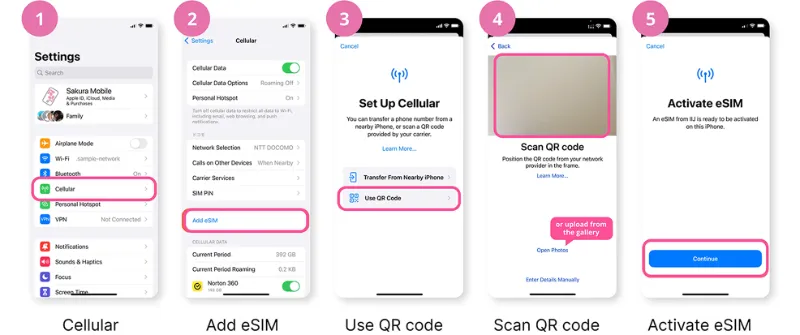
It is highly recommended to install your eSIM before you leave for Japan, while you are still connected to a stable Wi-Fi network.
For iPhone Users:
-
Ensure you are connected to Wi-Fi.
-
Open your camera app and scan the QR code from your confirmation email. Alternatively, go to Settings > Cellular > Add Cellular Plan and scan the code there.
-
Tap "Add Cellular Plan." A label "Cellular Plan" will appear.
-
Go to Settings > Cellular. You will see your new plan (it may be labeled as the carrier, e.g., "Docomo").
-
Tap on the new plan and turn on "Turn On This Line."
-
Important: Set "Data Mode" to Allow More Data on 5G or Standard and make sure your Primary line (your home number) is selected for "Cellular Data Switching" if you want to use your home plan as a backup.
-
To ensure it uses the Sakura eSIM for data, go to Settings > Cellular > Cellular Data and select the Sakura Mobile plan as your primary data line.
-
Activation: The eSIM should activate automatically once you are in Japan and connected to the DOCOMO network. You may need to turn on "Data Roaming" for this line in your cellular settings.
For Android Users (steps may vary slightly by model):
-
Ensure you are connected to Wi-Fi.
-
Go to Settings > Connections > SIM card manager (or Network & Internet > Internet or Settings > Network & Internet > SIMs).
-
Tap "Add Mobile Plan" or "Download a SIM instead."
-
Select "Use QR code" and scan the QR code from your confirmation email.
-
Follow the on-screen prompts to download and install the eSIM profile.
-
Once installed, you can enable the eSIM profile and configure it.
-
Go to Settings > Connections > Mobile Networks and ensure the Sakura Mobile eSIM is selected for mobile data. You may also need to turn on "Data Roaming" for this specific SIM.
-
Activation: The eSIM should activate automatically upon arrival in Japan.
While many phones set up the APN automatically, you may need to enter it manually, especially on Android devices, or if you plan to use a Personal Hotspot (Tethering).
|
Setting |
Value |
|
Name |
sakuramobile |
|
APN |
vmobile.jp |
|
Username |
|
|
Password |
sakura |
|
Auth. Type |
PAP or CHAP (Android Only) |
Manual APN Path (Android Example): Settings > Mobile network > Access Point Names (APN) > Tap + or Add > Enter the values above > Save > Select the new APN.
>>Check step-by-step video guide for more details
Step 4: Final Activation in Japan
-
Go back to Settings.
-
Set your Cellular Data or Mobile Data line to the Japan Data eSIM you just installed.
-
Keep your home SIM as the Default Voice Line if you need to receive calls/texts back home (if your phone supports Dual SIM Dual Standby).
Tips for Using Sakura eSIM in Japan
-
Save or print your QR code before departure.
-
Turn off your home SIM to avoid roaming charges.
-
Keep your phone fully charged before arrival.
-
In case of issues, switch airplane mode on/off.
-
If speed drops, wait after midnight for full speed reset.
-
Keep customer support email handy.
Real-User Reviews for Sakura Mobile eSIM
1️⃣Reddit Feedback:
| 1.High Cost / Slowing Speeds |
“I just bought a Sakura eSIM. I totally regret it. … The speed is only LTE … if you use more than 3 GB the speed will slow down… … 7,700 yen for 15 days.” This user felt the price was too high compared to competitors.They also raised concern that their “unlimited” plan slowed after ~3 GB/day. |
| 2.5G Unlimited Plan Questioned |
“Looking at Sakura Mobile’s 5G Unlimited Travel eSIM … They say it’s truly unlimited … Has anyone here actually used this plan? Any throttling, slowdowns, or issues with hotspot?” Some potential buyers are unsure whether the 5G “unlimited” is actually unlimited under real use. |
| 3.Rural / Longer Trip Use |
“I have been looking at Sakura Mobile … it does say unlimited data, which is great … I will likely need a heck of a lot when not on wifi … Anyone have any personal experience with them?” A user planning a 35-day trip through rural Japan considered Sakura because of its flexibility and “unlimited” data promise. |
| 4.Installation / Reliability Issues |
“Downloaded an eSIM … worked fine for about the first week and then suddenly stopped … data speed became slow to nonexistent. … all the bars for the LTE system exist … but they’re all gray … Does anyone know what I might be doing wrong?” This user experienced a drop in data speed mid-trip; signal bars remained, but performance degraded significantly. |
| 5.Comparisons With Other Providers |
“I’ve seen Sakura Mobile … but I’m not sure which is the best. … Extremely easy to set up and cancel.” For someone staying for months, Sakura was considered “easy to set up” compared to others, though they weighed pros and cons around voice/data features. |
2️⃣Trustpilot / Professional Reviews:
|
1.Very High Rating |
On Trustpilot, Sakura Mobile has a 4.8/5 rating based on over 900 reviews. Users repeatedly mention “reliable, fast service,” “good coverage,” and “very helpful English-speaking support.” |
|
2.English Customer Support Praise |
Many reviews highlight how responsive and clear Sakura’s support team is, especially for international travelers. For example: “They helped me to install my eSim and answered all my questions.” |
|
3.Coverage & Performance |
Some users say they had excellent network performance across Japan: “Strong and reliable coverage in all the places I visited … only dropping when in the mountains.” According to Tokyo Cheapo’s testing, Sakura’s download speeds averaged ~84 Mbps in their test. |
|
4.Mixed on “Unlimited” |
While Sakura advertises “unlimited” data, some reviews note caveats — especially for 4G plans, which may throttle after certain daily usage. |
|
5.Customer Service |
Several reviews mention that support was “very fast,” “polite,” and “helpful” when setup or connectivity problems arose. There are also claims from more critical users:“Sakura not work … hidden limitation … they refuse to refund …” |
The Sakura Mobile eSIM is a premium, hassle-free choice for staying connected in Japan. Its unbeatable combination of the Docomo network and dedicated English support makes it worth the slightly higher price compared to some unknown eSIM brands. It delivers peace of mind, ensuring you have reliable internet for navigation, translation, and sharing your journey from the moment you step off the plane.