Staying connected in South Korea has become easier than ever, especially for travelers who prefer instant, hassle-free mobile access. With modern smartphones supporting embedded SIM technology, you can enjoy fast data speeds, reliable coverage, and even voice services without visiting a physical store. This guide walks you through practical mobile connectivity options in Korea, helping you compare digital SIM solutions, understand activation steps, and choose cost-effective plans—whether you’re visiting for a short trip or an extended stay.
What Is an eSIM & Why Use It in Korea?
An eSIM (embedded SIM) is a digital SIM profile you install directly on your phone — no physical SIM card needed. It lets you access local mobile data (and sometimes calls/SMS) easily without swapping SIMs. You activate it by scanning a QR code or link, usually over Wi-Fi, downloading a carrier profile directly to your phone.Many phones support both your physical SIM and an eSIM, letting you keep your home number while using a Korean data plan.
Why Use an eSIM in Korea:
-
Avoid Roaming Fees: Get local data rates at a fraction of the cost of your home carrier's roaming.
-
Convenience: No need to find a store, wait for delivery, or handle tiny physical SIMs; activate before or after arrival.
-
Stay Connected: Essential for navigation (Naver Map, Kakao T), translation (Papago), and real-time sharing without hunting for Wi-Fi.
-
Security: If your phone is lost or stolen, you can remotely disable the eSIM, unlike a physical SIM.
-
Keep Your Original Number: Use your home number for calls/texts while the eSIM provides data, keeping both active.
- Flexible Plans: Choose short-term or long-term options
How It Works in Korea:
-
Purchase a Korean eSIM plan from providers.
-
Scan the provided QR code in your phone's settings (under Cellular/Mobile Data) to install the profile.
-
Activate the plan and select it for data, while your original SIM handles calls/SMS (or vice versa).
Phones Supporting eSIM in Korea
To use an eSIM in South Korea, your phone must be carrier-unlocked and compatible with eSIM technology. While most flagship phones released after 2019 are compatible, there are specific regional restrictions—particularly for devices from China, Hong Kong, and the US.Here’s a comprehensive list of devices that support eSIM and work well on Korean networks, plus important compatibility notes.
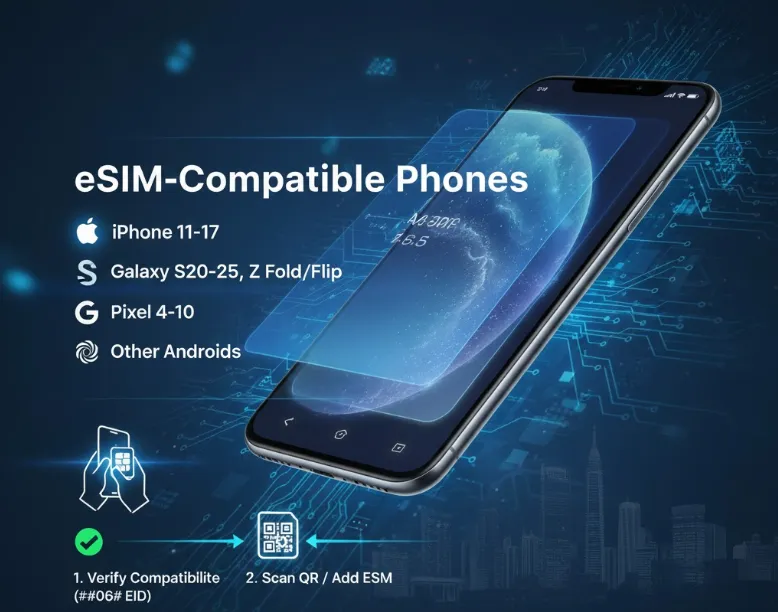
✅ Apple iPhones (Best Overall for eSIM)
Apple has had broad eSIM support for many years — most iPhones from XR (2018) onward support eSIM and are great for use in Korea (with unlocked models):
|
Model |
Restriction |
|
iPhones sold in Mainland China, Hong Kong or Macao may not have eSIM enabled — check your specific model before buying an eSIM. |
✅ Android Phones with eSIM Support
|
Brand |
Model |
Restriction |
|
Samsung |
|
Many Samsung "FE" (Fan Edition) models do not support eSIM (except for the S23 FE). Additionally, some older US-specific carrier models of the S20/S21 series may not have eSIM enabled. |
|
Google Pixel |
|
Certain older Pixel models may have regional exceptions — check if your specific variant supports eSIM.Beside,some Korean providers (like LG U+) historically noted "incompatibility" with Pixels, but recent reports from 2025–2026 show they work fine if you manually set the APN or restart the device. |
|
Xiaomi |
|
Many Android phones may list eSIM support globally, but compatibility with Korean carriers (especially local eSIM profiles) varies — always confirm before purchase. |
|
vivo |
|
|
|
Honor |
|
|
|
Motorola |
|
|
|
Sony |
|
>>Search for more phones that support eSIM
How to Verify Your Phone Instantly:
If you aren't sure, you can check your hardware directly:
-
The Dialer Method: Open your phone app and dial *#06#.
-
If you see an EID (Embedded Identity Document) number, your phone is eSIM-capable.
-
-
The Settings Method:
-
iOS: Go to Settings > Mobile Service (or Mobile Data). If you see "Add eSIM," you’re good to go.
-
Android: Go to Settings > Connections > SIM Manager. Look for "Add eSIM."
-
Even if your phone has eSIM hardware, it won't work if it's "locked" to a carrier (e.g., AT&T, Verizon, T-Mobile) under a payment plan. You must request a "Carrier Unlock" from your home provider before leaving for Korea.
Top eSIM Providers in Korea
A. Local Big Three (Data + Local Number Options)
If you want the absolute best coverage and speed, go with the "Big Three" Korean telcos. They offer tourist-specific eSIMs that are reliable and often include local numbers.Buying directly from the carriers (often via their roaming websites or at Incheon Airport) ensures the highest priority on the network and reliable 5G access.
-
SK Telecom (SKT): Generally considered the best coverage nationwide. Great for travelers heading outside Seoul.Their "T-Roaming" eSIMs are highly rated for speed and reliability in rural areas.
-
KT (Korea Telecom): The most popular choice for tourists. They offer easy pickup at airports and excellent English support.
-
LG U+: Often the most budget-friendly of the major three. Their eSIMs frequently include a free T-Money card (transportation card) if picked up at the airport, though the eSIM itself is digital.
|
|
SK Telecom (SKT)
|
KT
|
LG U+
|
|
Key Features |
Largest network & best overall coverage nationwide in Korea. |
Strong 4G/5G network with good urban + rural coverage. |
Cheapest rates, good data allowances. |
|
Best For |
Travelers visiting multiple regions, speed enthusiasts. |
First-time visitors, those wanting voice/SMS options. |
Budget travelers, urban explorers. |
|
Typical Offerings |
|
Travel eSIMs often include data only or data + number options depending on seller. |
|
|
Local Number |
✔️ |
✔️ |
✔️ |
|
5G Coverage |
Best |
Excellent |
Very Good |
|
Tourist Support |
Good |
Best |
Good |
|
English Service |
Yes |
Excellent |
Yes |
|
Airport Counters |
Yes (T1, T2) |
Yes (T1, T2, Arrival) |
Yes (T1) |
|
Price Competitiveness |
Premium |
Mid-range |
Most Affordable |



How to Purchase from Major Carriers:
1. Before Arrival:
-
Online purchase via carrier's tourist website
-
Receive QR code via email
-
Activate upon landing in Korea
2. At Airport (Most Convenient):
Incheon Airport has carrier counters in:
-
Terminal 1: Arrival Floor (Near Gates 4, 11, 13)
-
Terminal 2: Arrival Floor (Near Gates 4, 10)
-
Operating hours: Typically 6:00 AM - 10:00 PM
Gimpo Airport: Smaller counters in arrival area
3. In the City:
-
Carrier flagship stores in Myeongdong, Hongdae, Gangnam
-
Authorized dealers throughout Seoul
-
Convenience stores (some offer KT/SKT prepaid but limited eSIM)
B. Travel & Third-Party eSIM Providers
If you don't need a local number (meaning you'll use WhatsApp/KakaoTalk for calls), third-party providers are significantly cheaper.These are usually purchased online and delivered via QR email before travel — perfect for tourists and short stays.
|
Provider |
Network(s) |
Key Features |
|
LG U+, others |
App purchase, easy install, unlimited daily cap plans available, good for simple data coverage. |
|
|
SK Telecom + some KT routes |
Flexible data sizes, good value, nationwide coverage. |
|
|
Often SKT |
Affordable mid-range plans & 5G. |
|
|
Typically LG U+ |
Unlimited data options, slightly pricier. |
|
|
Three carriers |
They use direct local routing, meaning speeds are nearly as fast as the major carriers. |
|
|
Three carriers |
They often have "Buy 1 Get 1" deals or discounted rates for KT and LG U+ eSIMs. |
Pros:
-
Instant online setup (no airport lines).
-
Pre-installation before travel.
-
Good data coverage across Korea.
-
Works well with dual SIM/daily travel data needs.
Cons:
-
Most are data only (no Korean phone number).
-
Voice/SMS support depends on provider — not guaranteed.
Do You Need a Local Number?
This is the most important question for a trip to Korea.
-
Data-Only eSIM: Perfect for navigation, social media, and translation.
-
eSIM with Voice/SMS (Local Number): Highly recommended if you plan to:
-
Make restaurant reservations (many use "CatchTable" or require a phone number).
-
Use food delivery apps like Coupang Eats or BaeMin.
-
Use the Tada or KakaoTaxi apps (some features require verification).
-
Access "Waiting" systems at popular cafes (e.g., London Bagel Museum).
-
🔔 Pro Tip: For a Local Number with Outgoing Calls, look for "Voice + Data" packages from SK Telecom (SKT),KT or LG U+. Most tourist eSIMs only allow you to receive calls/texts for free, while outgoing requires a top-up.
⚠️Note: LG U+ and KT offer tourist eSIMs that include a local number starting with 010. Note that these are usually "Incoming Call/Text" only unless you add credit for outgoing calls.
Budget Plans & Local Number Options
|
Provider |
Type |
Data |
Price (Approx.) |
Local Number? |
|
Tourist |
Unlimited (3GB/day + 5Mbps) |
~$30(10 Days) |
Yes (Receiving) |
|
|
Tourist |
Unlimited (Daily High Speed) |
~$26 (10 Days) |
Yes |
|
|
Data Only |
10GB (30 Days) |
~$18 |
No |
|
|
Budget/MVNO |
Varies |
~$5-39 |
Yes |
|
|
Data Only |
10GB (30 Days) |
~$18.99 |
No |
How to Buy & Activate Your Korea eSIM?
Step 1: Choose a provider
Pick a global/third-party eSIM or a local Korean MVNO.
Step 2: Purchase an eSIM Plan
You can buy an eSIM before you fly or upon arrival. Pre-purchasing online is recommended to avoid airport queues.
✔️ Purchase Before You Travel:
-
Usually through the provider’s app or website.
-
Receive QR code via email.
-
Install anytime before or after arrival.
✔️ Purchase Upon Arrival:
-
Some providers offer airport pickup.
-
Alternatively, visit carrier stores in Seoul (KT, SKT, LG U+).
Step 3: Activation (iOS & Android)
-
Connect to Wi-Fi (Incheon Airport has free high-speed Wi-Fi).
-
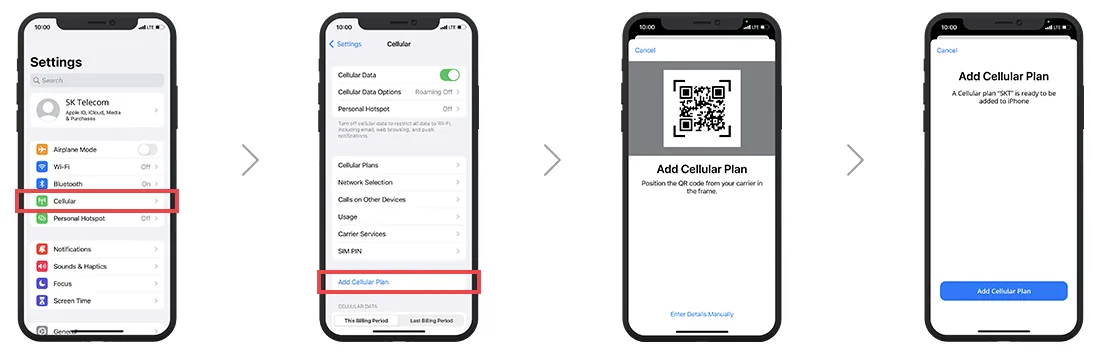
Scan QR Code:
-
iPhone: Settings > Cellular > Add eSIM.
-
Samsung: Settings > Connections > SIM Manager > Add eSIM.
-
-
Label the SIM: Name it "Korea" or "Travel."
-
Set Data Roaming: Ensure "Data Roaming" is turned ON for the new eSIM line.
-
Restart: If it doesn't connect immediately, restart your phone.
Many travel eSIMs activate automatically when you land and connect to a local network, or you can manually turn them on from your phone settings.
Step 4: Adjust preferences
-
Set the eSIM profile as your data line. Etourism Korea DMC.
-
Enable Data Roaming if required by the provider.
Important Tips for 2026
-
Identity Verification: Most tourist eSIMs (purchased with a passport) cannot be used for "Identity Verification" (PASS app/Self-Authentication) required for some Korean shopping sites. You need an Alien Registration Card (ARC) for that.
-
Emergency Numbers: Your eSIM will allow you to dial 112 (Police) or 119 (Ambulance) even if your data runs out.
-
Use Public Wi-Fi: Korea has "Public WiFi Secure" almost everywhere (subways, buses, streets). You can save on data by logging into these using the credentials provided by your eSIM provider.
-
Avoid Airport Walk-ups: If you buy at the airport counter without a reservation, it’s often 10-20% more expensive. Book online for "Airport Pickup" or "Instant Delivery."
-
Apps to Download: Before you arrive, download Naver Map (better than Google Maps in Korea) and KakaoTalk(iOS; Android).
Korea eSIM Q & A
Can tourists use eSIM in South Korea?
Yes. Tourists can freely use eSIMs in Korea, including short-term travel eSIMs and some local prepaid eSIM plans. No Korean residency is required for most data-only eSIMs.
Do Korean eSIMs include a local phone number?
Most travel eSIMs are data-only and do not include a Korean phone number.Official carrier eSIMs or local MVNOs (e.g. SKT, KT, LG U+, Chingu Mobile) may offer a Korean number (+82 10…), but usually require passport verification and sometimes in-person activation.
Is 5G available with a Korea eSIM?
Yes. Many Korea eSIM plans support 5G, especially in major cities like Seoul, Busan, and Incheon. Actual speeds depend on:
-
Your phone’s 5G compatibility
-
Network congestion
-
The specific eSIM plan (some throttle after high usage)
Can I install a Korea eSIM before arriving?
Yes — and it’s highly recommended.You can install the eSIM before departure, then activate it upon arrival by enabling the eSIM line and turning on data roaming (if required).
Will a Korea eSIM work alongside my physical SIM?
Yes. Most modern phones support Dual SIM (physical SIM + eSIM) or Dual eSIM, allowing you to:
-
Keep your home number for calls/SMS
-
Use the Korea eSIM for local data
Can I use Kakao Taxi with a data-only eSIM?
Yes, but with a catch. You can use the Kakao T app with a foreign phone number to book taxis. However, if the driver needs to call you (to find your exact location), they cannot reach you on a data-only eSIM.
Can I make outgoing calls with a tourist eSIM?
Generally, no (unless you top up). Most "Data + Voice" eSIMs for tourists allow unlimited incoming calls and texts for free. To make an outgoing call (e.g., to call a shop or a local friend), you usually need to add "Voice Credit" (around $5–$10) during or after purchase.
Is hotspot / tethering allowed on Korea eSIMs?
In most cases, yes, but it depends on the provider:
-
Many travel eSIMs allow hotspot use
-
Some “unlimited” plans apply fair-use limits or throttle speeds when tethering
Always check the plan details before purchase.
Do I need to enable data roaming for a Korea eSIM?
Often, yes.Even though you’re using local networks, many travel eSIMs require data roaming to be turned ON for the eSIM profile to connect properly. This does not incur extra roaming charges.
Can I top up or extend my Korea eSIM?
-
Many travel eSIM providers allow online top-ups or plan extensions.
-
Some short-term eSIMs cannot be extended and require purchasing a new plan.
Check extension rules before buying if you plan a longer stay.
Is ID or passport required for a Korea eSIM?
-
Travel data-only eSIMs: No ID required
-
Local eSIMs with phone numbers: Passport (and sometimes ARC) required