The future of travel connectivity is here, and it's built right into your phone. As more devices become eSIM-compatible, this innovative digital SIM technology has become the essential choice for anyone seeking seamless, instant mobile data access when traveling in Malaysia. It eliminates the hassle of switching physical cards and provides unprecedented flexibility, making it a true game-changer for 2026.This comprehensive guide walks you through everything you need to know about using digital mobile service on your phone. From compatible devices and activation steps to top carriers and value-for-money data options, you’ll find practical tips to help you get started smoothly. Whether you’re a traveler or a long-term resident, this resource ensures you enjoy hassle-free connectivity across Malaysia.
What Is eSIM & Why Use It in Malaysia?
eSIM, short for embedded SIM, is a digital version of the traditional physical SIM card. Unlike standard SIMs, an eSIM is built directly into your device and can be programmed remotely by your mobile carrier. This means you don’t need to insert or swap physical SIM cards to switch networks or activate new mobile plans.In Malaysia, using an eSIM is beneficial for travelers as it allows for easy, immediate, and often more cost-effective connectivity compared to traditional roaming or buying a local physical SIM. You can activate an eSIM from home before you travel, avoiding queues and hassle upon arrival.
Why Use an eSIM in Malaysia?
-
✅ Avoid Roaming Fees: Saves you from huge bills; provides local data at a fraction of the cost.
-
✅ Convenience: No more searching for a physical SIM card shop, dealing with paper forms, or fiddling with a tiny SIM tray tool at the airport. You can buy,activate, and install it instantly online.
-
✅ Instant Setup: Get online within minutes of arriving in Malaysia.
-
✅ Keep Your Number: Maintain access to your primary contacts and apps like WhatsApp using your main number while using the eSIM for data.
-
✅ Stay Connected: Essential for navigation (Google Maps), booking, communication (WhatsApp), and sharing your adventures.
-
✅ Flexibility: Easily switch between data plans or providers for better coverage or pricing, especially useful across diverse areas like cities and jungles.
Comparison: eSIM vs. SIM vs. International Roaming
|
Feature |
eSIM for Malaysia |
Physical SIM (Local Prepaid) |
International Roaming |
|
Convenience |
Instant delivery via email/app. Install before you land. |
Requires visiting a store/kiosk and mandatory passport registration (KYC). |
Automatic, but expensive. |
|
Dual-SIM |
Use your home physical SIM for calls/SMS and the eSIM for data simultaneously. |
Requires removing your home SIM. |
N/A |
|
Cost |
Highly competitive data-only bundles. |
Affordable, but involves setup hassle. |
Extremely expensive and unpredictable. |
|
Activation |
Instant (scan QR code or use app). |
Requires physical insertion and waiting for activation process. |
Instant. |
|
Security |
No risk of losing your home SIM card. |
Risk of losing or damaging your home SIM. |
Secure. |
In short: eSIMs offer seamless, budget-friendly internet for tourists and digital nomads in Malaysia, making travel less stressful and more connected.
Phones Supporting eSIM in Malaysia
Before purchasing, you must ensure your phone supports eSIM technology and is carrier-unlocked.Most flagship phones released since late 2018/2019 are compatible.
Supported Smartphones (Partial List):
|
Device Category |
Supported Models (Generally) |
Key Feature |
|
Apple iPhone |
iPhone XS, iPhone XS Max, iPhone XR, and all newer models (iPhone 11, 12, 13, 14, 15, 16, 17series). |
Can usually hold 8 or more eSIM profiles, but only one can be active at a time (alongside one physical SIM). |
|
Samsung Galaxy |
Galaxy S20 series, Note 20 series, and all newer flagship models (S21, S22, S23, S24 series, Fold/Flip models). |
Compatibility may vary slightly by country version; always check the specific model number. |
|
Google Pixel |
Pixel 3a, 4, 5, 6, 7, 8 series and later. |
Fully supports eSIM for both single and dual-SIM modes. |
|
Other Brands |
Huawei P40/Mate 40 Pro, Oppo Find X series, Xiaomi 12T Pro/13 series, Motorola Razr/Edge series, and others. |
Compatibility varies significantly by model and region. Always check the eSIM provider's compatibility list. |
>>Search for more phones that support eSIM
How to Check (Quick Tip):
-
iPhone: Go to Settings > Cellular (or Mobile Data). Look for an option like "Add Cellular Plan" or "Add eSIM".
-
Android: Go to Settings > Connections > SIM Card Manager (or Network & Internet > Mobile Network). Look for "Add Mobile Plan" or "Download a SIM."
-
Dial Code (General Check): You can also try dialing *#06#. If your device shows an EID (Embedded Identity Document) number, it supports eSIM.
Major Carriers & eSIM Options in Malaysia
You have two main options for purchasing an eSIM: Local Malaysian Carriers(which often require registration in-person or via a local app/ID) or international eSIM providers (which are quicker and easier for immediate data access upon arrival).
A. Local Malaysian Carriers
Malaysia's mobile market is dominated by three main groups, all of which offer eSIM services for both residents and tourists.
|
Carrier Group |
Key Features & Network |
Notes on eSIM Support / What they Offer |
|
|
Result of a merger between Celcom and Digi. Very wide coverage across Malaysia, with a rapidly expanding 5G network. |
It offers competitive data-only plans with full in-app control. Requires passport/ID verification during the app-based sign-up process. |
|
|
Maxis is generally considered one of the premium networks, with high speeds and a strong presence in urban areas. Hotlink is their prepaid brand. |
Maxis supports eSIM for Postpaid customers (and Hotlink for some prepaid/postpaid conversion). Activation can be done via their app or at Maxis Centres. |
|
|
Known for being a strong competitor with aggressive, value-driven prepaid and postpaid plans, often focusing on "unlimited" data options. |
Offers a prepaid Travel Pass that can be purchased as an eSIM via the MyUMobile App. Plans often include "Unlimited Data" (with a Fair Usage Policy/FUP) and unlimited local calls. |




B. International/Travel eSIM Providers (Data-focused)
Travel eSIMs are typically data-only, meaning they provide internet access but not a local Malaysian phone number for traditional calls or SMS. They work by connecting to the major local networks, such as CelcomDigi or Maxis.Here are some popular global/regional eSIM providers:
|
Provider |
Best For |
Key Feature/Network |
|
|
Instant setup & Global Popularity |
Fast speeds (Maxis 4G/LTE network). User-friendly app. |
|
|
Reliability & Remote Work |
Excellent overall performance, often connects to Maxis 5G. Offers a local IP address. |
|
|
Perks & High Speed |
Good speeds (Maxis 4G/5G). Includes SmartDelay (free airport lounge access for flight delays). |
|
|
Unlimited Data Users |
Offers "Unlimited" data plans (subject to daily high-speed limits). Data-only. |
|
|
Privacy & Multi-Country |
Built by NordVPN team, includes optional privacy features (VPN/Ad-blocker). Works across multiple countries. |





Comparison: Local Carrier eSIM vs. Third-Party eSIM
|
Local Carrier eSIM |
Third-Party eSIM |
|
|
Activation |
Requires a more formal eKYC (electronic Know Your Customer) process, including passport scan and sometimes facial recognition via the carrier's app. Can sometimes take a few minutes longer. |
Easiest. Instant, done before arrival via QR code or app. Minimal ID verification. |
|
Phone Number |
✔️ You get a local Malaysian phone number for calls and SMS. |
❌ Plans are typically data-only. You use apps like WhatsApp for calls/texts. |
|
Local Network |
Direct, premium access to the carrier's network (Maxis, CelcomDigi, or U Mobile). |
Connects to a local carrier (often Maxis or CelcomDigi). |
|
Cost |
Generally offers the best local value, especially for longer or high-usage plans (e.g., large 5G/4G quotas). |
Slightly higher price per GB than local plans, but the installation convenience is the selling point. |
|
Best For |
Longer stays, digital nomads, travelers who need a local Malaysian number for bookings or local contacts, and budget-conscious users. |
Short trips, users prioritizing instant connectivity upon landing, and those who only need data. |
Which Option Is Right for You?
It depends on your needs. Here’s a quick decision guide:
-
You are visiting Malaysia for a short trip (a few days to a few weeks) and just need data for maps/internet/WhatsApp → a travel/data-only eSIM from a provider like Airalo, Holafly, SimOptions is often most convenient. No need to visit a store, and activation is quick with QR.
-
You plan to stay longer (months), want a Malaysian number, or need calls/SMS + data → get eSIM from local operators like Maxis, Hotlink, or CelcomDigi — either via postpaid or convert a prepaid SIM to eSIM.
How to Activate an eSIM (Step-by-Step Guide)
A. Activation for Local Carriers (Postpaid/Prepaid)
The process typically requires Know Your Customer (KYC) registration, usually involving your Passport (for tourists) or MyKad (for residents).
-
Online Purchase/Request: Visit a physical store (or online store/App, if supported) and request an eSIM or convert your existing SIM.Receive an activation kit (often a QR code), or get eSIM profile via the operator’s app if you’re already a customer.
-
KYC Verification: You must upload a copy of your identity document (e.g., passport photo and a selfie) for verification.
-
QR Code/Activation: Once approved, the carrier will email you a QR code or provide a manual activation code.
-
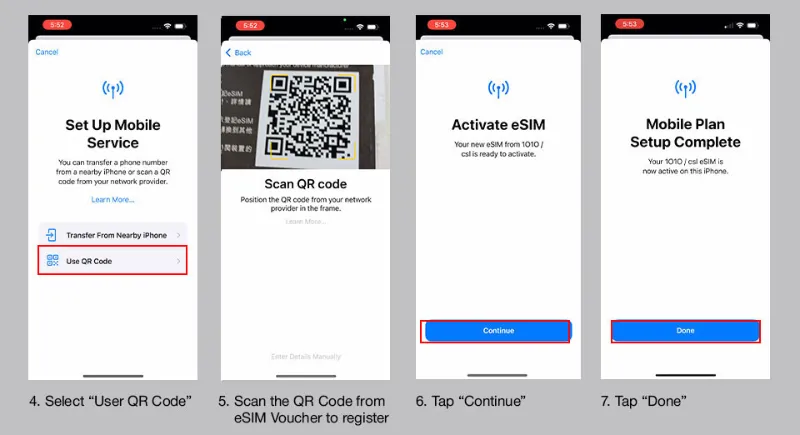
Device Installation: Scan the QR code using your phone's settings (Settings > Cellular/Mobile Data > Add eSIM).
-
Activation: The line will typically activate instantly once the profile is downloaded.
B. Activation for International/Travel eSIM Providers
The process is fast and can be done from anywhere with a Wi-Fi connection (even before you leave home).
Step 1: Purchase Your Plan
-
Select a plan based on your data needs and trip duration from a provider like Airalo, Ubigi, or Holafly.
-
Purchase the plan using the provider's app or website. The QR code or installation instructions will be emailed to you instantly.
Step 2: Installation (Before You Land - Recommended)
-
Connect to Wi-Fi (ideally before leaving your home country or while at the airport).
-
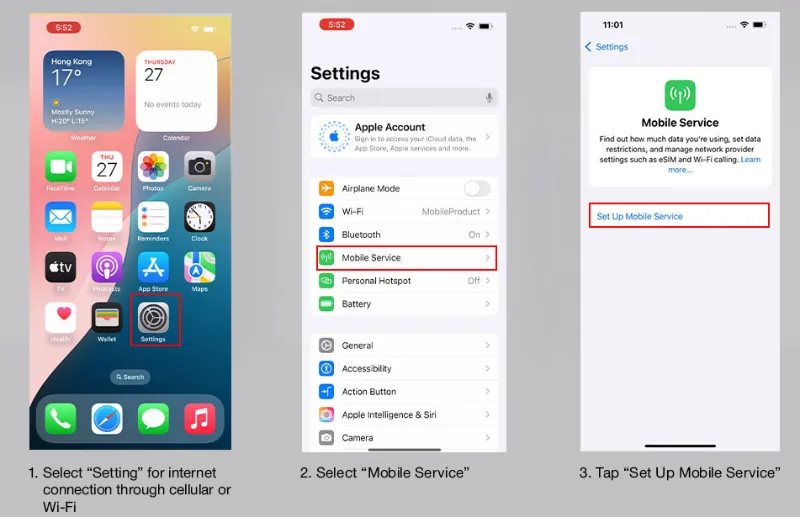
Navigate to your phone's cellular settings:
-
iOS: Settings > Mobile Service/Mobile Data > Add eSIM
-
Android: Settings > Network & Internet > SIMs > Add eSIM (or similar depending on manufacturer)
-
-
Scan the QR Code or enter the details manually.
-
Label the eSIM (e.g., "Malaysia Travel").
⚠️IMPORTANT: Keep the eSIM line turned OFF until you arrive in Malaysia to prevent the validity period from starting early.
Step 3: Activation (Upon Arrival in Malaysia)
-
Once you land, go back to your Mobile Service/Mobile Data settings.
-
Turn ON the newly installed eSIM line ("Malaysia Travel").
-
Set the Cellular/Mobile Data to the eSIM line.
-
Enable Data Roaming for the eSIM line (this is usually required for international travel eSIMs to connect to the local partner network).
-
Your phone should connect to the local Malaysian network (e.g., Maxis or CelcomDigi) and you will be online!
Pro Tips for Using Your Malaysia eSIM
-
Keep Your Home Number Active: Set your primary SIM to be used for Voice & SMS only and the eSIM for Mobile Data. This allows you to receive calls, SMS, and critical two-factor authentication (OTP) texts from your home country without paying for roaming data.
-
Hotspot/Tethering: Most travel eSIM providers allow you to share your data connection, but always confirm the policy of your specific plan.
-
Local Carrier SIMs: Local Malaysian carriers like CelcomDigi, Maxis (Hotlink), and U Mobile also offer eSIMs for tourists. This is a good option if you need a local phone number, but it usually requires a more involved sign-up process (sometimes requiring passport verification in person or through an app) compared to a pure travel eSIM.
-
Top-Ups: If you run out of data, most providers allow instant top-ups directly in their app.
Top Malaysia eSIM Plans
Here is a detailed breakdown of the best Malaysia eSIM plans for tourists, categorized by your travel priorities:
|
Provider |
Data |
Validity |
Price |
|
Unlimited |
7 Days |
$27.30 |
|
|
Unlimited |
15 Days |
$50.90 |
|
| Unlimited |
30 Days |
$74.90 |
|
|
3GB |
7 Days |
€7.50 |
|
|
5GB |
15 Days |
€10.50 |
|
|
10GB |
30 Days |
€18 |
|
| Ubigi |
Unlimted |
7 Days |
$24 |
|
3GB |
15 Days |
$6 |
|
|
10GB |
30 Days |
$12 |
|
|
1GB |
7 Days |
$3.99 |
|
|
10GB |
30 Days |
$21.99 |
⚠️Note on "Unlimited" Plans: Be cautious. Most unlimited plans are subject to a Fair Usage Policy (FUP), meaning your speed will throttle heavily (e.g., drop to 1 Mbps) after you use a high-speed allowance (e.g., 3GB or 5GB) per day.
🥇 The Winners by Category
1. Best for Overall Value and Reliability: Ubigi
Ubigi frequently receives high marks for quality of service, particularly its low latency, which makes it ideal for video calls, remote work, and time-sensitive apps.
2. Best for Raw Speed and Beginner Use: Airalo
As the global pioneer, Airalo is incredibly user-friendly and is frequently cited in speed tests as having the fastest download speeds in Kuala Lumpur (over 300 Mbps in some reports).
3. Best for Unlimited Data: Holafly
If you plan to use data constantly, including heavy streaming or tethering, Holafly provides the peace of mind of "unlimited" usage (subject to a Fair Usage Policy, or FUP).
Malaysia eSIM Q & A (Frequently Asked Questions)
Do Malaysia travel eSIMs include a local phone number?
Most travel eSIMs are data-only and do not include a Malaysian phone number.You can still make calls using apps such as WhatsApp, Telegram, WeChat, or FaceTime.
Should I install the eSIM before or after arriving in Malaysia?
You can install it before traveling, but only activate/use data when you arrive (many plans start counting validity once activated).
Do Malaysia eSIMs support 5G?
Yes, but availability depends on the provider:
-
Local carriers (Maxis, Digi, CelcomDigi) → 5G supported on many plans.
-
Some travel eSIMs offer 4G/LTE only, while others include 5G depending on the package.
Can I use hotspot/tethering with a Malaysia eSIM?
Most local operator eSIMs allow hotspot use.Travel eSIMs vary: some support hotspot, others restrict it. Always check the plan details.
Can I convert my physical SIM to eSIM in Malaysia?
Yes. Maxis/Hotlink, and CelcomDigi allow users to convert a physical SIM to eSIM.
You may need:
-
Your phone
-
Passport/ID
-
Access to carrier’s app or a visit to a store
Can I keep both my home SIM and Malaysia eSIM active at the same time?
Yes, if your phone supports dual SIM (most modern devices do).You can:
-
Keep your home SIM for calls/SMS
-
Use the Malaysia eSIM for data
What happens if I delete the eSIM?
Most eSIMs cannot be reinstalled once deleted.If you accidentally remove it, you may need a new QR code, and some providers charge a reissue fee.