
Traveling to Thailand should be about exploring stunning temples, relaxing on pristine beaches, and enjoying incredible food—not worrying about mobile connectivity. Yet, finding reliable, affordable local data can often be a confusing task. The embedded SIM (eSIM) technology offers a powerful solution, allowing you to instantly download a mobile plan without swapping tiny plastic cards. But with so many eSIM providers and plan options available, how do you pick the right one?This comprehensive guide is your essential resource for everything you need to know about setting up, activating, and choosing the best digital SIM card for your smartphone. Dive in to discover the top local providers, compare the most cost-effective prepaid data plans, and ensure you have seamless high-speed internet from the moment you land. Say goodbye to searching for Wi-Fi and hello to hassle-free travel!
What Is eSIM & Why Use It in Thailand?
An eSIM is a digital SIM card built into your phone that lets you install mobile data plans without a physical SIM card. It’s ideal for travelers because you can buy, install, and activate it online before your flight — no airports queues or local shops. For travelers heading to Thailand, an eSIM is the most convenient, flexible, and often cost-effective way to stay connected.

Benefits of Using an eSIM in Thailand:
-
Easy Setup: You buy a plan online, scan a QR code or use an app, and activate it before or upon arrival, getting instant data.Easy top-ups and plan extensions via App.
-
Dual SIM Functionality: You can keep your home SIM active (for calls/texts) while using the eSIM for local data in Thailand, preventing lost home numbers or high roaming charges.
-
Cost-Effective: Significantly cheaper than international roaming, with affordable local data plans.
-
Reliable Connectivity: Connects to major Thai networks (AIS, DTAC, TrueMove H) for fast 4G/5G speeds.
-
Stay Connected: Use maps (Google Maps, Grab), messaging (WhatsApp), and social media without worry.
-
Flexibility: Easily switch between different local or regional data plans.
-
No Risk: Prevents bill shock from accidental data roaming on your home plan.
eSIM vs. Physical SIM Card: The Quick Comparison:
|
Feature |
eSIM (Digital SIM) |
Physical SIM Card (Local Tourist SIM) |
|
Setup |
Instant digital purchase and activation via QR code or app. |
Requires purchase at airport/store, passport registration, and physical swap. |
|
Convenience |
Activate before you land; keep your home SIM active for calls/texts. |
Must visit a physical shop; risk of losing your home SIM. |
|
Speed |
Access to fast 4G/5G on major local networks (AIS, DTAC, TrueMove H). |
Access to fast 4G/5G on major local networks. |
|
Pricing |
Often very competitive, especially for data-only plans. |
Can be slightly cheaper for long-term/large local packages, but airport prices are higher. |
|
Security |
Embedded in the device; cannot be lost or stolen. |
Can be lost or stolen easily. |
|
Flexibility |
Easily switch between plans and providers. |
Tied to one carrier; swapping is a hassle. |
|
Phone Number |
Usually data-only (keeps your home number for calls/texts). Some plans include a local number. |
Typically includes a local Thai phone number for calls and SMS. |
Verdict: An eSIM is generally the superior choice for most tourists due to the convenience and instant connectivity.
Phones Supporting eSIM in Thailand
Before purchasing, you must ensure your phone:
✔️ Must be eSIM-compatible (modern iPhones, Samsung Galaxy S/Note/Z series, Google Pixel, etc.)
✔️ Must be carrier-unlocked — locked phones may not accept foreign eSIMs.
Most modern smartphones support eSIM technology:
-
iPhone: iPhone XS, XS Max, XR, and newer models (including all iPhone 11, 12, 13, 14, 15, 16, 17series). Note: iPhones sold in mainland China, Hong Kong, and Macao may not be compatible.
-
Samsung Galaxy: Galaxy S20 series and newer (S21, S22, S23, S24), Note 20, Fold, Flip models, and newer. Note: Compatibility can vary by region/country of purchase.
-
Google Pixel: Pixel 3 and newer.
-
Other Android: Most 2019+ flagships from manufacturers like Huawei and Oppo. Always check your specific model!
>>Search for more phones that support eSIM
⁉️How to Check:
1.Go to your phone's Settings:
-
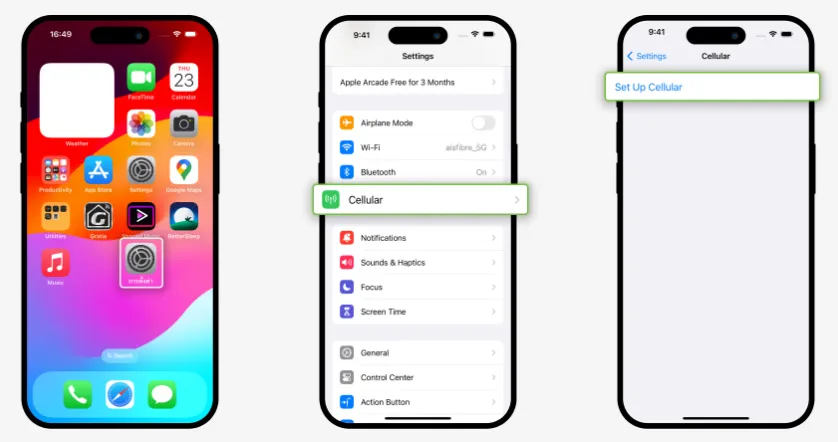
➤ iPhone: Go to Settings > Mobile Service (or Mobile Data). Look for an option like "Add Cellular Plan" or "Add eSIM".
-
➤ Android: Go to Settings > Connections > SIM Card Manager (or Network & Internet > Mobile Network). Look for "Add Mobile Plan" or "Download a SIM."
2.Dial Code (General Check): You can also try dialing *#06#. If your device shows an EID (Embedded Identity Document) number, it supports eSIM.
Major Carriers & eSIM Options in Thailand
A. The Big Three Thai Carriers (MNOs)
Thailand has three major carriers, all offering eSIM options with extensive 5G/4G coverage nationwide.
|
|
|
|
| Coverage & Reputation | Best Overall Coverage. Widely regarded as having the broadest and most reliable 4G/5G network, especially in less touristy and remote areas (islands, mountainous regions). | Best Speed & Value. The two companies have merged, often sharing towers, leading to improved, faster 5G speeds, especially in major cities like Bangkok and Phuket. dtac is known for historically offering great value/budget plans. |
| How to Get an eSIM |
|
|
| Plan Type | Offers official AIS tourist eSIMs with data, and sometimes calls/SMS included. | Offers True/dtac Happy Tourist SIM with large data allowances (e.g., 50GB) and minutes for a great price. Available as an eSIM. |
| Best for | All-around traveler, extensive travel outside of major cities. | City-focused trips, heavy data users needing the fastest possible speeds. |


📢Key Takeaway: For most tourists sticking to major cities and islands, the performance difference between the carriers will be negligible. AIS is the slight winner for remote coverage, while TrueMove H/dtac often compete with the best value tourist packages.
B. International eSIM Providers
These global eSIM providers partner with Thailand's major network operators (AIS, DTAC, and TrueMove H) to offer reliable coverage, including 4G/LTE and often 5G speeds in major cities (Bangkok, Phuket, Chiang Mai).They offer the easiest activation and are almost always data-only, meaning you keep your home number for SMS/calls but use the eSIM for data.Here is a comparison of some highly-rated providers:
|
Provider |
Best For |
Key Features |
Network Partners |
|
|
Overall Value & Security |
Affordable plans, user-friendly app, often includes VPN features. |
AIS, DTAC, TrueMove H |
|
|
Frequent Travelers |
Broad coverage worldwide, reliable network. |
DTAC, AIS |
|
|
Flexible Data Plans |
Excellent 4G/5G coverage, flexible top-ups, regional plans available. |
AIS, DTAC, TrueMove H |
|
|
Unlimited Data Users |
Truly unlimited data options (subject to Fair Usage Policy/FUP), customizable duration. |
TrueMove H |
|
|
Need a Local Number |
Plans may include an international phone number for calls/SMS. |
AIS, DTAC |





Choosing the Right Option: Local vs. International eSIM
|
Factor |
Local Carrier eSIM |
International Reseller eSIM |
|
Local Number? |
Yes, included with most tourist packages (essential for local calls/Grab). |
No, usually data-only. |
|
Activation Process |
Requires online or airport Passport Registration (KYC). Can be done online but may require a follow-up step. |
Simple QR code scan and instant activation (usually no ID/Passport needed). |
|
Best Value For |
Longer trips (15+ days), needing a Thai phone number, heavy call/text usage. |
Short trips (7-14 days), convenience, data-only travelers. |
✅ Advantages of Buying Direct from Local Carriers:
-
Thai Phone Number: Essential for app registrations, deliveries, emergencies.
-
Local Support: Physical stores everywhere for troubleshooting.
-
Better Value: Often cheaper for same data amounts.
-
Included Calls/SMS: Most plans include local calling credit.
-
Network Priority: Potential for better speed during congestion.
✅ Advantages of Buying from International Providers:
-
English interface and support
-
Purchase before arrival
-
No registration/paperwork
-
Multi-country plans available
If you are just looking for reliable, fast data the moment you step off the plane, an international provider like Airalo or Nomad is the simplest choice.
If you need to make frequent local calls (e.g., for booking hotels, tours, or using the Grab taxi app effectively), consider a plan that includes a local number, which may mean buying directly from a carrier like AIS or True/dtac.
Where to Buy a Thailand eSIM?
✈️ Before You Travel (Recommended)
Buying online gives you time to install and test your eSIM over Wi-Fi before landing.
Top platforms include:
-
Provider websites/app (Airalo, Holafly, Ubigi, Nomad, Maya Mobile)
-
Reseller marketplaces (SimOptions, EsimOne, Skyalo)
You'll get a QR code or in-app install immediately after purchase.
🏪 Upon Arrival in Thailand
You can also buy at:
-
Airport kiosks
-
Mall/central city shops
-
Official carrier stores (AIS, TrueMove H, DTAC)
Staff can assist with installation if you’re not confident doing it yourself.
Thailand eSIM Pricing Guide (Examples)
Here’s a curated list with best options for travel, data needs, and value:
A. International eSIMs (Good for Pre-Travel Purchase)
|
Provider |
Plan Example |
Price |
Key Details |
|
1 GB / 7 Days |
$2.99 |
|
|
|
10 GB / 30 Days |
$8.79 |
||
|
Unlimited GB / 15 Days |
$39.19 |
||
|
3 GB / 7 Days |
€5.50 |
|
|
|
10 GB / 30 Days |
€10 |
||
|
Unlimited GB / 15 Days |
€34.50 |
||
|
50 GB / 100 mins / 10 Days |
€9 |
||
|
1 GB / 7 Days |
$5 |
|
|
|
10 GB / 30 Days |
$12 |
||
|
Unlimited GB / Unlimited phone calls / 15 Days |
$19 |
||
|
Unlimited GB / 7 Days |
$27.30 |
|
|
|
Unlimited GB / 15 Days |
$50.90 |
||
|
Unlimited GB / 30 Days |
$74.90 |
💡 International eSIMs are mostly data-only, though some include limited voice/SMS depending on provider and plan.Be aware that "unlimited" plans often have a Fair Usage Policy (FUP), meaning your speed may be throttled (slowed down) after you reach a high daily or total data limit (e.g., after 50GB or after using a few GBs in a single day).
B. Local Thai eSIMs (Best Coverage & Local Number)
|
Plan |
Plan Detail |
Validity |
Price |
|
|
|
5 Days |
$12.14 |
|
15 Days |
$21.26 |
||
|
30 Days |
$36.47 |
||
|
8 Days |
$14.29 |
|
|
15 Days |
$22.24 |
||
|
30 Dayd |
$38.15 |
👉 These may require passport registration in store if you want calls/texts or postpaid options.
Key Considerations When Buying
-
Local vs. Regional Plans:
-
Local (Thailand-only): Best value if you are only visiting Thailand.
-
Regional (e.g., Asia Link): Excellent for multi-country trips (e.g., Thailand, Vietnam, Singapore). You install one eSIM and it works across multiple countries.
-
-
Validity Period: Does the plan last for the entire duration of your trip (7, 15, or 30 days)? Activation typically starts the moment the eSIM connects to the network in Thailand.
-
Hotspot/Tethering: If you need to share data with a laptop or travel companion, confirm the eSIM plan explicitly allows hotspot/tethering. Many unlimited plans restrict or prohibit it.
-
Local Thai Phone Number: If you need a local number for booking reservations, local calls, or registering for apps like Grab, choose a plan from a local carrier (like AIS or DTAC) that specifically includes calls/SMS. Many international eSIMs are data-only.
Data Recommendation
|
Usage Pattern |
Recommended Data Plan |
|
Light Use (Maps, messaging, email) |
1-3 GB for 7 days. |
|
Standard Use (Social media, light streaming, navigation) |
5-10 GB for 7-15 days. |
|
Heavy Use (Video calls, daily uploads, streaming) |
Unlimited/High-GB (20GB+) plan for 30 days. |
Set Up & Activate: A Step-by-Step Guide
The process is generally the same for all providers, utilizing either a QR code or the provider's app.It is recommended to install the eSIM before you leave or while connected to Wi-Fi at the airport, but only switch it on/activate it upon arrival in Thailand.
A. Installation (While on Wi-Fi)
-
Purchase Your Plan: Select your preferred provider and plan (see comparison below) and complete the purchase online.
-
Receive Instructions: You will immediately receive an email with a QR code and detailed instructions.
-
Install the eSIM:
-
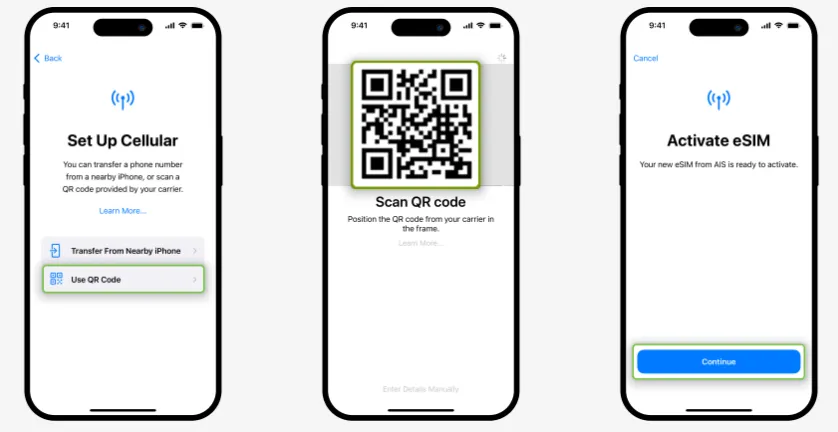
iOS (iPhone): Go to Settings > Cellular or Mobile Data > Add eSIM or Add Mobile Plan. Choose to use a QR code and scan the code from your email.
-
Android (Pixel/Samsung): Go to Settings > Network & internet > SIMs > Add more. Choose to download a SIM instead and scan the QR code.
-
-
Label the eSIM: Name the new line something easy to identify, like "Thailand Data" or the provider's name (e.g., "Airalo"). Do NOT turn it on yet.
B. Activation (Upon Arrival in Thailand)
-
Land in Thailand: Once your plane lands, ensure your phone is connected to the local network (either manually or automatically).
-
Enable the eSIM: Go to Settings > Cellular or Mobile Data and switch the "Thailand Data" line ON.
-
Set Data Roaming: For the new "Thailand Data" line, ensure Data Roaming is ON. This is necessary for the eSIM to connect to the local Thai network.
-
Set Default Line for Data: Set the "Thailand Data" line as your default line for Mobile Data.
-
Set Default Line for Voice (Optional): Keep your primary (home) SIM set as the default line for Voice, but you can set the eSIM for voice if it includes a Thai phone number.
-
Enjoy Connectivity! Your phone should now connect and you will receive a notification that your plan has started.
Important Tips & Troubleshooting
Common Issues & Solutions:
-
"No service" after activation: Restart phone, ensure correct APN settings
-
Can't scan QR code: Manually enter activation code if provided
-
Slow speeds: Switch network manually in settings (try all 3 providers)
-
Dual-SIM issues: Ensure correct line is selected for cellular data
Money-Saving Advice:
-
Buy online before arrival (airport purchases often cost 20-50% more)
-
Check coverage maps for your specific destinations
-
Consider data-only plans if you only need internet (use WhatsApp/VoIP for calls)
-
Look for promo codes on provider websites or travel forums
Local Nuities:
-
Registration: All Thai SIMs require passport registration by law (done automatically for eSIMs)
-
Top-ups: Most tourist eSIMs are non-renewable; purchase new plan if needed
-
Speed: "Unlimited" plans typically throttle after high-speed allowance
Thailand eSIM: Traveler Q & A
Can I buy a Thailand eSIM before arriving?
Yes. Most international eSIM providers allow you to purchase and install the eSIM before departure. Activation usually starts automatically when your phone connects to a Thai network after arrival.
When does a Thailand eSIM start counting days?
This depends on the provider:
-
Some plans activate upon first connection in Thailand
-
Others activate immediately after installation
Always check the activation policy before installing the eSIM.
Do Thailand eSIMs support 5G?
Yes. Most Thailand eSIMs support 4G LTE and 5G, depending on:
-
Your device compatibility
-
Network coverage in your location
-
The specific plan you purchased
Major Thai networks (AIS, TrueMove H, DTAC) offer extensive 5G coverage in cities and tourist areas.
Can I use hotspot or tethering with a Thailand eSIM?
Most Thailand eSIM plans support personal hotspot, but some unlimited plans may limit or restrict tethering. Always check the plan details if hotspot usage is important to you.
Can I use my home SIM and Thailand eSIM at the same time?
Yes. With a dual-SIM phone, you can:
-
Use your home SIM for calls and SMS
-
Use the Thailand eSIM for mobile data
This is ideal for travelers who need to stay reachable.
Is a passport required to buy a Thailand eSIM?
-
Online international eSIMs: No passport required
-
Local Thai carrier eSIMs: Passport registration is usually required, especially for plans with a phone number
Can I reuse a Thailand eSIM?
Most Thailand eSIMs are single-use and cannot be reused once expired. Some global eSIM providers allow you to top up on the same eSIM profile, which is useful for repeat trips.
What should I do if my Thailand eSIM doesn’t work?
Try the following steps:
-
Enable data roaming for the eSIM
-
Restart your phone
-
Select the network manually
-
Confirm the eSIM is set as the primary data line
If issues persist, contact the eSIM provider’s customer support.
Can I top up my data?
It depends on the provider and the plan:
-
Some providers/plans allow you to top up the existing eSIM profile through their app.
-
Other plans are "fixed" and require you to purchase an entirely new eSIM plan and QR code to continue service.
What happens if I accidentally delete the eSIM?
DO NOT DELETE YOUR ESIM. The QR code is typically single-use. Once the eSIM profile is deleted from your device, you cannot scan the QR code to reinstall it. You will have to contact the provider's customer support for assistance, which is time-consuming.
Using an eSIM in Thailand is one of the easiest and most flexible ways to stay connected — whether you’re there for sightseeing, work, or digital nomad life. Just check device compatibility, pick a reputable plan, and install it before your flight or right after landing.