
As Singapore continues its push toward a fully digital infrastructure, mastering the art of the eSIM is no longer a luxury—it's a necessity for travelers and residents alike. Forget the hassle of swapping tiny physical SIM cards or hunting down a local telco store upon arrival. So how to get an eSIM in Singapore?This ultimate guide is your essential roadmap to seamless mobile service in Singapore. I’ve done the deep dive, offering a comprehensive comparison of leading providers and walking you through every step, from selecting the right data plan to activating your eSIM quickly and efficiently,and crucial advice on managing your personal phone number while traveling. Get ready to experience effortless data access and make the smart choice for your Singapore communication needs.
What Is eSIM & Why Use It in Singapore?
eSIM, short for embedded SIM, is a digital version of the traditional physical SIM card. Unlike standard SIMs, an eSIM is built directly into your device and can be programmed remotely by your mobile carrier. This means you don’t need to insert or swap physical SIM cards to switch networks or activate new mobile plans.In Singapore, using an eSIM is beneficial for travelers as it allows for easy, immediate, and often more cost-effective connectivity compared to traditional roaming or buying a local physical SIM. You can activate an eSIM from home before you travel, avoiding queues and hassle upon arrival.
Top 8 Reasons to Use an eSIM in Singapore
-
Convenience: You can purchase and activate a Singapore-specific or regional eSIM plan online before your trip and be connected as soon as you land. This eliminates the need to find a store or wait in long lines at the airport.
-
Cost-effectiveness: eSIMs, especially travel-specific ones, can help you avoid expensive roaming charges from your home provider.
-
Flexibility: You can switch carriers, switch devices, or have multiple numbers (e.g. home + local Singapore) on the same phone.
-
Durability and Security: Since they are built into the device, eSIMs cannot be lost or physically damaged like a small plastic SIM card.
-
Faster setup & travel‑friendly: Especially when visiting Singapore — travel or tourist eSIMs let you connect almost instantly after QR scan. Great for short stays or frequent travellers.
-
Digital‑first & “eco”: No plastic SIM cards, no trips to stores — many carriers allow remote activation and full management via mobile Apps.
-
Multiple lines on same device: Ideal for people with personal + business numbers, or travellers wanting to keep their home SIM intact while using a local number.
-
Seamless Number Porting: Switching carriers in Singapore is simpler with eSIM. You can port your existing number without needing a physical SIM swap, avoiding downtime or service interruptions.
‼️ In short: eSIM makes mobile connectivity in Singapore faster, more flexible, and more convenient — whether you’re moving there, staying long-term, or just visiting.
Phones Supporting eSIM in Singapore
Before purchasing, you must ensure your phone supports eSIM technology and is carrier-unlocked.Most flagship phones released since late 2018/2019 are compatible.
Supported Smartphones (Partial List):
|
Device Category |
Supported Models (Generally) |
Key Feature |
|
Apple iPhone |
iPhone XS, iPhone XS Max, iPhone XR, and all newer models (iPhone 11, 12, 13, 14, 15 16,17series). |
Can usually hold 8 or more eSIM profiles, but only one can be active at a time (alongside one physical SIM). |
|
Samsung Galaxy |
Galaxy S20 series, Note 20 series, and all newer flagship models (S21, S22, S23, S24 series, Fold/Flip models). |
Compatibility may vary slightly by country version; always check the specific model number. |
|
Google Pixel |
Pixel 3a, 4, 5, 6, 7, 8 series and later. |
Fully supports eSIM for both single and dual-SIM modes. |
|
Other Brands |
Huawei P40/Mate 40 Pro, Oppo Find X series, Xiaomi 12T Pro/13 series, Motorola Razr/Edge series, and others. |
Compatibility varies significantly by model and region. Always check the eSIM provider's compatibility list. |
⚠️Crucial Check: Phones purchased in Mainland China, Hong Kong, and Macau often do not have eSIM functionality (they use physical dual-SIM trays instead). Always verify your specific device model.
>>Search for more phones that support eSIM
Quick Check on Your Phone:
-
iPhone: Go to Settings > Cellular (or Mobile Data). Look for an option like "Add Cellular Plan" or "Add eSIM".
-
Android: Go to Settings > Connections > SIM Card Manager (or Network & Internet > Mobile Network). Look for "Add Mobile Plan" or "Download a SIM."
-
Dial Code (General Check): You can also try dialing *#06#. If your device shows an EID (Embedded Identity Document) number, it supports eSIM.
Device Compatibility Notes:
-
iOS 20 (releases late 2025): Enhanced dual-eSIM support (up to 8 profiles)
-
Android 16: Standardized eSIM API across manufacturers
-
Wearables: Apple Watch Ultra 3 & Galaxy Watch 7 support standalone eSIM
-
Backup: Cloud eSIM backup now available via carrier apps
Major Carriers & eSIM Options in Singapore
You have two main options for purchasing an eSIM: local Singapore carriers (which often require registration in-person or via a local app/ID) or international eSIM providers (which are quicker and easier for immediate data access upon arrival).
A. Local Singapore Carriers
Singapore has three main network operators (MNOs) that offer robust eSIM services for both pre-paid and post-paid (contract) plans.
|
|
|
|
|
|
Coverage & Reputation |
Largest network, excellent coverage and reliability. Generally considered the premium option. |
Strong network, often competitive bundled packages (Fiber/Mobile). |
Focused on competitive data packages and flexibility. |
|
Key Features |
|
|
|
|
Plan Type |
Postpaid & Prepaid (e.g., hi! Tourist eSIM) |
Postpaid & Prepaid |
Postpaid & Prepaid (e.g., M1 Tourist Prepaid SIM) |
|
How to Get an eSIM |
Via Singtel Shops, Online Registration, or through the My Singtel App (for conversion). |
Via StarHub Online Store or any StarHub Retail outlet. |
Available through M1 stores or online sign-up for new lines. |
|
Best For |
Reliability, wide network coverage, and established service. |
Value-added services and competitive pricing, especially on contract plans. |
Budget-conscious, seniors. |
|
Notes |
Prepaid/tourist eSIM plans have limits (sometimes data-only/no or limited voice/SMS) depending on plan. |
Switching from physical SIM → eSIM costs a small one-time fee (unless done digitally) |
eSIM is included in many 5G plans; activation is done via their app or in-store. |



⚠️ Note: For long-term residency (postpaid or long-term prepaid), you will typically need to present your Singapore ID (e.g., NRIC, S Pass, Employment Pass) for mandatory registration.
Beyond the big three, there are smaller/digital‑first providers offering eSIM — e.g. Circles.Life, GOMO (a sub‑brand under Singtel),giga, SIMBA and other MVNOs. Some of them offer flexible or contract-free plans, which can be handy for short stays or travellers.
B. International/Travel eSIM Providers (Data-focused)
These are third-party apps/websites that sell data plans using the local carrier networks (like Singtel or StarHub). They are excellent for immediate data on arrival or short stays; often cheaper than roaming but may be data-only (no local number).Here are some popular global/regional eSIM providers:
|
Provider |
Key Feature |
Price |
Best For |
|
|
Offers unlimited data plans for specific durations. |
|
Heavy data users who want peace of mind with no limits. |
|
|
(Highly Popular) Huge variety of Hong Kong-specific and regional Asia plans. |
|
Best value & flexibility. |
|
|
Offers competitive data packages for Hong Kong. |
|
Budget-conscious travelers who prefer a fixed, pay-as-you-go data allowance. |
|
|
Flexible data packages (e.g., 1GB, 3GB, 5GB). |
|
Budget-conscious travelers who prefer a fixed, pay-as-you-go data allowance. |
|
|
Known for good 5G coverage and global plans. |
|
Long-term or global travelers. |





‼️ Recommendation: For the first few weeks, using an international provider like Airalo or Saily is often the easiest way to ensure you have data as soon as you land, allowing you to set up other things at your leisure.
Which to choose:
-
Move-in / long term: Local carrier postpaid (or no-contract Circles.Life/SIMBA) so you get a local number, billing, and porting support.
-
Short visits: Airalo/Nomad or a carrier tourist eSIM will be easiest.
If you want wide coverage + flexibility + local number options, Singtel / StarHub / M1 are the “safer” bets. If you’re more price‑sensitive or don’t need a local number, some MVNOs / digital‑first eSIM providers may work too.
How to Buy an eSIM in Singapore?
A. From the Local Carrier (For Residents/Long-Term Stayers)
✅ Online (Carrier Website / App):
-
Choose carrier: Compare plans on Singtel, StarHub, M1, Circles.Life.
-
Sign up online:
-
Residents: Use SingPass/MyInfo for instant verification.
-
Foreigners: Upload passport, FIN/EP/DP, proof of address.
-
-
eSIM Selection: During the checkout process, select "eSIM" instead of "Physical SIM."
-
Payment: PayNow, credit/debit card, Apple/Google Pay
-
Verification: The carrier will verify your details. This usually takes a few hours.
-
QR Code Delivery: Once approved, you will receive an eSIM Activation Email containing a unique QR code and activation instructions.
-
Scan and activate immediately
✅ In-Store (Retail Shops):
Visit any carrier's major retail store (found in shopping malls). The staff will guide you through the sign-up process, scan your physical documents, and generate the QR code for instant activation.
-
Visit Singtel/StarHub/M1 store
-
Staff verifies documents
-
Choose plan
-
Pay
-
Staff helps install eSIM via:
-
QR code printout
-
NFC transfer (newer stores)
-
Email follow-up with QR
-
B. From Changi/Global eSIM Shops (For Tourists/Short-Term Visitors)
✅ At Changi / Airport Counters:
Many tourist eSIMs and operator kiosks sell/pre-order SIMs & eSIMs at arrival. Good to have connectivity immediately.
-
Changi Recommends counters in all terminals (24/7)
-
Singtel/StarHub/M1 booths in arrival halls
-
Process:
-
Show passport
-
Choose plan (7-30 days, 10-100GB)
-
Pay by credit card/cash
-
Receive QR code on receipt/email
-
Scan immediately or later
-
✅ Global eSIM Provider's Website/App
Select a provider (e.g., Airalo, Nomad, or a local operator) and the data/duration plan that suits your needs.Complete the purchase through the provider's website or app.After payment, you will receive an email or in-app notification containing the eSIM's activation details. This is usually a QR code or a manual activation code.
How to Activate an eSIM (Step-by-Step Guide)
Once you have received the QR code via email, follow these steps to install the eSIM profile onto your phone:
Phase 1: Install the eSIM Profile
For iPhone (iOS):
-
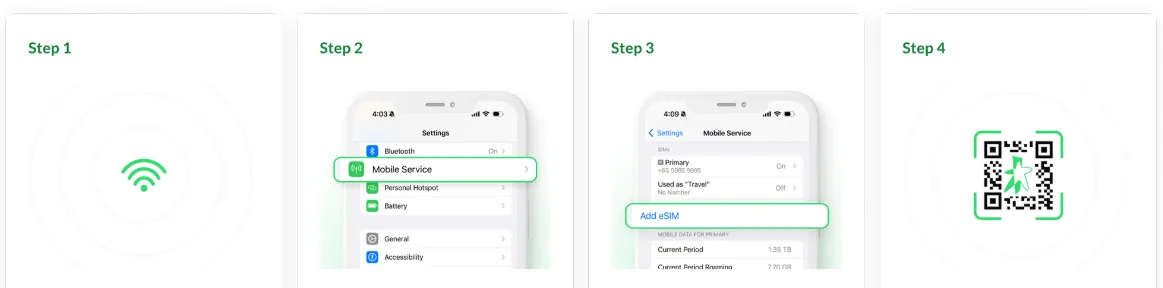
Go to Settings > Mobile Service (or Mobile Data).
-
Tap Add eSIM or Add Data Plan.
-
Choose Use QR Code (or Scan QR Code).
-
Scan the QR Code provided in the activation email. If scanning fails, you may need to enter the Sm-DP+ Address and Activation Code manually (listed in the email).
-
Follow the prompts. Your phone will download the eSIM profile.
-
When prompted, label your plan (e.g., "Singapore Line").
For Android (Samsung/Google Pixel):
-
Go to Settings > Connections (or Network & Internet).
-
Select SIM card manager (or Mobile network).
-
Tap Add mobile plan (or Add eSIM).
-
Choose Scan carrier QR code.
-
Scan the QR Code from the email.
-
The eSIM will download. Label the plan when prompted.
Phase 2: Activate eSIM (Upon Arrival in Singapore)
1. Activate the Line
When you land in Singapore, go to Settings (Mobile Service/Mobile Data section).
-
Go to Settings > Mobile Service/Mobile Data.
-
Select your new "Singapor Data" eSIM line.
-
Set this line as your Primary Data Source.
-
Toggle Data Roaming > ON for the new eSIM line. (This is necessary for regional plans to connect across multiple countries.)
2. Manage Your Home Line (Dual SIM Management)
-
To save money, ensure Data Roaming is OFF for your home/primary physical SIM card.
-
Keep your home line ON (enabled) to receive critical SMS/calls (like bank codes or WhatsApp verification).
Your phone should connect to a local network automatically within minutes!
Essential Dual-SIM Usage Tips
Since you are a resident, you likely have two plans (your home country SIM and your new Singapore eSIM). Managing them correctly is key.
|
Setting |
Recommendation |
Why It Matters |
|
Default Line for Voice |
Set to your Singapore eSIM. |
All local outgoing calls and texts will use this line, avoiding expensive international roaming charges. |
|
Default Line for Data |
Set to your Singapore eSIM. |
This ensures all internet usage relies on your local, affordable data plan. |
|
Home Country SIM |
Keep it active and label it (e.g., "Home SIM"). |
Use this line ONLY for receiving two-factor authentication (2FA) codes or important calls from your home bank/contacts. |
|
Cellular Data Switching |
Disable this feature. |
This prevents your phone from automatically using your Home SIM for data if the Singapore eSIM data runs out, saving you from enormous roaming bills. |
Number Portability & Switching Carriers
If you already have a physical SIM from a Singapore carrier (e.g., M1) and want to switch to their eSIM, or if you are porting a number from one SG carrier to another, the process is streamlined but requires strict adherence to rules.
A. Porting an Existing SG Number to a New Carrier's eSIM
This is known as Mobile Number Portability (MNP).
Pre-Port Checklist:
- Ensure current account is active and in good standing.
- No outstanding bills or contractual obligations.
- Backup SMS/OTP codes from old SIM.
- New phone supports eSIM (carriers now charge SGD 5-10 for physical SIM).
- Note current number and account details.
Step-by-Step Porting Process:

-
Confirm Eligibility: Your existing number must be active, under your name, and typically on a postpaid/SIM-Only contract (though some prepaid numbers can be ported).
-
Sign Up: When you sign up for the new carrier's eSIM plan (e.g., porting from StarHub to giga!), select the option "Transfer my number" (or "Port-in").
-
Provide Details: You must provide the exact details of your old number, current carrier, and identity documents (NRIC/Pass). Errors here cause delays.
-
Activation: The new carrier (recipient) will handle the porting request. Once approved (usually 1-3 working days), your old physical SIM will stop working, and you will receive the eSIM activation code from the new carrier.
B. Converting Your Existing Physical SIM to an eSIM (Same Carrier)
This is the easiest process:
-
Check Carrier App: Log into your carrier's official mobile app (e.g., My Singtel App, My M1+ App).
-
Request Conversion: Look for an option like "Request eSIM," "SIM Management," or "Switch to eSIM."
-
Fee: Many carriers offer the first conversion for free, but subsequent conversions (e.g., moving the eSIM to a new phone) may incur a small fee (e.g., S$5.45 - S$10.90).
-
Instant Delivery: The eSIM QR code/profile link is usually emailed or displayed instantly in the app.
Common Pitfalls & What to Watch Out For
- Bring your passport when buying/registering in Singapore — ID is usually required for tourist SIMs and porting.
- Use the carrier app for top-ups, plan changes, and transfers — it’s usually easiest.
- eSIM profile limits: phones can store several eSIM profiles but may only use 1–2 simultaneously. If you switch phones often, check how to transfer or request a new QR from your carrier (charges may apply on some carriers).
- Prepaid/tourist eSIM limitations: Some tourist/prepaid eSIMs may offer data only — or limited voice/SMS support; not all allow receiving OTPs or voice calls reliably.
- If activation fails: restart phone, delete any partly-installed eSIM profile and retry, or contact carrier chat/support. Carriers have step-by-step eSIM troubleshooting pages.
- Keep a physical SIM (or backup eSIM from an international vendor) until port completes; eSIM activation sometimes needs an online step.
- eSIM non‑transferability (for some plans): Once installed on a device, some eSIM profiles can’t be transferred to another device or reset — must get a new profile.
- Potential disruptions during porting: There can be up to several hours of downtime while number switches networks — plan accordingly (e.g. avoid switching when you need to receive urgent calls or SMS).
- Loss of extra services / add‑ons: Any value‑added services tied to old SIM (ring tones, downloads, etc.) usually don’t transfer over when you port to a new carrier.