Traveling to Taiwan should be about adventure, not struggling to get online. eSIMs offer the simplest solution for tourists: no SIM swaps, no shop visits, just instant connectivity. In this guide, we break down everything from buying your digital plan and activating it in minutes to comparing budget-friendly and high-data options. Plus, learn how a local number can make your travels smoother. Get ready to navigate, share, and discover with confidence.
Why Choose eSIM for Taiwan?
An eSIM is a digital SIM card built into your phone — no physical card to insert — that lets you install a mobile plan by scanning a QR code or using an app. It works just like a normal SIM for data, and in some cases, voice/SMS if the plan supports it.Using an eSIM in Taiwan is one of the easiest and smartest ways for travelers to stay connected. Here are the specific reasons why an eSIM is the superior choice for Taiwan:
1. 24/7 Availability (The "Red-Eye" Saver)
The physical SIM card kiosks at Taoyuan International Airport (TPE) typically close by midnight. If your flight lands at 2:00 AM, you’ll be without data until you find a city-center store the next morning.
-
eSIM Advantage: Choosing an eSIM for Taiwan is primarily about bypassing the airport bottleneck. Since Taiwan has a strictly regulated telecommunications market requiring real-name registration, physical SIM counters at the airport can have long queues, especially during peak tourist hours.You can buy and install it while still in your home country and activate it the second your plane touches the tarmac, regardless of the time.
2. Security & Dual-SIM Functionality
Taiwan is a very safe country, but losing a tiny physical home SIM card while traveling is a logistical nightmare.
-
eSIM Advantage: Your home SIM stays safely inside your phone (or as its own eSIM profile). This allows you to receive 2FA (Two-Factor Authentication) text messages from your bank on your home number while using the Taiwan eSIM for all your data needs.
3. Instant Access to Vital Navigation
Taiwan’s cities, especially Taipei, are dense and rely heavily on the MRT (subway) and bus systems.
- eSIM Advantage: Having data the moment you step off the plane means you can immediately use Google Maps to find the "Airport MRT" or book an Uber/Bolt without hunting for the airport's public Wi-Fi.
4. Cost & Variety
While physical SIMs at the airport are standard, digital providers offer more granular control.
- eSIM Advantage: If you are only in Taiwan for a 48-hour layover, you can buy a 2GB/3-day plan for about $5 USD. Airport physical SIMs usually start at a minimum of 3 or 5-day unlimited plans (approx. $10–$15 USD).If Taiwan is part of a longer Asia trip, eSIM makes it easy to add or remove plans without changing SIM cards. You can store multiple eSIM profiles and switch between them anytime.
Quick Checklist: Is Your Phone Compatible?
To use an eSIM in Taiwan, your phone must be carrier-unlocked and contain an eSIM chip. Most modern smartphones from 2019 onwards support eSIM in Taiwan — but remember: support can vary by region and specific model version (e.g., Taiwan vs. China/Hong Kong vs. US) so it’s best to confirm on your exact device before buying a plan.Here's a list of phones that support eSIM:
|
Brand |
Model |
|
Apple |
⚠️Note: iPhones sold in China, Hong Kong or Macau sometimes don’t include eSIM depending on model and region — check your exact variant. |
|
Samsung |
|
|
|
Pixel 3 and newer (3, 4, 5, 6, 7, 8, 9, 10 series) |
|
Taiwanese Brands |
|
|
Other Androids: |
Xiaomi 13/14/15 series, Sony Xperia 1 IV/V, and Oppo Find X5/X8 Pro or more |
>>Check the whole eSIM compatible phone list
‼️The "Regional" Restrictions (Crucial):
Even if your model is on the list, where you bought it matters:
-
Mainland China/HK/Macau: iPhones purchased here often have two physical SIM slots and no eSIM chip. These will not work with any eSIM.
-
Pixel 3 Alert: Google Pixel 3 models originally purchased in Taiwan, Australia, or Japan typically do not support eSIM functionality.
-
Samsung (USA/South Korea): Some older US or Korean carrier-locked Samsung models (like the S20 or S21) may have the eSIM feature disabled by the software.
⁉️How to Verify Your Phone Right Now:
You can check for the "eSIM chip" in about 5 seconds:
-
The Code Method: Open your phone app and dial *#06#.
-
If you see an EID number (a 32-digit code), your phone has an eSIM chip and is ready.
-
-
The Settings Method (iPhone): Go to Settings > Cellular (or Mobile Service). If you see "Add eSIM" or "Add Cellular Plan," you’re good to go.
-
The Settings Method (Android): Go to Settings > Connections > SIM Manager. Look for "Add eSIM."
eSIM Providers for Taiwan
The eSIM landscape in Taiwan has split into two distinct categories: International eSIM providers and Local Carrier eSIMs (which include that crucial local phone number).Here is the breakdown of the top providers to help you choose the right one for your trip.
A. Best for Convenience: International eSIM Providers (Data-Only)
These are the easiest to set up. You can buy them in your home country and activate them the moment you land. While Taiwan law requires real-name registration for local prepaid SIMs, third-party travel eSIMs often bypass this for tourists. Some, however, may require passport verification.
Here are some popular global/regional eSIM providers:
|
Provider |
Best For |
Pros |
Cons |
Network |
|
Overall Value |
Budget-friendly and easy-to-use,straightforward plans |
Data-only,Unused data is forfeited after the plan expires |
Multi-network |
|
|
First-time eSIM users, simple setup |
User-friendly app, global availability |
Data-only (no local number), slightly slower activation |
Chunghwa |
|
|
Unlimited data, heavy users |
True unlimited, no speed caps on some plans |
No local number, premium pricing |
Multi-network |
|
|
Regional travel (Asia packages) |
Regional bundles, flexible options |
Smaller network selection |
FarEasTone/CHT |
|
|
Perks (lounge access) |
Unique perks (smart delay),competitive pricing & good deals |
No local number, customer support inconsistency,performance varies outside cities |
Chunghwa |
B. Best for Full Access: Local Carriers (with Phone Number)
If you need a local 09 number for YouBike, restaurant bookings, or food delivery, stick with the "Big Three" Taiwanese telcos. You can buy these at airport counters (Taoyuan TPE, Songshan, or Kaohsiung).By law, these require a passport/ID upload for "Real-Name Registration."
|
Provider |
Best For |
Pros |
Cons |
Where to Buy |
|
|
Overall coverage, rural areas, reliability |
Best nationwide coverage, includes local number |
Slightly more expensive |
|
|
|
Urban speed, competitive pricing |
Fast urban speeds, good app interface |
Rural coverage slightly less than Chunghwa |
|
|
|
Balance of price and coverage |
Good mid-range option, often promotions |
Less English support than competitors |
|



C. The Hybrid Option: Third-Party with Number
Some global providers now partner with local telcos to offer "pseudo-local" features.
-
aloSIM: Offers a way to get a local number via their partnership with Hushed (though it is often a VOIP number rather than a true Taiwanese mobile number).
-
MobiMatter: Often has "Greater China" plans that include Taiwan, Hong Kong, and Macau—great if you are visiting multiple cities.
⁉️Which one should you choose?
-
The "Hassle-Free" Traveler: Get Airalo or Saily. It's fast, cheap, and works immediately.
-
The "Deep Explorer": Get Chunghwa Telecom via Klook. You'll need the local number for the public bikes (YouBike) and the best signal if you're hiking in Taroko or Alishan.
-
The "Power User": Get Holafly for truly unlimited data if you plan to work remotely or stream 4K video constantly.
⚠️Mandatory Real-Name Registration:
Since 2023, Taiwan has strictly enforced real-name registration for all SIMs (including eSIMs).
-
For International Apps: You may receive a link via SMS or email after installation to upload a photo of your passport. Data will not work until this is done.
-
For Local Carriers: Verification is done at the airport counter or in-store. One passport can typically register up to 3 SIMs.
Best eSIM Plans for Tourists
Choosing the "best" eSIM for Taiwan depends on whether you value maximum convenience (instant app setup) or local utility (having a phone number for services like YouBike).
Below is the comparison of the best plans for tourists.
|
Plan |
Price |
Data |
Validity |
Local Number? |
Why |
|
NT$600 |
5GB |
5 days |
✅ |
Includes local number, perfect coverage, easy airport pickup |
|
|
NT$390 |
5GB |
30 days |
❌ |
Cheapest per day, flexible, activate before arrival |
|
|
NT$1,000 |
Unlimited |
10 days |
✅ |
Reliable high-speed, good for video calls |
|
|
NT$1,690 |
Unlimited |
15 days |
❌ |
Share with 3-4 devices, no data anxiety |
|
|
NT$999 |
10GB |
30 days |
✅ |
Best data allowance with local number included |
How to Buy & Activate?
1. Buying Your eSIM
➡️Buying a Local eSIM (with Number):
-
Requirement: You must provide two forms of ID (usually your Passport + a secondary ID like a Driver's License or Entry Permit). This is a legal requirement in Taiwan for any SIM with a phone number.
-
Process: Visit the telecom counter at the airport. They will scan your IDs and give you a QR code.
-
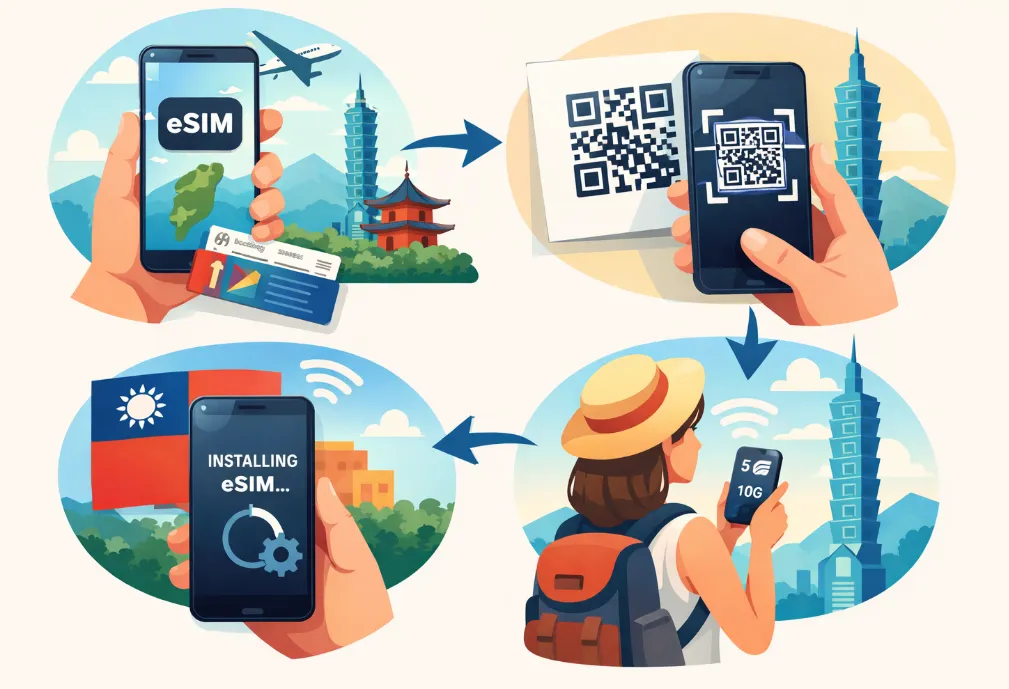
Activation: Scan the QR code in your phone's "Cellular/Mobile Data" settings. It activates instantly.
➡️Buying an International eSIM (Data-Only):
-
Purchase: Buy via the Airalo/Holafly app or website.
-
Installation: Follow the app instructions to "Install eSIM." It’s best to do this while you still have Wi-Fi (e.g., at home or in the airport).
2. Installation (Do this before you fly)
You should install the eSIM while you have a stable Wi-Fi connection (at home or the airport).
-
For iPhone:
-
Go to Settings > Cellular (Mobile Service) > Add eSIM.
-
Select Use QR Code and scan the code provided in your email or app.
-
Label the new line "Taiwan."
-
Set your home SIM as the "Default Line" (to keep receiving texts) and the Taiwan eSIM as "Cellular Data."
-
For Android:
-
Go to Settings > Connections > SIM Manager.
-
Tap Add eSIM > Scan QR code.
-
Follow the prompts to download the profile.
3. Activation (Do this when you land)
The plan's "validity period" (e.g., 5 days) usually starts the moment you connect to a Taiwanese tower.
-
Turn on the Line: Go to your SIM settings and toggle the Taiwan eSIM to On.
-
Enable Data Roaming: This is the most important step for travel eSIMs. Go to the Taiwan eSIM settings and ensure Data Roaming is switched ON.
-
Set as Data Source: Ensure your phone is using the Taiwan eSIM for "Mobile Data" and not your home SIM.
-
Restart: If it doesn't connect within 2 minutes, toggle Airplane Mode on and off, or restart your phone.
Frequently Asked Questions (Q & A)
1. Can I get a local phone number with an eSIM?
Yes, but only from specific providers.
-
Data-Only Apps: Providers like Airalo, Saily, and Holafly do not provide a local phone number. You get data only.
-
Local Telcos: If you buy an eSIM through Chunghwa Telecom or Taiwan Mobile (either at the airport or via Klook/KKday), you will receive a local Taiwanese number (starting with 09).
2. Do I really need a local number?
For most tourists, no. However, it is highly recommended if you plan to:
-
Rent a YouBike: The registration process for the public bike system requires an SMS verification code sent to a local number.
-
Make Reservations: Many popular restaurants use local SMS systems for waitlists.
-
Stay Long-term: If you are in Taiwan for more than 2 weeks, a local number makes life much easier for local apps.
3. Can I use YouBike without a local number?
Yes, but with a catch. You can use the "Single Rental" option in the YouBike 2.0 app using a credit card (Apple Pay/Google Pay). This avoids the need for a local number, but it requires a holding deposit (usually around NT$2,000) for every ride, which is released later. To link an EasyCard for seamless "tap-and-go" riding, you must have a local number.
4. Can I keep my home WhatsApp/Line number?
Yes. When you install a Taiwan eSIM, your phone will ask which line to use for data. Choose the "Taiwan" line. Your WhatsApp and Line accounts are tied to your app account, not the physical SIM, so they will continue to work exactly as they do at home.
5. Can I install an eSIM before traveling to Taiwan?
Yes. You can install the eSIM profile in advance, but your data plan usually starts only when you connect to a Taiwanese network.
7. Can I keep my home SIM while using Taiwan eSIM?
Yes. Most modern phones support dual SIM (physical + eSIM). This allows you to receive calls or OTPs on your home SIM while using the Taiwan eSIM for data.
8. Are Taiwan eSIMs cheaper than roaming?
Almost always. eSIMs from local or online providers offer faster 4G/5G speeds at lower costs than international roaming.
9. Can I top up or extend my Taiwan eSIM?
-
Online providers: You can top up via app or website.
-
Local carrier eSIM/SIM: Usually can extend or top up at stores or via carrier app.