Staying connected while traveling or living in the United States has never been easier. With digital SIM technology becoming widely supported by modern smartphones, users can now access mobile data without physical cards, long contracts, or complicated store visits. Whether you’re a tourist, student, remote worker, or frequent traveler, choosing the right mobile data solution can significantly improve your experience.This guide walks you through the most cost-effective data options available in the U.S., explains how digital SIMs work, and shows you how to get connected within minutes. From coverage considerations to activation steps, you’ll find everything you need to make an informed decision before your trip or stay.
What Is eSIM & Why Use It in USA?
eSIM(embedded SIM) is a relatively new technology that replaces the traditional physical SIM card in mobile devices. With eSIM cards for USA, you can easily switch between different mobile carriers without the need to physically swap out SIM cards. This technology is particularly beneficial for travelers, as it allows you to stay connected in the USA without the hassle of purchasing a local SIM card.
How eSIM Cards for USA Works:
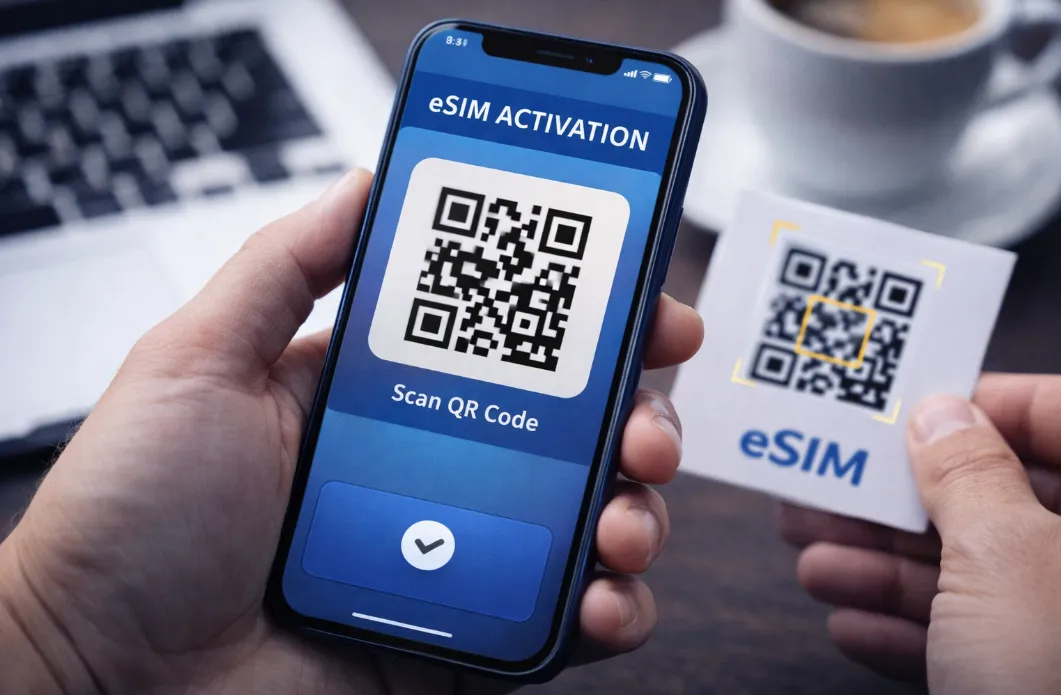
When you purchase an eSIM card for USA, you will receive an activation code or QR code from your chosen carrier. Simply scan the code with your device, and the eSIM profile will be downloaded onto your device. You can then select the eSIM profile to use as your primary mobile plan. The eSIM technology allows you to switch between different profiles seamlessly, making it easy to switch carriers or plans as needed.
Benefits and Advantages of eSIM Cards for USA:
-
Easy activation: Activating an eSIM card for USA is quick and simple, typically done through a QR code or mobile app.
-
Cost-effective: eSIM cards often offer competitive rates and plans, saving you money on international roaming fees.
-
Flexibility: You can easily manage multiple phone numbers on a single device, making it ideal for business travelers or individuals with dual SIM phones.
-
Dual SIM Functionality: You can keep your home SIM active (for calls/texts) while using the eSIM for local data in Thailand, preventing lost home numbers or high roaming charges.
-
Travel: Easily add local data plans for different regions without buying physical SIMs, avoiding expensive roaming charges.
-
Space & Sustainability: Saves physical space inside devices for other components and reduces plastic waste.
-
Security: More secure than physical SIMs because they can't be physically removed if your device is lost or stolen, preventing unauthorized use or number porting.
Who Benefits Most in the USA:
-
International Travelers: Adding a local US plan for short trips is seamless.
-
Business Professionals: Managing work and personal lines on one phone.
-
Tech Enthusiasts: Enjoying the latest in flexible, multi-carrier connectivity.
Phones Supporting eSIM in USA
Most modern smartphones sold in the USA support eSIM. However, there is a major shift happening: starting in 2022, Apple began removing the physical SIM tray entirely for US models, making them eSIM-only.Below is a breakdown of compatible devices as of 2026:
| Brand |
Model |
| Apple iPhone |
All modern iPhones from iPhone XS (2018) onward support eSIM — plus newer models sold in the U.S. are eSIM-only with no physical SIM tray.Supported models include:
👉 U.S. iPhone 14 and newer are generally eSIM-only (no physical SIM slot) — so they must use eSIM for cellular. |
| Google Pixel |
👉 Global versions may differ. US models always include eSIM. |
| Samsung |
👉 Samsung's eSIM support varies by region. USA models always have eSIM, but international versions may not. |
| Other Manufacturers |
Many newer phones from other brands may support eSIM — but availability still varies by region and carrier support in the U.S. Check official specs: Motorola:
OnePlus:
Sony:
Fairphone:
Nothing Phone:
👉 Always confirm via manufacturer/spec sheet that your exact model includes eSIM support before buying a plan. |
⚠️ International Warning: Samsung and iPhone models purchased in Mainland China, Hong Kong, or Macao often have two physical SIM slots and no eSIM capability at all (with rare exceptions like the iPhone 16e).
>>Search for more phones that support eSIM
How to Verify Your Specific Phone:
Even if your model is listed above, it must be Carrier Unlocked to use an eSIM .To check compatibility instantly:
-
The "EID" Test: Open your phone's dialer and type *#06#.
-
If you see a barcode/number labeled EID, your phone supports eSIM.
-
-
The Settings Check:
-
iPhone: Settings > Cellular > "Add eSIM".
-
Samsung: Settings > Connections > SIM Manager > "Add eSIM".
-
Pixel: Settings > Network & Internet > SIMs > "+".
-
Major Carriers & eSIM Options in USA
In 2026, the US cellular market has fully embraced eSIM, with major carriers and budget-friendly MVNOs (Mobile Virtual Network Operators) offering instant digital activation.
A. The "Big Three" Major Carriers
If you want the most reliable coverage and maximum 5G speeds, these are the primary networks. All three offer eSIM options for travelers and locals.
|
Carrier |
eSIM Support |
Key Features |
Activation |
Notes |
|
|
Full support for postpaid and prepaid — one of the most flexible eSIM ecosystems. |
Best 5G Speed: Known for the fastest and most expansive 5G network. |
Quick install via settings, QR code, or carrier app. |
eSIM Quick Transfer support for seamless number moves between phones. |
|
|
Full support on both postpaid and prepaid plans. |
Best Overall Coverage: Often considered the gold standard for reliability, especially in rural areas. |
Via My Verizon app, QR code, or carrier provisioning. |
Activation fees may apply on some plans. |
|
|
Available across postpaid and prepaid plans. |
Best Rural Reach: Excellent for national parks and remote areas. |
Use the myAT&T app or QR code scan to install your eSIM. |
eSIM Quick Transfer support for seamless number moves between phones. |



B. Top MVNOs (Budget-Friendly Gems)
These carriers piggyback on the major networks (AT&T, Verizon, T-Mobile) but often offer lower-cost plans and flexible eSIM activation:
|
Carrier |
Network Used |
Key Benefit |
|
|
Verizon |
Truly unlimited everything (including hotspot). Owned by Verizon. |
|
|
T-Mobile |
Best for long-term stays (3, 6, or 12-month prepay). |
|
|
All Three |
Unique "Teleport" feature lets you switch networks (e.g., T-Mobile to Verizon) via eSIM. |
|
|
T-Mobile |
Excellent if you plan to travel between the USA, Canada, and Mexico. |




C. International Travel eSIMs (No US Number)
If you are visiting for less than 30 days and only need data (no calling/texting), specialized travel providers are often cheaper and easier to set up before you land.Here is a comparison of some highly-rated providers:
|
Provider |
Best For |
Network |
Features |
|
|
Overall Choice |
Major 5G Carriers |
Built-in VPN, ultra-secure. |
|
|
Short Trips |
T-Mobile / Verizon |
"Change" system for loyalty perks. |
|
|
Unlimited Data |
AT&T / T-Mobile |
Truly unlimited, 24/7 human support. |
|
|
Budget Champion |
AT&T / Verizon |
Global lounge access on select plans. |
|
|
High Data (30GB+) |
Tier-1 Partners |
Aggregator with the best bulk rates. |





📌 Tips for Choosing & Using eSIM:
-
Device Must Be Compatible: Even if a carrier supports eSIM, your exact phone model and IMEI/EID must work on that carrier — especially for Verizon and AT&T (they sometimes check IMEI lists).
-
eSIM Travel & Dual-SIM: You can often use your carrier eSIM together with an international travel eSIM on dual-SIM phones, keeping both lines active.
-
Voice & SMS: Most postpaid carriers include full voice/SMS on eSIM plans. Some MVNOs may offer data-only or separate charges for voice.
Top Budget eSIM Plans for USA
Here are some of the best low-cost options you can buy and activate instantly from anywhere:
|
Provider |
Best For |
Starting Price |
Top Value Plan (Estimated) |
|
Ultra-Low Budget |
$1 |
10GB / 30 Days for ~$15 |
|
|
Privacy & Simplicity |
$3.49 |
10GB / 30 Days for ~$15.19 |
|
|
Casual Travelers |
€4 |
10GB / 30 Days for ~€20.50 |
|
|
Heavy Data Users |
$5 |
20GB / 30 Days for ~$18 |
|
|
Unlimited Data |
$3.90 |
Unlimited / 15 Days for ~$50.90 |
Budget Winner: Jetpac & Saily
-
Jetpac remains the price leader for short stays, offering entry-level 1GB plans for just $1.
-
Saily (by the creators of NordVPN) is highly recommended for its security features and frequent "First Purchase" discounts, often bringing 10GB plans down to roughly $1.50/GB.
Best for "Unlimited" Data: Holafly
If you stream video or work remotely, Holafly is the top choice. Note that while data is unlimited, speed may be throttled after very high usage (FUP), and hotspot/tethering is sometimes limited compared to fixed-data plans.
⁉️ How to Choose Your Plan?
-
Duration: Most plans last 7, 15, or 30 days. If you're staying for 3 weeks, a 30-day plan is usually cheaper than two 10-day plans.
-
Network Partner: Look for plans using T-Mobile or Verizon for the best 5G speeds in cities. AT&T offers excellent coverage in rural areas and national parks.
-
Phone Number: Most travel eSIMs are data-only. If you need to receive local calls or texts (e.g., for Uber or restaurant bookings), choose MobileX or aloSIM, which include a +1 US number.
Step-by-Step Setup & Instant Activation
You should ideally purchase and install your eSIM the day before you fly, but do not "activate" it until you land to save validity days.
Pre-Arrival Setup (At Home):
-
Check Compatibility: Ensure your phone is "Carrier Unlocked" and supports eSIM (iPhone XS or newer, Google Pixel 3+, Samsung S20+).
-
Purchase & Download: Buy your plan through the provider's app. You will receive a QR code or an "Install" button.
- Install the Profile:
-
Open Camera: Scan the QR code from your provider's email.
-
Tap Notification: Tap "Cellular Plan Detected" or the link that appears.
-
Follow Prompts: Tap "Add eSIM," then "Continue," and enter a carrier code if asked.
-
- Label Plan: Rename the new plan (e.g., "USA eSIM") in Settings > Cellular for easy identification.
-
Keep Your Primary SIM On: Do not turn off your home SIM yet if you need to receive 2FA codes before you leave.
Activation (Upon Landing in the USA):
-
Connect to Airport Wi-Fi: You need a brief internet connection for the eSIM to "check in" with the local network.
-
Switch Data Lines: Go to Settings > Cellular > Cellular Data and select your USA eSIM.
-
Turn on Data Roaming: This is critical. You must toggle "Data Roaming" to ON for the travel eSIM specifically (keep it OFF for your home SIM to avoid charges).
-
Restart Your Phone: If the 5G/LTE icon doesn't appear within 2 minutes, a quick restart usually forces the connection.
‼️ Quick Troubleshooting Tips:
-
No Signal? Manually select a network. Go to Settings > Cellular > Network Selection and turn off "Automatic." Try T-Mobile, Verizon, or AT&T manually.
-
No Data? Double-check your APN settings. Most providers (like Airalo or Saily) set this automatically, but some require you to type a specific word (e.g., "internet") into the APN field.
-
Running Low? Most apps allow "Top-Ups." It’s cheaper to add 5GB to an existing eSIM than to buy and install a brand-new one.
USA eSIM – Frequently Asked Questions (Q & A)
Q: Is eSIM widely supported in the USA?
A: Yes. The USA has full nationwide eSIM support. Major carriers like Verizon, AT&T, and T-Mobile, as well as many MVNOs and travel eSIM providers, support eSIM on compatible devices.
Q: Can I get a US number with eSIM as a tourist?
A: Yes - T-Mobile tourist plan, Visible, and some travel eSIMs offer US numbers.
Q: Which carrier doesn't require SSN?
A: MVNOs (Visible, Mint, US Mobile) and travel eSIM providers don't require SSN.
Q: Can I switch eSIMs easily?
A: Yes - Store multiple profiles and switch in Settings (iPhone) or Connections (Android).
Q: What if my phone is carrier-locked?
A: You can only use eSIM from that carrier. Request unlock after meeting requirements.
Q: Best emergency coverage nationwide?
A: Verizon-based eSIM (Visible or US Mobile Warp 5G) for most reliable emergency coverage.
Q: Can I use eSIM and a physical SIM at the same time?
A: Yes. Most eSIM-compatible phones support dual SIM, allowing you to:
-
Keep your home SIM for calls/SMS
-
Use a USA eSIM for data
This is ideal for travelers and business users.
Q: Does a USA eSIM include phone calls and SMS?
A: It depends on the plan.Travel eSIMs are usually data-only.Some providers (e.g. aloSIM, Google Fi, U.S. carriers) offer voice + SMS,You can still use WhatsApp, FaceTime, Zoom, and other apps with data-only eSIMs.
Q: How long does eSIM activation take?
A: Activation is fast:
-
Installation: 1–3 minutes.
-
Network connection: almost instant once in the USA.No store visit, no paperwork.
Q: Can I hotspot (share internet) with a USA eSIM?
A: It depends on the plan.Many plans allow hotspot.Some budget or unlimited plans may limit or block tethering.Always check the plan details.
Q: Will I keep my WhatsApp/iMessage number?
A: Yes. Your WhatsApp and iMessage are tied to your account settings, not your active SIM. When your phone asks if you want to switch to the new number for these apps, select "No" or "Keep Current" to stay reachable on your original number.
Q: Can I move my eSIM to a different phone?
A: Usually not. Unlike physical SIMs, most travel eSIMs are "one-time use" and are locked to the hardware of the phone they were first installed on. Do not delete your eSIM profile if you are having trouble; you likely won't be able to scan the QR code again.